We have been building and maintaining WordPress sites for over 15 years, and nothing that happened this year made us want to stop. But 2026 did change how we explain the job to clients, and this post is that explanation.
TL;DR: In July, WordPress core had its first critical unauthenticated remote code execution flaw in nearly a decade. The annual reports from the companies that track WordPress vulnerabilities all point the same way: there are more and more vulnerabilities in the WordPress ecosystem, and they are exploited sooner.
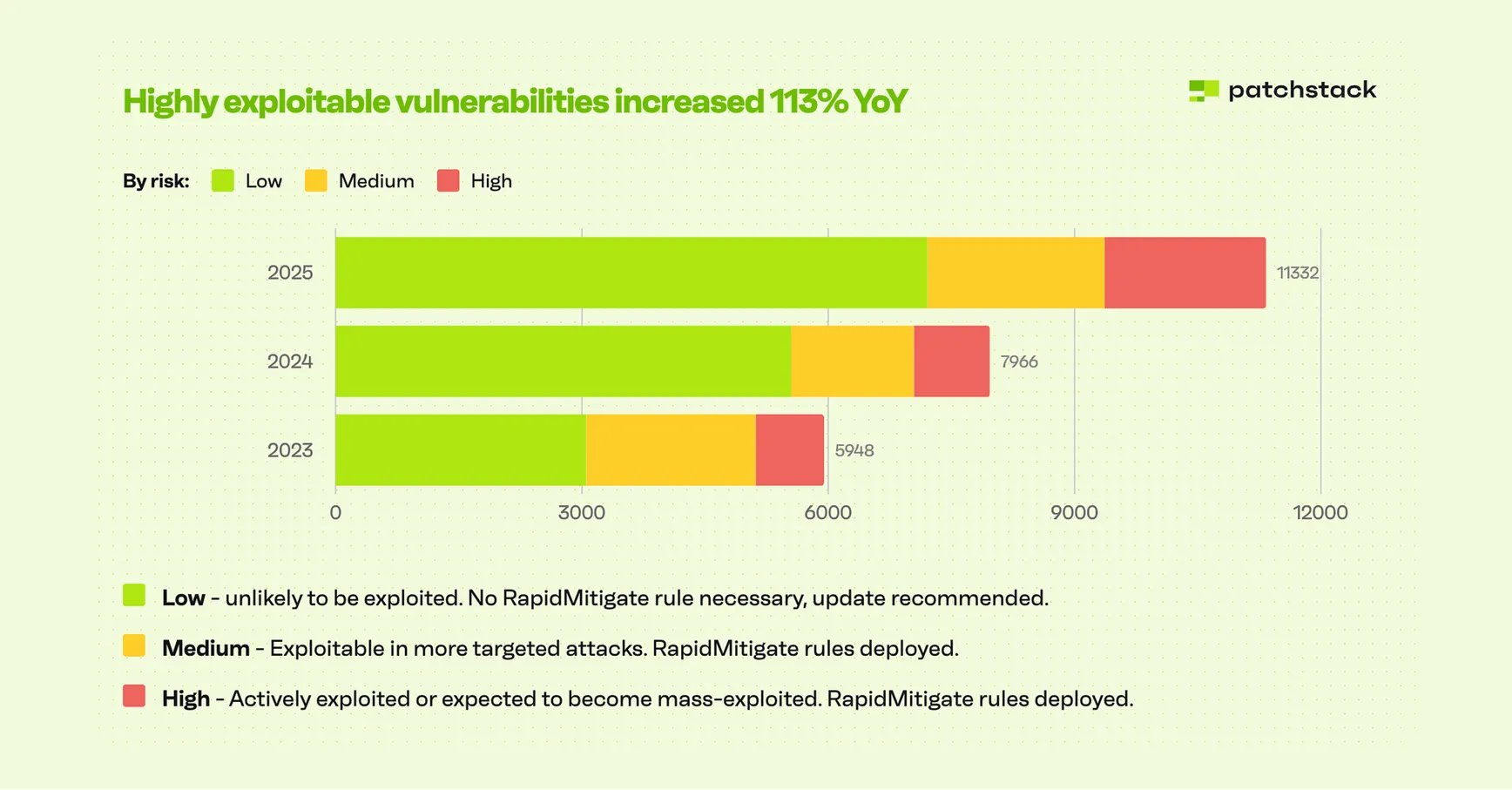
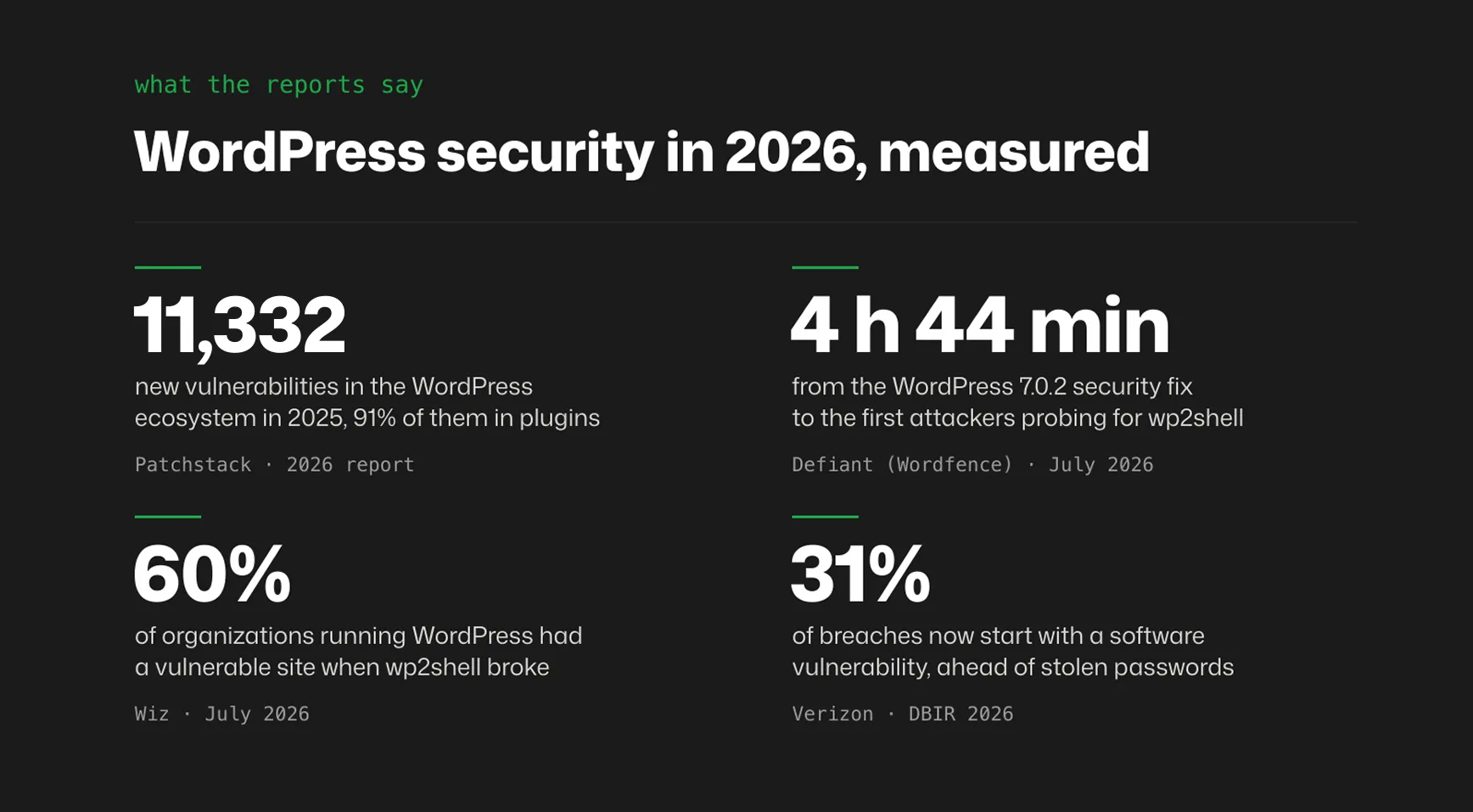
Patchstack counted 11,332 new vulnerabilities in the WordPress ecosystem in 2025, 42% more than the year before. Wordfence’s count for 2024 was 8,223, a 68% jump on 2023. Once a vulnerability that attackers care about goes public, the first attacks typically start within hours. What is more, it is not only a WordPress problem. Verizon’s 2026 Data Breach Investigations Report says 31% of breaches now start with a software vulnerability, ahead of stolen passwords.
All of this means we have to watch our sites more closely every year and can no longer leave them unattended. In the second part of this post, we share our ideas on what to do about it and how to protect your site effectively.
Plugins are where the holes are. But WordPress core is not immune.
Three independent counts, one picture. In Patchstack’s 2025 data, 91% of new vulnerabilities were in plugins. In Wordfence’s 2024 report, 96% were in plugins and exactly five were in WordPress core. WPScan’s database splits the same way: 93% plugins, 6% themes, 1% core.
Plugins you add yourself are where the risk lives. Every active plugin is code that runs on your server on every request, written by someone whose release process you know nothing about.
Core is not immune either, and 2026 proved it. In July, two core flaws chained together, CVE-2026-60137 and CVE-2026-63030, gave attackers remote code execution on WordPress 6.9.0 to 6.9.4 and 7.0.0 to 7.0.1 without logging in. In short, anyone could get full administrator rights on your site. If you ran WooCommerce, that meant full access to your customer database. If you kept newsletter subscribers in the WordPress database, the same went for your list of readers.
Searchlight Cyber, which disclosed the chain, named it wp2shell, as in “WordPress to shell”. That is where the chain ends: with a shell, a way to run any command on the server. It even got its own website, with a checker for site owners. By the way, as we publish this, CISA’s Known Exploited Vulnerabilities catalog has just added another WordPress core vulnerability, on September 25.
So core deserves the same “update within hours” rule as everything else. But day to day, and judging by the numbers, the first practical question about any WordPress site is how many plugins it runs and who maintains them. A site with eight plugins has eight suppliers whose bugs are its problem. A site with forty has forty.
…And forty is not the worst of it. Over the years we have logged into sites running more than 50 active plugins, and we still see a few of those plugin lists when we close our eyes. 💀
Hours, not weeks
The five hours from the title change what “keeping plugins updated” means. That is the median time, in Patchstack’s data, between a heavily exploited vulnerability being made public and the first attack on it.
That matches what everyone else sees. Cloudflare has logged exploitation attempts 22 minutes after proof-of-concept code was published. Google’s Mandiant measures how long attackers take to exploit a vulnerability, counting from the day its patch comes out. In 2018 and 2019, the average was 63 days, and in 2023 it was five days.
Attackers do not read changelogs by hand. They run scanners that look for the vulnerable version and fire the exploit at every site that has it.
wp2shell showed the whole sequence in one weekend. On Friday, July 17, at 18:45 UTC, WordPress published 7.0.2, the security release that fixed both flaws, and forced the fix out to affected sites through automatic updates. Defiant, the company behind Wordfence, saw the first requests testing sites for the vulnerability at 23:29 UTC, less than five hours later, and the first attempt to exploit it 13 minutes after that. By Saturday, attacks were running at scale. Wordfence went on to block over 11 million (!) exploit attempts, and Wiz found that 60% of organizations running WordPress had at least one vulnerable instance when the news broke.
The fix was out all along. The sites that got hit were the ones it had not reached yet… or the ones that had automatic updates switched off. But even when they are on, automatic updates do not fully solve the problem. Here is why.
Why automatic updates are not enough
Automatic updates are not instant. A WordPress site checks for updates twice a day, and only when WP-Cron runs, which by default happens when someone visits the site. That can leave hours between the release and the install, and the first attempts to exploit wp2shell came in less than five. And where automatic updates are switched off, or cannot run on the server, the update does not arrive until someone installs it by hand. Wiz found that a day after the release, half of the organizations running WordPress still had a vulnerable instance, down from 60%.
We learned this the embarrassing way. An old WordPress install of ours that should have been switched off after a domain was retired was still answering on that domain. An attacker’s bot scanning for wp2shell found it, and an administrator account we had not created appeared in its database. Nobody was using that site and it was deleted the same day, but the full story, including what we changed so it cannot happen again, is a post of its own.
The conclusion is uncomfortable if your maintenance plan is “update everything on the first Monday of the month”. A monthly cycle leaves a site exposed for weeks after each disclosure. Even a weekly one is slow against a five-hour window. Updating is still the single most useful thing you can do, but on its own it cannot close a gap that short.
AI on both sides
Of the two flaws behind wp2shell, the critical one was found by a security researcher, Adam Kues, who used an AI model to hunt through WordPress core. The same tools that help us review code help attackers read plugin code for bugs. Defenders use AI too, to write blocking rules faster once a vulnerability is confirmed… We are living in a crazy world, right? ;)
The less obvious effect is on the reporting pipeline. Daniel Stenberg, who maintains curl, wrote in July 2025 that about 20% of the security reports curl had received that year were AI-generated nonsense and that only about 5% described a real vulnerability. In January 2026 he ended curl’s bug bounty altogether. A one-person plugin shop gets the same flood with none of the time to sort it, which can slow down the fix your site is waiting for.
Or take the CMS off the public internet
Everything above assumes the public website and the CMS are the same PHP application, answering every request from every visitor and every bot. That is how traditional WordPress works, but it is not the only way.
The idea is simple: split the two. The website that visitors see is built ahead of time into plain HTML files, which sit on a CDN or object storage. When someone opens a page, they simply get a ready-made file. There is no PHP and no database behind it, so there is nothing to exploit.
The CMS still exists. It can be WordPress, Strapi, Directus or any other CMS you host yourself, but it lives somewhere the public cannot reach: behind Cloudflare Access or another zero-trust gateway, behind HTTP basic auth, on a VPN, or on an IP allowlist. Editors log in through that gate.
The only other thing that needs the content is the build pipeline. It fetches the content over the CMS’s REST or GraphQL API with a service token at build time, generates the pages and deploys them. The API does not have to be public at all.
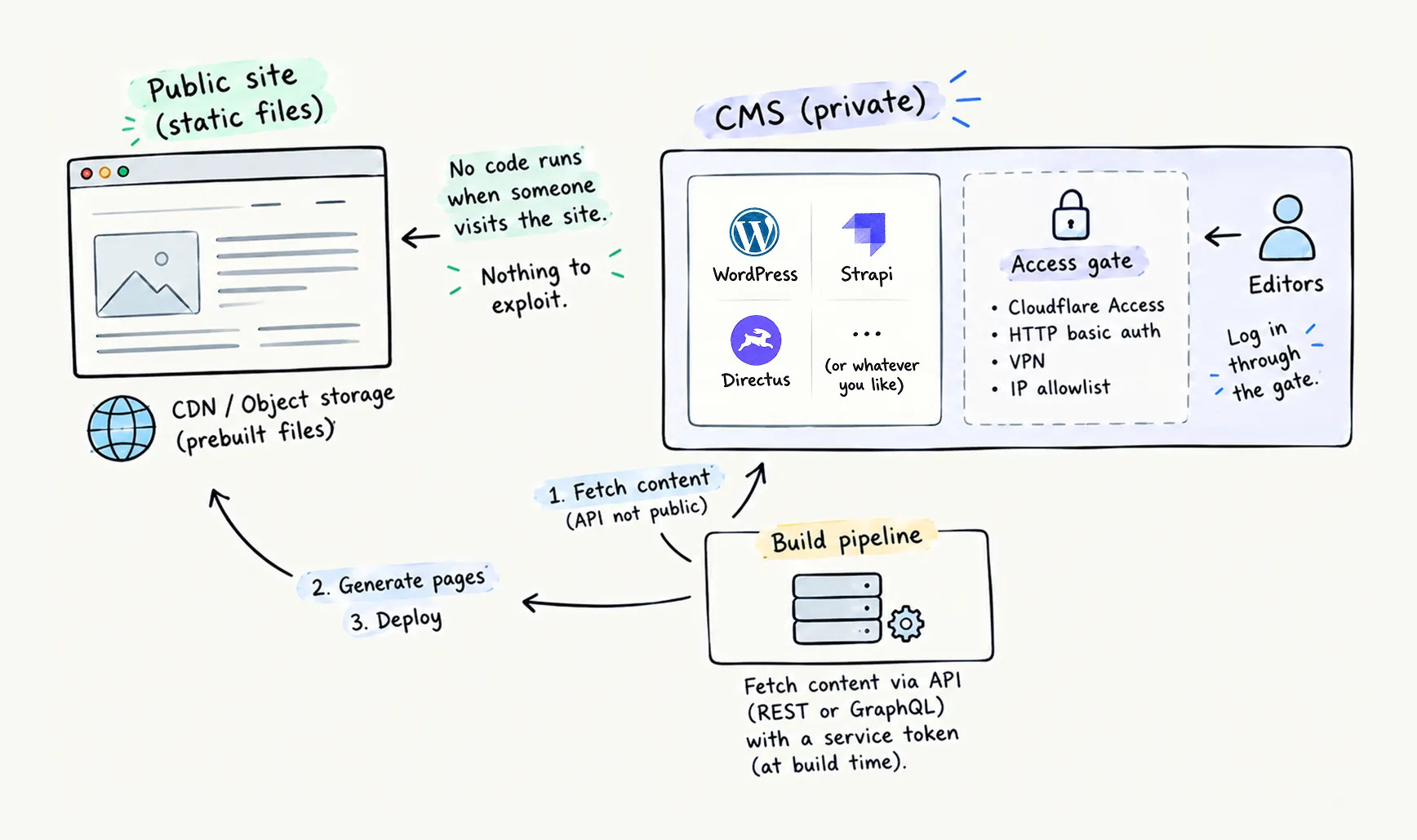
Look at what that does to the attack surface. A bot scanning for the wp2shell endpoint hits a static file host and gets a 404. The CMS still needs updates, and if it is WordPress, it still runs PHP and plugins. But the race between disclosure and update is no longer run in public. An attacker has to get past the identity layer before any WordPress vulnerability matters. The read-only approach, as jamstack.org points out, reduces the attack vectors even further.
With a static frontend, publishing works in three steps:
- After saving a change in the CMS, the editor publishes it.
- A build runs and generates every page as static files.
- The new files are deployed to the CDN.
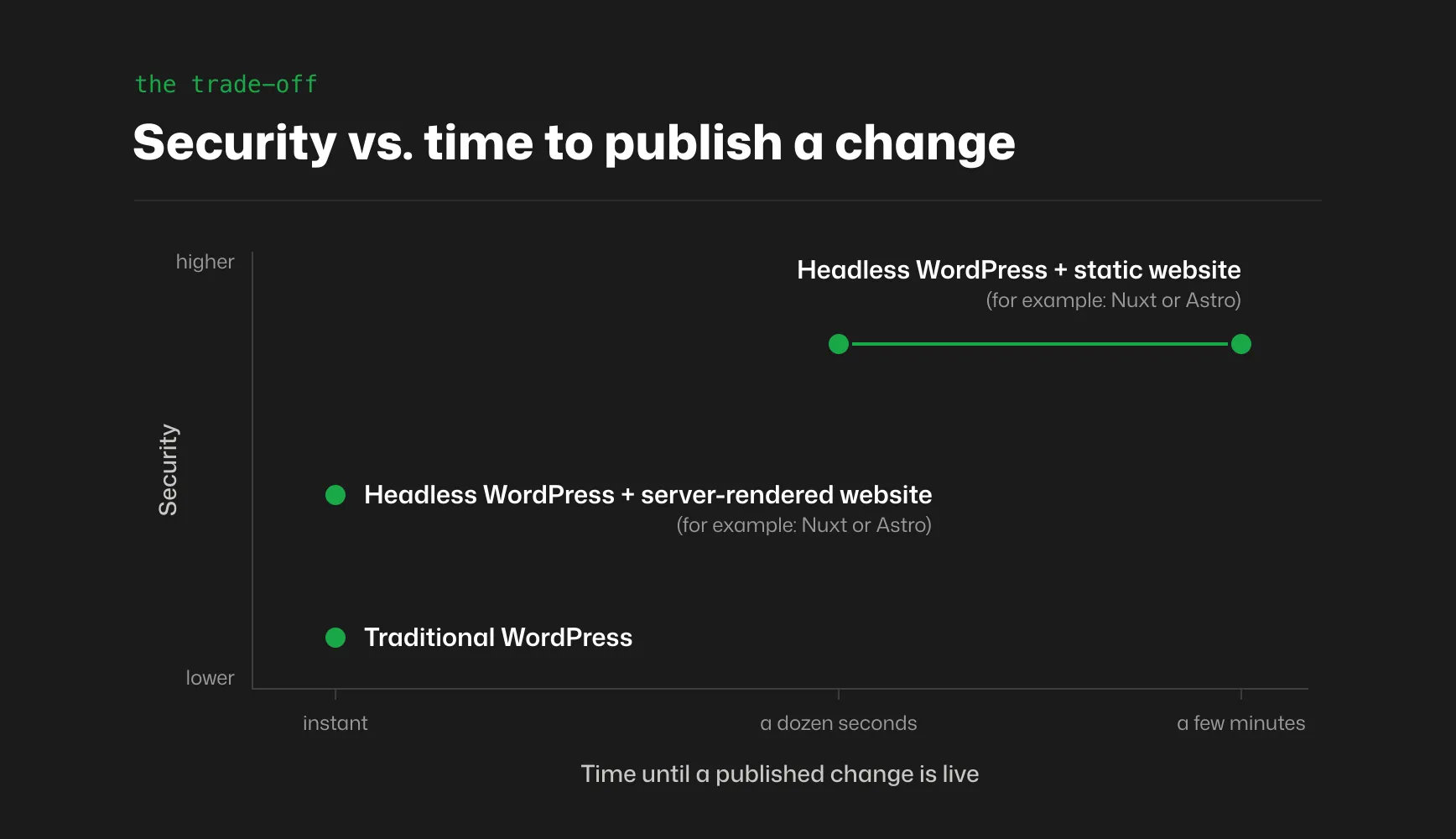
Depending on the project, the whole process takes anywhere from a dozen seconds to a few minutes.
If a build step does not fit, the frontend can render pages on the server instead, with Nuxt or Astro in server mode. The CMS is still off the public internet, but it is no longer out of reach: the frontend server fetches content over the non-public API, with a service token or over a private network, whenever a page is requested. Changes go live without a rebuild, and previews and personalized pages come naturally.
That convenience has a security cost. Once again, there is a public server running code on every request, and it holds the key to the CMS, so a flaw in the frontend or one of its dependencies can become a way to the content behind the gate. It is still a much smaller surface than a public WordPress install, because it is one application you control rather than core, a theme and dozens of plugins. The usual care still applies: update the frontend’s dependencies, give the token read-only access and keep it on the server, and put a CDN cache in front, so most visitors never reach the server at all.
In both setups, the CMS can be WordPress itself, running headless behind the gate. We put that approach side by side with a classic WordPress site in our traditional vs headless WordPress comparison.
When is it not worth the effort?
For a five-page site with one editor, a separate frontend and a hidden CMS are more work than they are worth. A traditional WordPress site that is kept up to date does the job just fine.
What about WooCommerce?
A WooCommerce store can use both setups at once. That takes more planning, and it costs more than a classic WooCommerce setup. Still, one of our clients runs exactly that: WordPress and WooCommerce on the backend, and a Nuxt frontend with hybrid rendering. What does hybrid mean here? Content and product pages are prerendered (static), and the whole shopping process, from the cart to the checkout, is rendered on the server.
What this means if you run a WordPress site
Here is how we would translate all of that into a to-do list for a business owner.
Know your plugin list, and shorten it. Every plugin is a supplier. Remove what you do not use, and replace abandoned plugins before they become a problem.
Update within hours, not weeks. The simplest rule is to let WordPress update itself. Core installs its security releases automatically by default, so never switch that off. Plugin auto-updates are off by default, so switch them on in the Plugins screen. Then open Tools → Site Health, which tells you whether background updates actually work on your site.
Add a layer that understands WordPress. A generic firewall in front of the site only sees web traffic. It does not know which plugins you run, or which of them have known holes. Security tools built for WordPress, such as Wordfence or Patchstack, do. They warn you when a plugin on your site turns out to be vulnerable. And they can block attacks on that flaw with a firewall rule written for that one vulnerability, often called a virtual patch, before the plugin author ships a fix.
Lock the accounts. Turn on two-factor authentication for every administrator. Give everyone the lowest role that lets them do their job, so a person who only edits content is an Editor, not an Administrator. And use a password manager, so nobody reuses the same password across services.
Have a one-page plan and a backup you know you can restore. Not a policy document. One page that says who does what in the first hour. And when a site does get hit, “update and move on” is not a cleanup: in Sucuri’s cleanup data, about half of the infected sites had a backdoor left behind.
If all of this is not enough, take the whole CMS off the public internet. That is the setup described above: WordPress runs headless behind a gate, and the public only ever reaches the frontend.
For clients on our WordPress support and maintenance packages, the updating is our job. If you are not sure how exposed your site is, get in touch, and we will run a vulnerability scan as part of a security audit.
Is WordPress unsafe, then?
No. Unmaintained WordPress is unsafe, and so is unmaintained anything. Verizon’s 31% is not a WordPress number. It covers breaches across every industry. WordPress just has more plugins, more sites and more scanners watching the changelogs than any other CMS.
What has changed is the definition of maintained. Ten years ago it meant “update when you remember”. In 2026 it means updates within hours, a protection layer that understands the application, a plan for the day something gets through anyway, and, for some sites, a CMS that the public never talks to.
We took the extreme version of that last option for our own website: no CMS on a server at all, just Markdown files in Git and a static site built from them. The case study explains why that fits a company where most editors are developers, and why it would be rather a bad idea for a marketing team publishing daily or a WooCommerce store. For most of the sites we build for clients, the answer is still WordPress, maintained properly.
Wondering how your site would cope with the next wp2shell-like vulnerability? Talk to us, and we will take a look.
The cover image of this post was inspired by the popular “This is fine” meme, but also by Patchstack’s great booth at WordCamp Europe 2026. Love ya, guys!