We built our own AI-powered content creation platform
See how we built an internal writing platform that uses AI to refine drafts, review content, and support client communication and internal workflows without losing the human voice.
When you write with AI agents, you usually do the draft in one place and ask tools like ChatGPT for help in another. That means copy-pasting, and moving between different tools even to make small changes. A quick review turns into extra steps, and the process gets messy fast. It gets harder to keep the content natural, clear, and easy to work with. We know that feeling well.
To solve this, we created one space for our team to handle content creation workflow, with AI supporting the parts that need it most, rather than creating everything for us with no human touch. That made it easier and faster to work, while keeping the human voice in control.
We share what problems Coditive Space actually solves for our team, how we use this in our own work, and why it made everyday content tasks feel much easier to manage. If you work with text content or client communication, the full article is worth a look.
What was wrong with our AI writing workflow?
Most teams already use AI to help write, and that sounds great right up until the result feels like it came from a machine wearing your name tag. People notice that. They can tell when a text answers the task but somehow misses the person behind it. In work like ours, that matters more than people admit, because a blog post, offer, estimate, or client message can shape trust just as much as the work itself.
That was the tension inside our team when we worked on any text content. We wanted the speed AI gives, but we didn’t want to hand over the writing to a tool with no stake in the result. The person writing still needs to lead, and that will never change for us. They need to know what the text is supposed to look like, what the reader needs to understand, and what kind of answer actually helps, before touching AI.
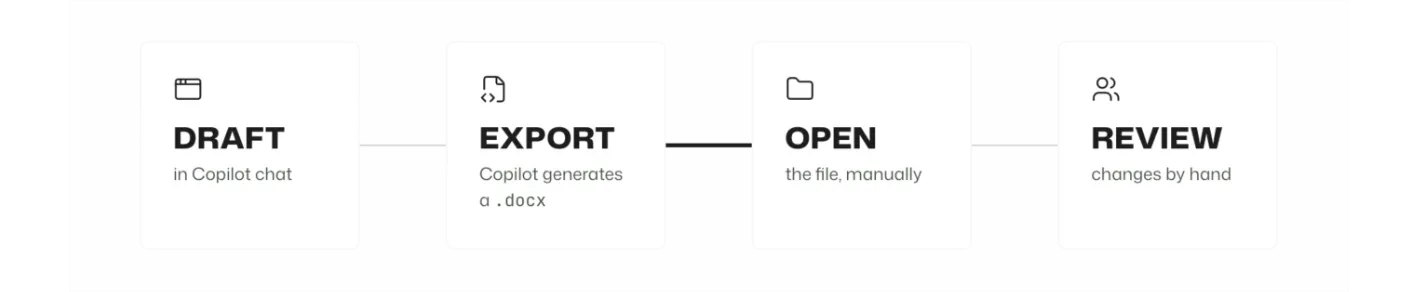
The hard part in such workflows was that they often involved several tools. A user might draft content in Copilot, have Copilot generate a .docx file, and then manually open it to review each change. If they wanted another revision, they would ask for an updated version, review the result manually, or ask for the changes in chat so they could copy and paste them back into the document themselves. In that setup, the document is an output of the chat, not the workspace itself. The work still depends on switching between different tools, checking versions by hand, and keeping track of changed.
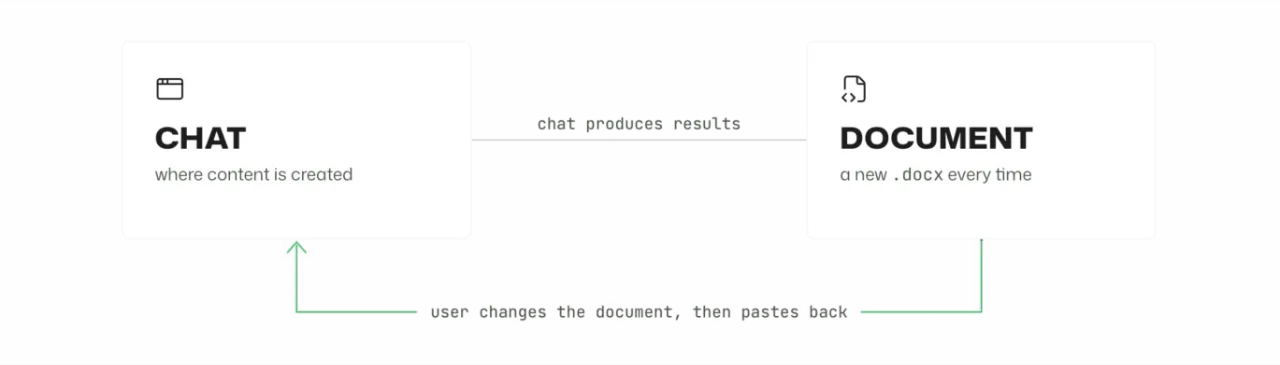
We talked with a few large companies in other industries that were using Copilot in their workflows, and while Microsoft Word tools can handle such changes directly, the teams mostly ended up using general chat and reviewing the generated files manually.
This article is a case study of how we fixed that for ourselves. We built Coditive Space as an internal tool that keeps the document at the center of the writing process, with AI agents helping instead of taking over. The goal was simple: keep the original intent intact and turn rough notes into clear, usable content with AI with human touch.
How does a messy note become a clean draft?
When we sit down to write, the text must already be formed in our heads because we care about the result and we don’t want it to feel artificial. We start by getting it down quickly and informally, much like we would explain it to a friend. That first draft is often rough - half-finished sentences, with typos, even with mixed languages because that was faster to capture the thought. The user creates the code content, not AI
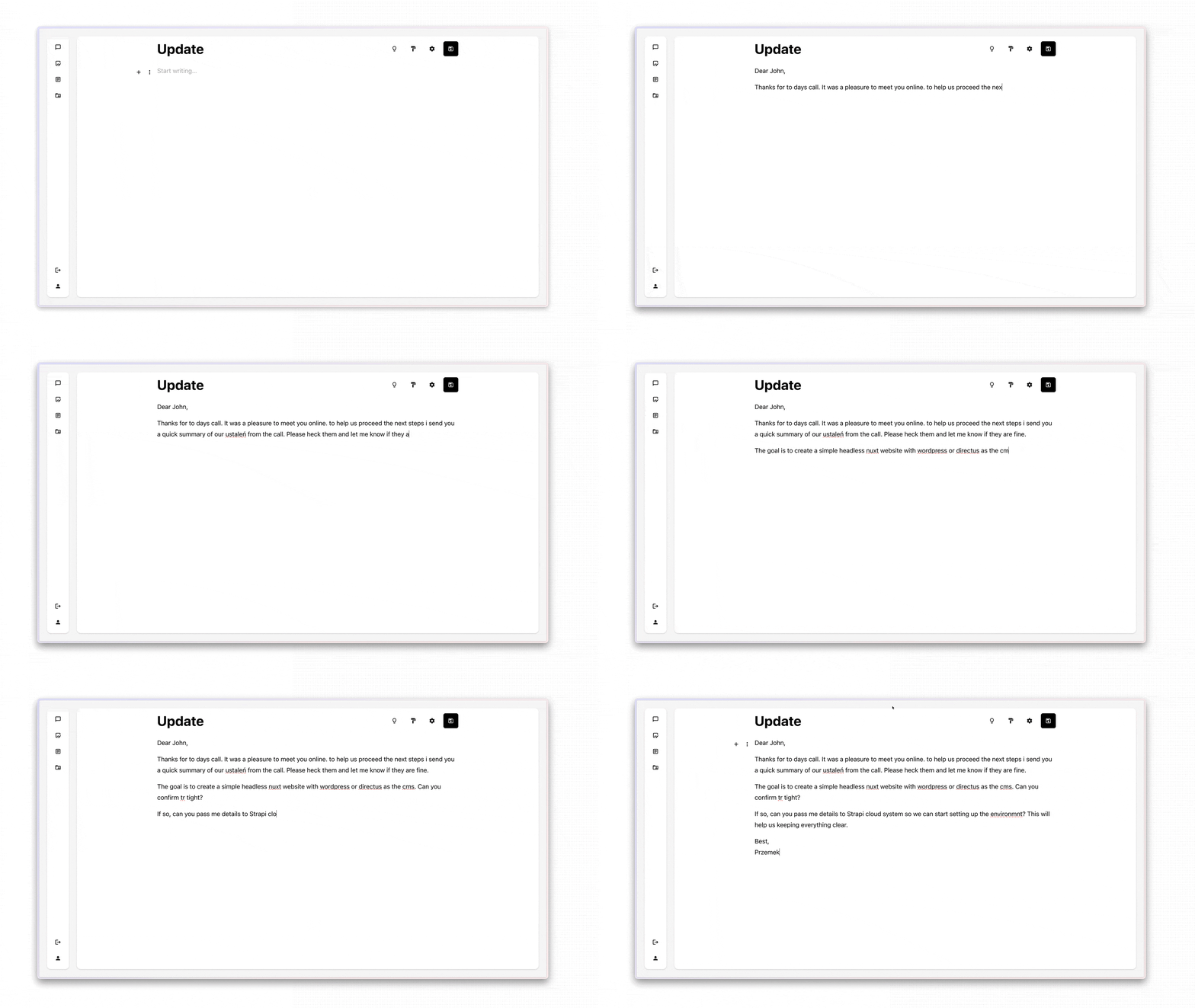
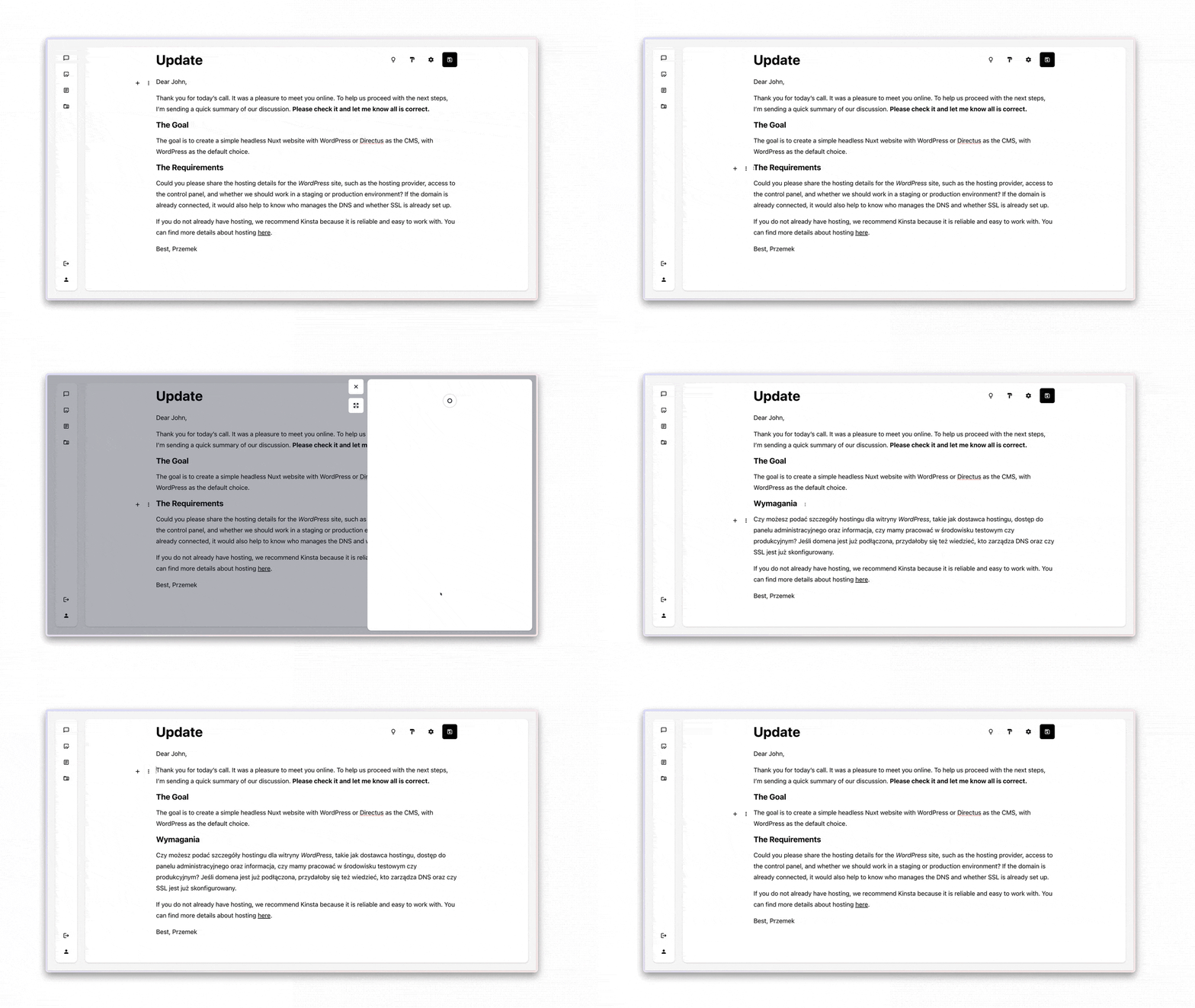
We can’t send that version, so the next step is to make it clear. Before AI tools were part of the workflow, this often meant manual editing. Now we can ask the agent to handle that refinement since that’s a perfect use case for them. However, we are not asking it to invent the draft from scratch. The content is already there, in our words and in our order, so its role is to make the text readable. We open the refining system, describe what we want, and ask the agent to make the fixes. If the result is not right, we run another round until it is. The content is then replaced when it’s fine. It’s our call.
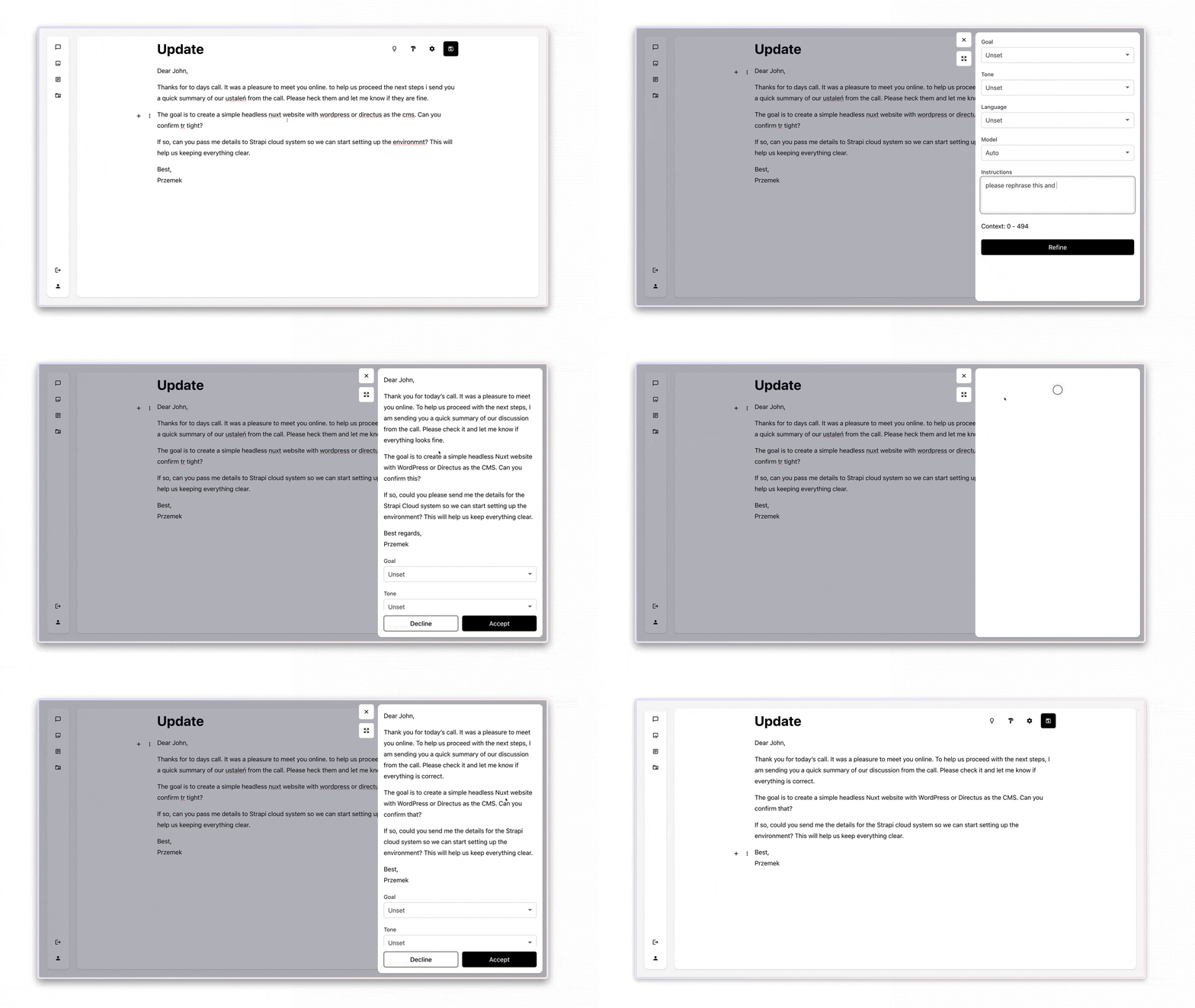
Then comes the stage where most of the draft works, but one paragraph still needs attention. With the content at the center of the workflow, we can improve only the section that needs work instead of reworking the entire document. We select the specific part of the text and focus there. That makes it easier to fix wording, tone, or structure in one section without disrupting the rest of the draft.
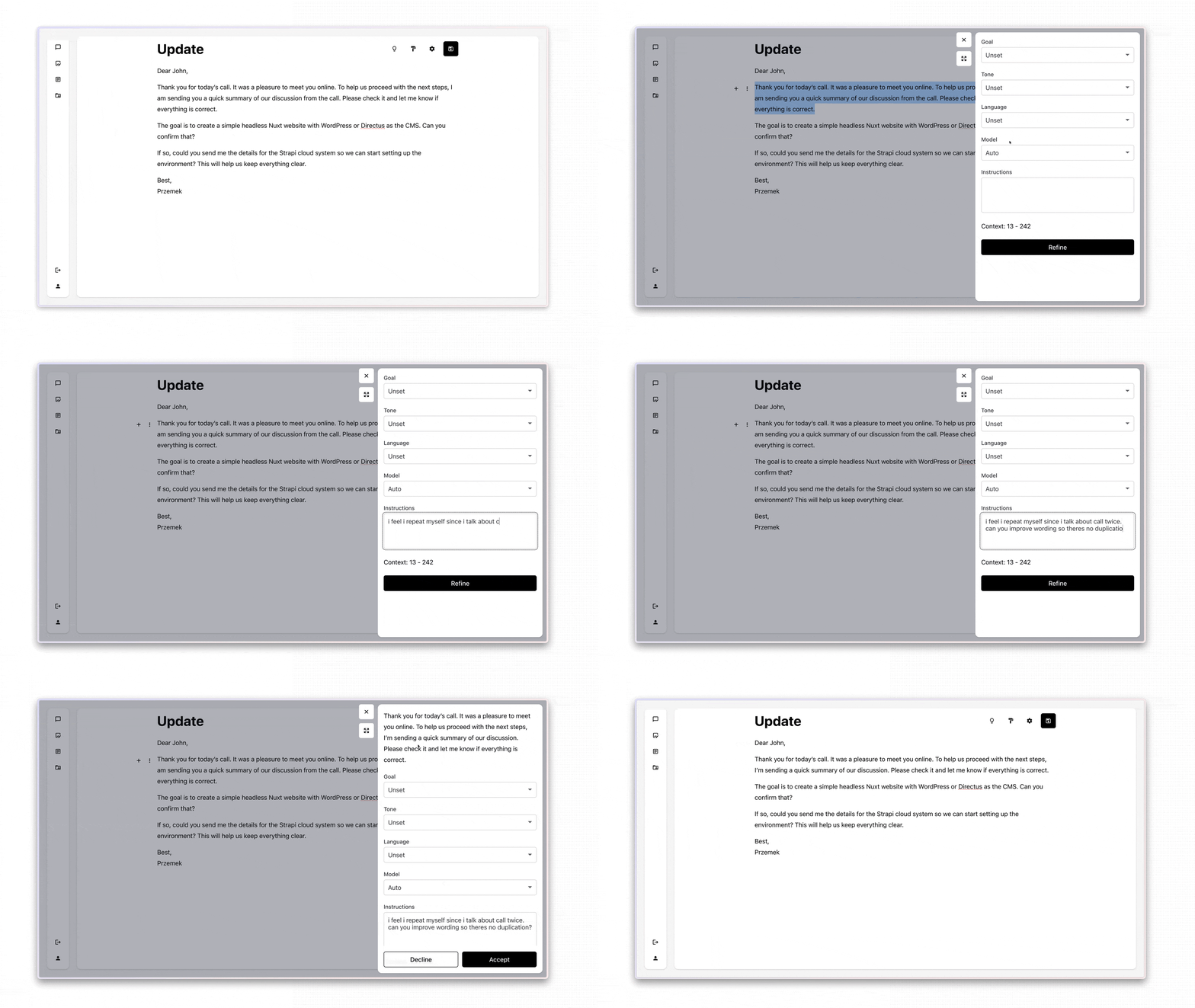
That shift improves both speed and control. In tools like ChatGPT or Claude, teams often send the full text even when the issue is limited to one paragraph. Here, only the selected section goes to the model, so the work stays focused, and the team pays only for what it changes. This flow is a great explanation of how we managed to use a $5 OpenAI balance for five team members over six months.
Who checks the results before anyone sees it?
Before anything goes out, we want the kind of feedback on a draft. Is it clear? Did we miss anything? What is the first question the reader is likely to ask after reading it? That kind of review helps protect credibility and trust, but it also needs to happen without interrupting the team every time someone creates content.
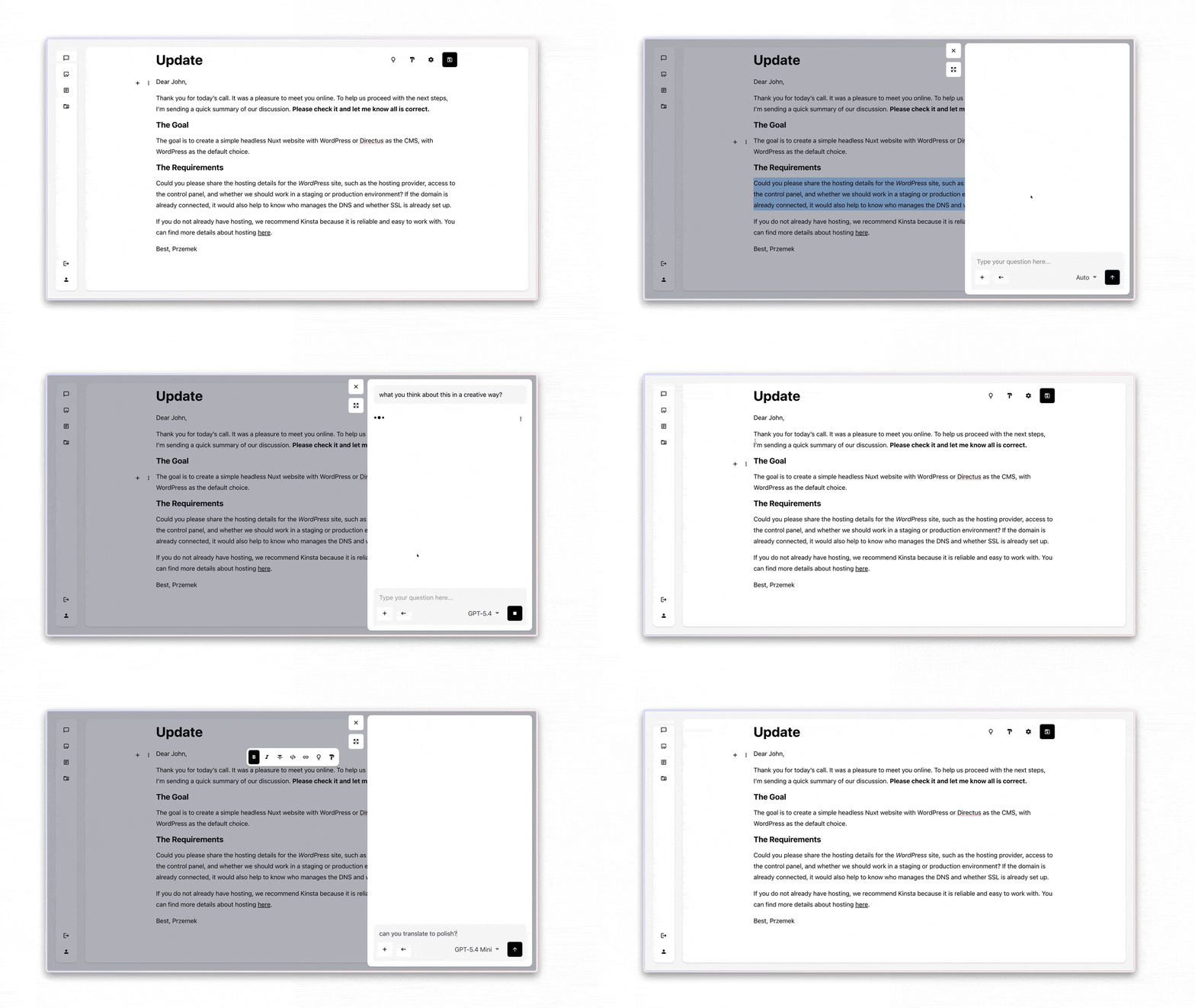
To fix that, we integrated the chat component that we already had directly into the document editor. The agent can already see the full content, so there is no need to paste it into another tool or explain it again. Team can ask about structure, tone, missing details, or whether the text is ready to publish, without leaving the document.
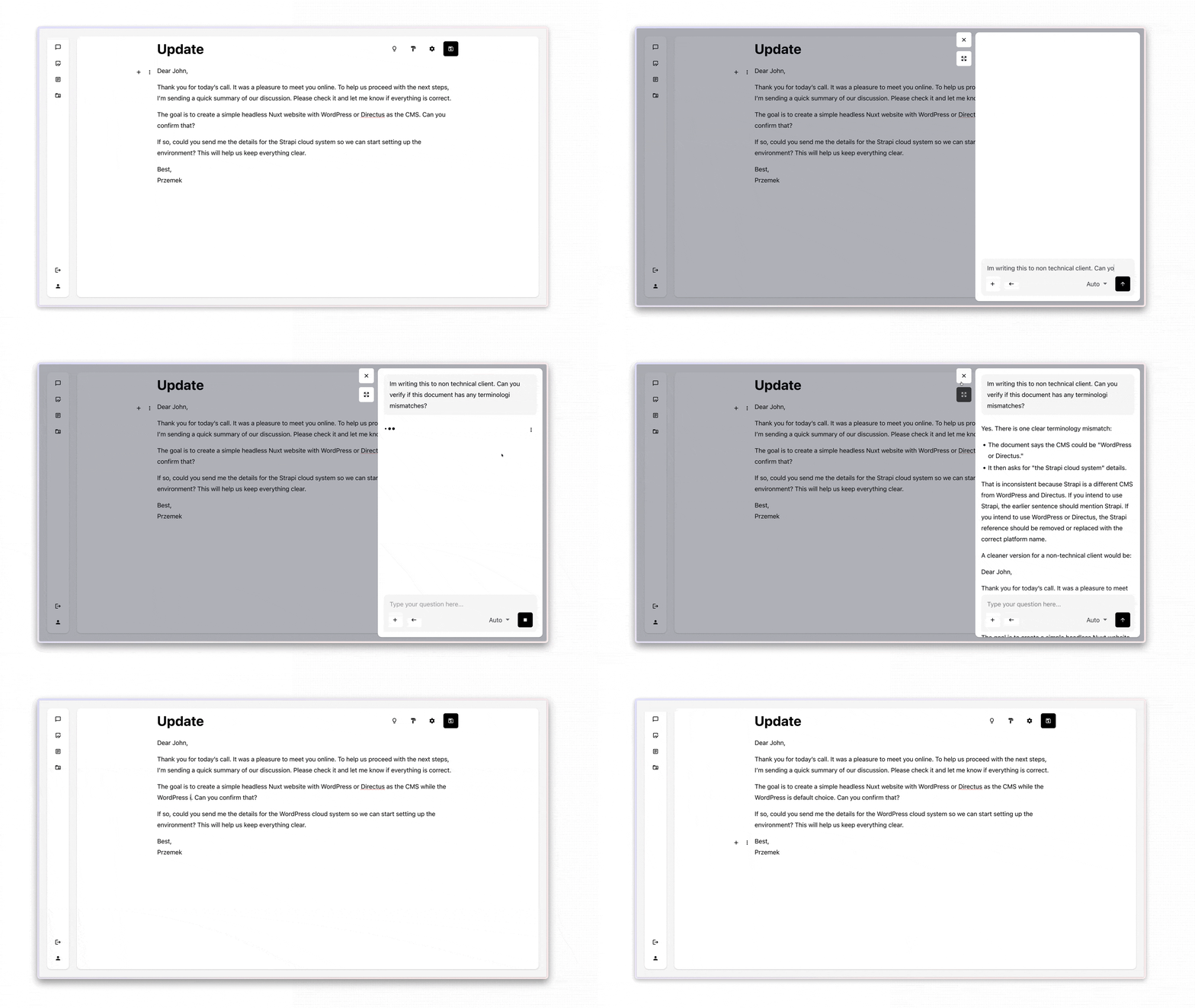
When a question applies only to one part of the document, we can select that part and review it on its own instead of working on the entire file, the same way we do for refinements. This keeps the context focused on the exact point, reduces token usage, and lowers AI cost. The user chooses what they want to discuss, and the agents receive only the relevant section as the current context.
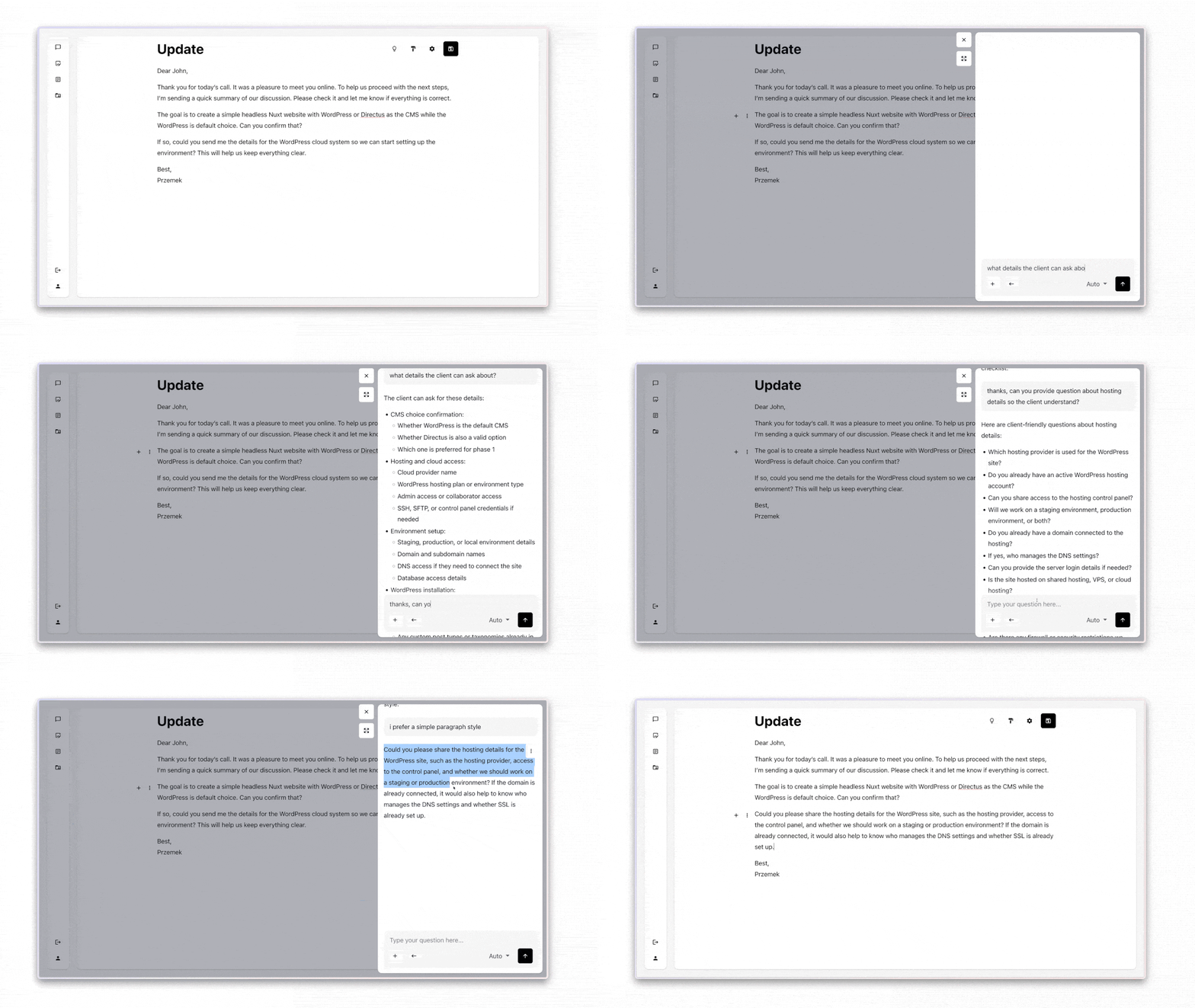
The best part is how flexible it is. We can create agents to ensure specific document rules and use them to check work before it goes out. We built an SEO agent that reviews articles from an SEO point of view and suggests fixes before we publish. And yes, it was set up directly in the editor, so nobody needed technical skills to do it. However, we’ll share more about that in the next article.
What had to be done underneath for this to work?
When we started building the editor, we realized the storage format mattered in two places at once: in the product logic behind the editor, and in how AI would read and work with the content. Users never need to think about that layer, but we did, because it affects how much control we have over the document and how easily AI can improve specific parts of it. That is why we wanted to get this decision right early.
The format we chose was Markdown. It is lightwe ight, portable, and easy to read, which matters when you are building AI features on top. AI models work better when the structure is clean and predictable, and we had already seen Markdown work well in projects built with Astro and Nuxt. This time, it fit especially well because the content was not just being written and stored but also being processed by AI models.
Dear John,

Thank you for today’s call. It was a pleasure to meet you online. To help us proceed with the next steps, I’m sending a quick summary of our discussion. **Please check it and let me know all is correct.**

#### The Goal

The goal is to create a simple headless Nuxt website with WordPress or Directus as the CMS, with WordPress as the default choice.

#### The Requirements

Could you please share the hosting details for the _WordPress_ site, such as the hosting provider, access to the control panel, and whether we should work in a staging or production environment? If the domain is already connected, it would also help to know who manages the DNS and whether SSL is already set up.

If you do not already have hosting, we recommend Kinsta because it is reliable and easy to work with. You can find more details about hosting [here](https://kinsta.com/pricing/).

Best, Przemek
Once we had the format, we needed an editor interface that worked well with Nuxt and Vue, but also let us build the product our way. We chose Milkdown because it hit that balance. It’s built on ProseMirror, so we could extend it with custom plugins and Vue-based components, which was crucial because we wanted something we could shape around the workflow instead of the other way around.
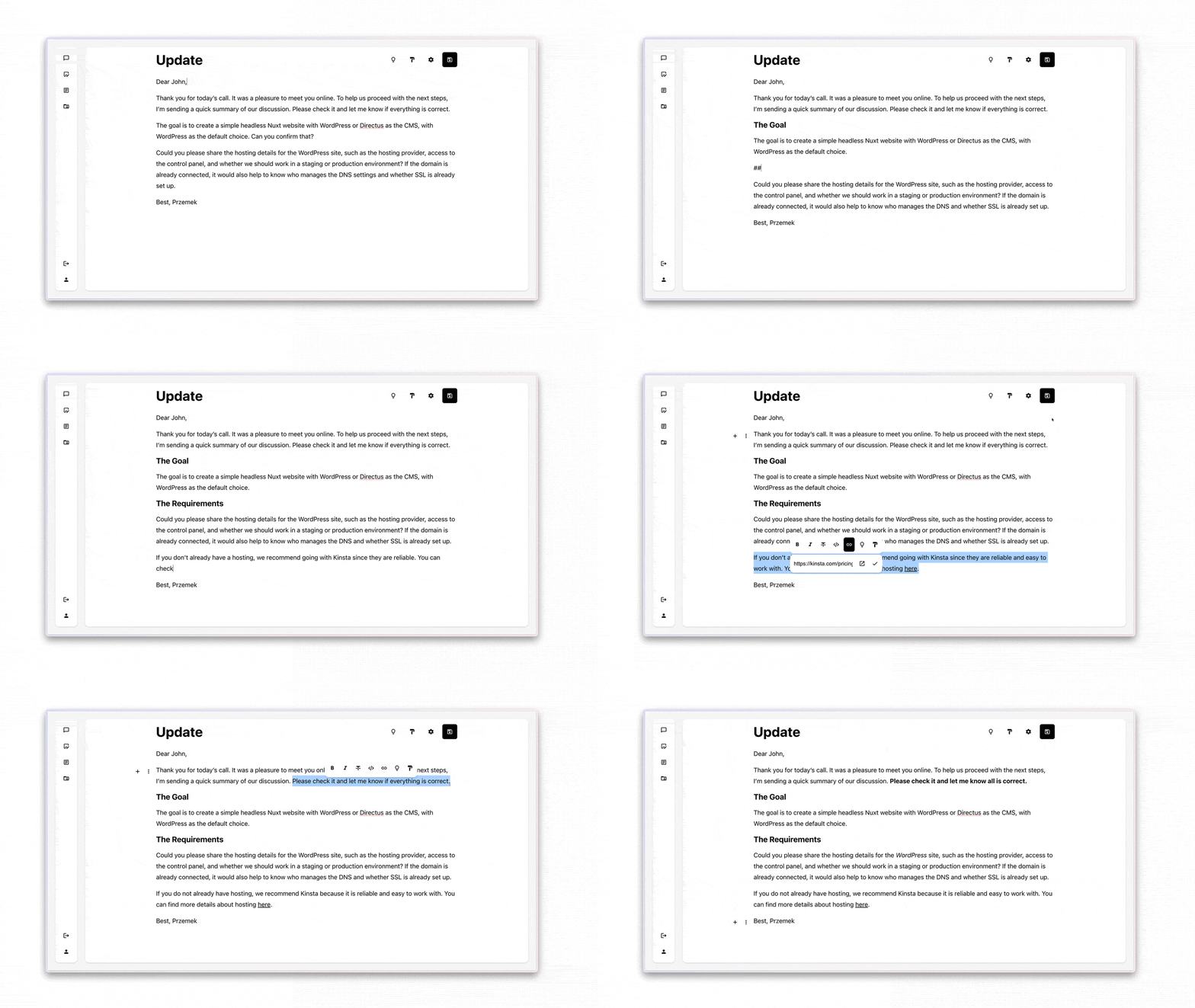
That flexibility mattered most in how we handled AI. Milkdown made it possible to work directly with the selected part of a document, so we could send only that exact slice to the model instead of the whole page. This made the AI much more precise. If someone wanted help with one paragraph, the result stayed focused just on that paragraph.
We also knew the AI layer had to stay flexible. Models change fast. One becomes too expensive, another gets better, another makes more sense for private content. So we built the app to work with multiple providers, including OpenAI, Google Gemini, and a model we host ourselves. That lets us choose the model based on the task, whether it is a quick grammar pass or content that needs to stay on infrastructure we control. It gives us room to improve the system without changing how people write.
For the foundations to all of this, we used the stack we discussed in our recommended setup for vibe-coded applications. That approach gave us a good base for building fast, keeping control over the moving parts, and still leaving room for the product to evolve as we learned. If you want to see that part in more detail, check the full article.
Right now, the editor is still an internal tool. We built it for our own team, and it is already useful enough in everyday writing work that we are thinking seriously about opening it up. We do not have a release date yet, but if you want to know when that changes, join our newsletter and follow the updates there. We promise - we send no spam ☺️
What did we learn from this for client projects?
We used to waste a lot of time doing the same work across different tools. We would write in one place, review in another, and end up doing extra rounds because everything kept drifting. That was fine on small tasks, but once we had to create something better, like a solid blog post, the process got messy fast. Too many tools created friction.
Things improved when we pulled everything into one place and shaped the process around how we actually work. That gave us more control, and made it easier to focus on the outpu. We confirmed once more that results improve when the tool fits the work. That lesson carries over naturally to the work we do for our clients too.
When a process is built around real business needs, it holds up better when the team changes or the pace picks up, because the setup supports the people doing the work. That is what we’re best at. So, if you have a project that needs to support real business results and you want help finding the right approach, reach out through the contact form, and me or Paweł will get back to you quickly.
If you found this topic helpful, don’t forget to give the YouTube video a thumbs-up. If you think it could be useful for others, feel free to share it. And for more content like this, please subscribe to our channel and check out our LinkedIn, Instagram, and website.