What stack should you use for a vibe-coded app?
Learn how to structure a vibe-coded app stack with Nuxt, Directus, MySQL, RustFS, and Docker so your prototype can scale.
These days, anyone can build an app with AI tools. Write a few prompts, click around for a while, and suddenly you have something that looks real: a home screen, a login, maybe even a dashboard with data. That is exciting, because it turns an idea into something visible very quickly, but it can also create a false sense of progress. The app may look finished while still being difficult to host.
Vibe-coded apps are often a great starting point, but if you want the project to be more useful, it helps to think about the foundation as early as possible. A more structure at the start makes the app easier to run, understand, and much easier to manage later.
I’ll show a simple way to set up that foundation. We’ll look at the main layers of a typical web app, how they fit together, and how to organize them in a way that works well.
What are the basic layers of a solid vibe-coded app?
As some of you may know, I recently decided to find a way to reduce the number of small subscriptions I need to get work done. With the recent technology shift where we use more and more agentic workflows, I wanted to use their advantages to build a simple app that helps me keep my notes organized and shared across devices, with a totally private space for a thinking process supported by different AI models.
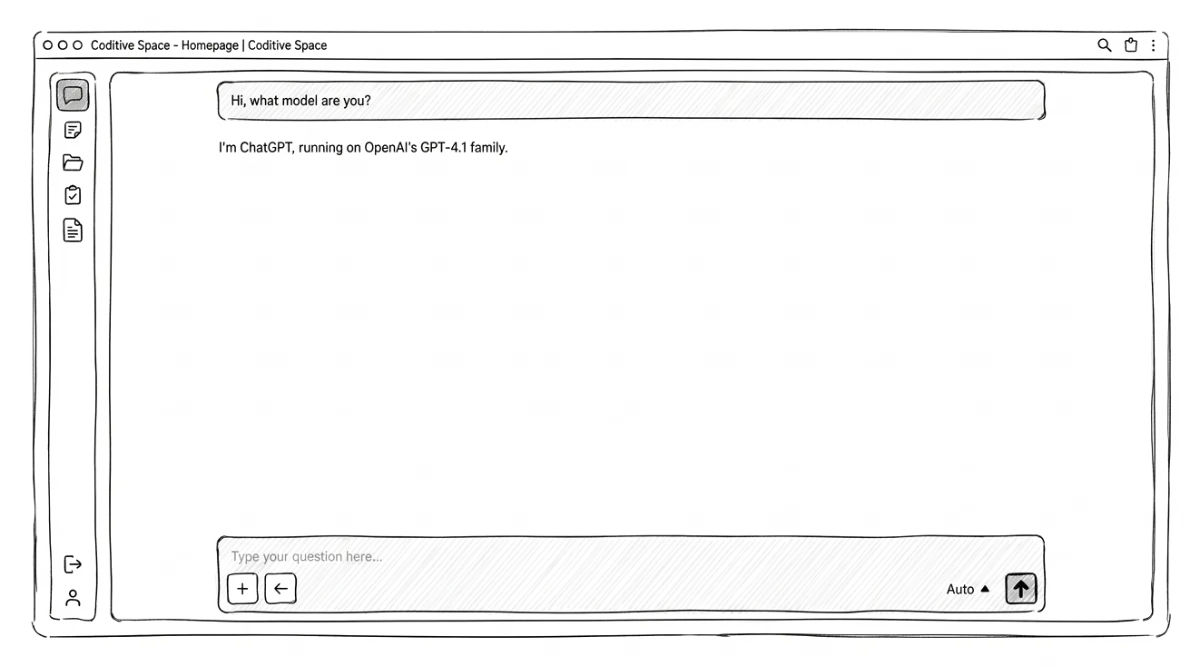
The initial goal is to create a web application where each user should have their own account, and the data will be stored remotely so they can access it from any device. The requirements are pretty basic and there will be just one user for now, but the primary idea is to show how we handle similar cases for our clients.
Such a simple user-protected stack usually requires a few layers: a frontend for user interaction, a backend for administration and authorization, a database, and storage for static assets. Some apps may skip some parts, like authorization, but the core pattern for such headless stacks usually stays the same. A frontend that communicates with a backend connected to specific database and storage service.
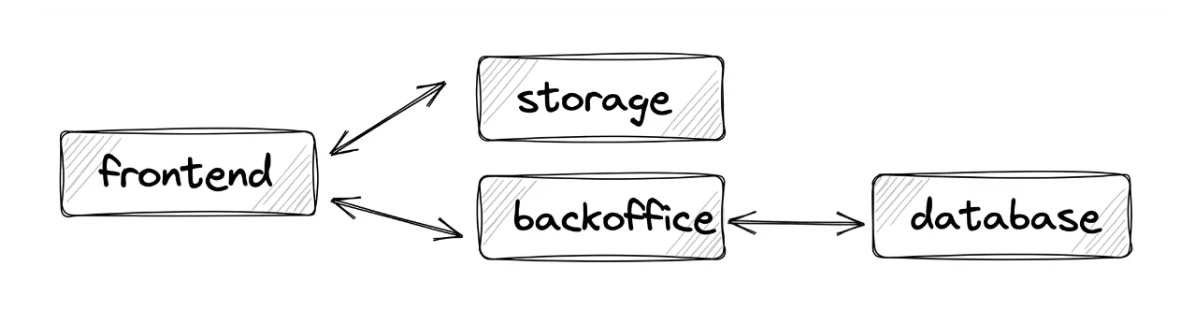
Each layer has a specific responsibility, so the connections between them matter! The code running on frontend layer, in the user’s browser should not have direct access to the database that stores all application data. If it did, the users could potentially access information that should remain protected.
What is the best stack for a vibe-coded application?
I won’t surprise you. There is no single best stack. Even when I recommend solutions, their use varies mainly based on the features the specific system must implement, the client’s requirements, and the development experience the project must support. In fact, I often say that for a good engineer, there is no difference when using Vue, React, or others. They share similar principles when building something solid.
For the tech stack, I am going to use a mix of technologies our team already knows well and a few I want to explore further. That balance helps the project move quickly while still leaving room for experiments. In fact, most of this recommended stack is the one we used for many projects made for our clients, so I know from experience that it works well, even for enterprise-level applications.
Nuxt: Our best choice for the frontend layer
The frontend is the part customers actually see and use every day. It sets the interface, shapes the user experience, and connects the customer’s browser to the rest of the platform. I recommend the Nuxt framework because we have successfully used it in many projects over the years, and we are very happy with the experience and the value it provides. It includes many ready-to-use custom modules, so for more advanced cases or tight timelines, we can reduce costs and handle integrations more quickly.
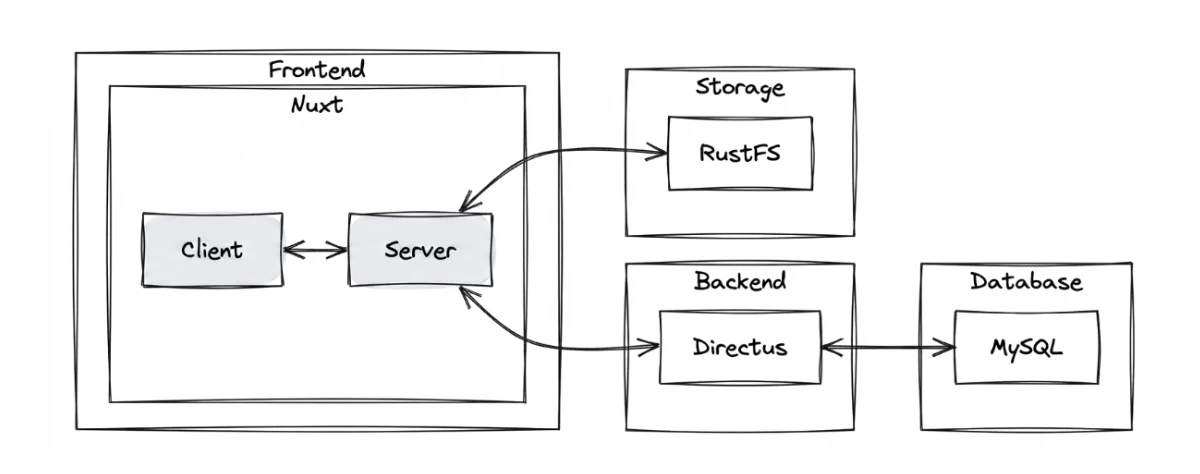
It works perfectly for such layered architecture, because it supports server-side rendering so we’re able to splits the frontend into two practical sub-layers: app, which is responsible for the interface and running code in the client browser, and server, which handles business operations, while keeping the application responsive and secure (browsers have access there just through controlled API endpoints).

Directus: Perfect backend for data-driven applications
The backend, or more accurately, the back office, will serve as the control center for the application. It connects the frontend to the data layer through the API, controls user authentication and authorization, and gives administrators a clear place to manage the system behavior, data structures or elements that are hidden from users.
For content-driven headless projects, we like using WordPress for this purpose because it integrates well with the frontend due to the Gutenberg editor; however, for data-driven apps that operate mainly on data structures rather than frontend blocks, Directus is a better choice, so I recommend going with this. We recently successfully used it for a project of +1000 hours in size, and it integrated perfectly with Nuxt. I’ve been amazed by how efficient it was and how easy it was to build custom data structures there.

MySQL: A solid engine for relational data
The backend layer needs to store its data somewhere. For simple vibe-coded apps, SQLite is often the first recommendation. It is simple, efficient for smaller apps, and integrates well with Directus without any additional work. It is worth trying first if you do not want to overcomplicate the infrastructure.
SQLite is a good first option for first experiments, but for this project I’ll use MySQL 8.4 as the primary database because it is a stronger fit for a structured app that may grow later. Data is routed through the Directus API, which helps protect data integrity, and reduce security risk because the database server is not available to end customers.

RustFS: S3-compatible storage for self-hosting
While MySQL is good for relational data, it cannot be used to store static files like images, videos, or other attachments. The first option that comes to mind is using cloud storage like AWS S3. However, be aware that due to its dynamic costs, it might not be the right choice for a vibe-coded application.
That is why I recommend an open-source, self-hosted alternative called RustFS. It is fully S3-compatible, so I can use the official S3 JS SDK without any problems. If it changes in the future, I can simply change the endpoints, and the application will keep working. This layer keeps file handling separate from the main logic, which simplifies operations and makes media storage easier to manage at scale.

Results: Balanced and solid stack for any vibe-coded app
I chose these tools for this project because they work well together. The connection is flexible enough to adapt as the application grows beyond initial expectations. We can replace one node with another and rework the small connection between them rather than rewriting the entire application just because we changed RustFS to AWS S3. Here’s how the layers interact with each other in such a flow.
How to run vibe-coded app locally with Docker?
I understand that, as a beginner, you can feel confused by all of this - layers, responsibilities, and four different tools to use. You might ask how to even run it in your local environment! Believe me, it is simple.
In many of our projects, the local environment remains flexible. Developers receive the final system requirements before the project starts, then prepare local stack to run the project. That can work here as well, but I want to test a different approach. Instead of relying as much on the system environment, I am going to use Docker to provide a single stack that runs everywhere. This reduces potential environment conflicts caused by different tool versions across developers’ devices.
It lets us define the project infrastructure once and run it the same way across other environments. So, no matter if the team uses macOS, Windows, or Linux, if they have different Node versions installed locally, they fire one command and the environment starts. That consistency makes local development simpler and also makes deployment easier as well. If something starts with a single command on a local device, it can do the same in the production environment that supports Docker as well.
The costs are much lower as well, which can matter when a project is at a very early stage or is still just an experiment, as is often the case with vibe-coded apps. Instead of managing and paying for four separate services - a Node server for Nuxt, Directus Cloud for backoffice, AWS S3 for storage, and a MySQL for relational data - we can run everything together in a single Docker stack. That may not be the best choice for enormous apps, but for a small app like ours, it is efficient and good enough.
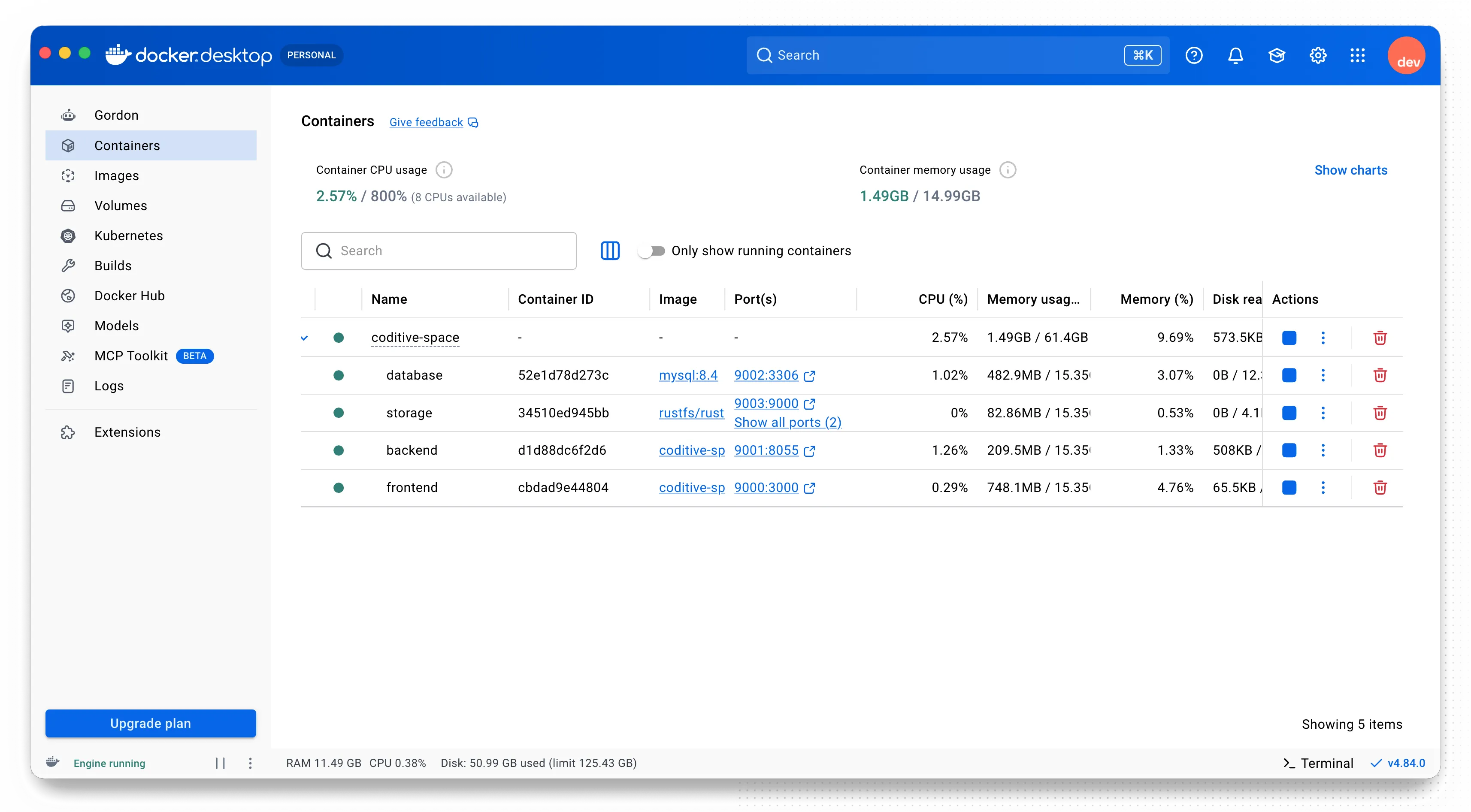
docker compose up -d --buildAs a result, a single command creates containers for each layer, installs the required dependencies, and exposes the URLs needed to access the application. Compared with the traditional process of configuring each layer by hand - installing MySQL, preparing a Node, and installing pnpm dependencies - this brings the whole system up at once. Developers do not need to run pnpm install when starting the local project. They only need to run one Docker command, and everything starts up.
name: coditive-space

services:
  storage:
    container_name: coditive-space-storage
    image: rustfs/rustfs:1.0.0-alpha.90
    ports:
      - "${HOST_S3_API_PORT}:9000"
      - "${HOST_S3_APP_PORT}:9001"
    volumes:
      - ./storage:/data

  database:
    container_name: coditive-space-database
    image: mysql:8.4
    restart: unless-stopped
    ports:
      - "${HOST_DB_PORT}:3306"
    volumes:
      - ./database:/var/lib/mysql

  backend:
    container_name: coditive-space-backend
    build:
      context: ./backend
      dockerfile: Dockerfile
    ports:
      - "${HOST_API_PORT}:8055"
    volumes:
      - ./backend/uploads:/directus/uploads
      - ./backend/extensions/backend:/directus/extensions/backend:cached

  frontend:
    container_name: coditive-space-frontend
    build:
      context: ./frontend
      dockerfile: Dockerfile
    ports:
      - "${HOST_APP_PORT}:3000"
    volumes:
      - ./frontend:/app:cached
      - ./frontend/node_modules:/app/node_modules:delegated
Here’s an example Docker configuration file that runs those layers at once. However, it is just for general understanding. In my project, it is a little larger, so if you want to see the full configuration or build a stack like this yourself, refer to our technical guide.
What is the takeaway for beginners?
That’s the foundation I’d reach for when a vibe-coded app starts to feel like more than just aprototype. A bit of structure early on makes the whole project calmer to work with later, and in my experience it saves a lot of time once the app needs to grow, change, or be handed over to someone else.
For this kind of project, I like the balance this stack gives us. Nuxt, Directus, MySQL, and RustFS keep each layer in its place, while Docker makes the whole setup much easier to run and share. It feels like a practical starting point, but also one that can grow with the project instead of fighting against it. And that’s all for today!
Check out our social profiles on LinkedIn or Instagram. And if you are watching this as a video, give it a thumbs up and subscribe to the channel for more content like this.