How to control user permissions in Nuxt and Directus?
Learn how to control what users can do in Nuxt applications with a Directus backend, using policies, permissions, and reusable access checks.
When user permissions in web applications are unclear, every new feature can create risk, extra support work, and avoidable friction for the team. The real challenge is finding one place to decide who can do what, so the rules stay consistent wherever the app needs them.
This article shows a practical way to handle web application authorization through a layered model, using Directus and Nuxt as one example. The result is a clearer setup where users only see and do what they should, while the team spends less time dealing with access issues and permission mistakes.
How to set up policies for data collection in Directus?
Directus describes access control with three things: roles, policies, and permissions. A role is a label for a group of users, such as Member, and you assign it to a person in their user profile. The label opens no door on its own, so someone with a role and nothing else attached still sees an empty app.
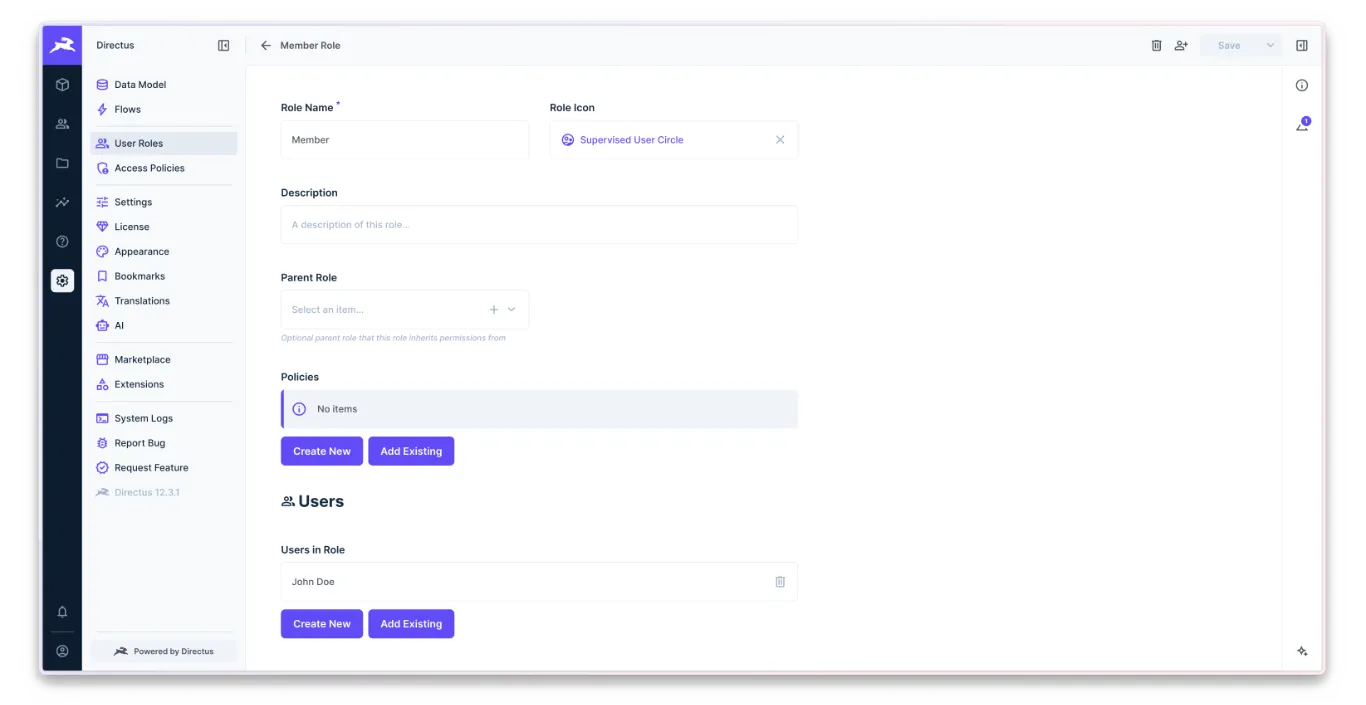
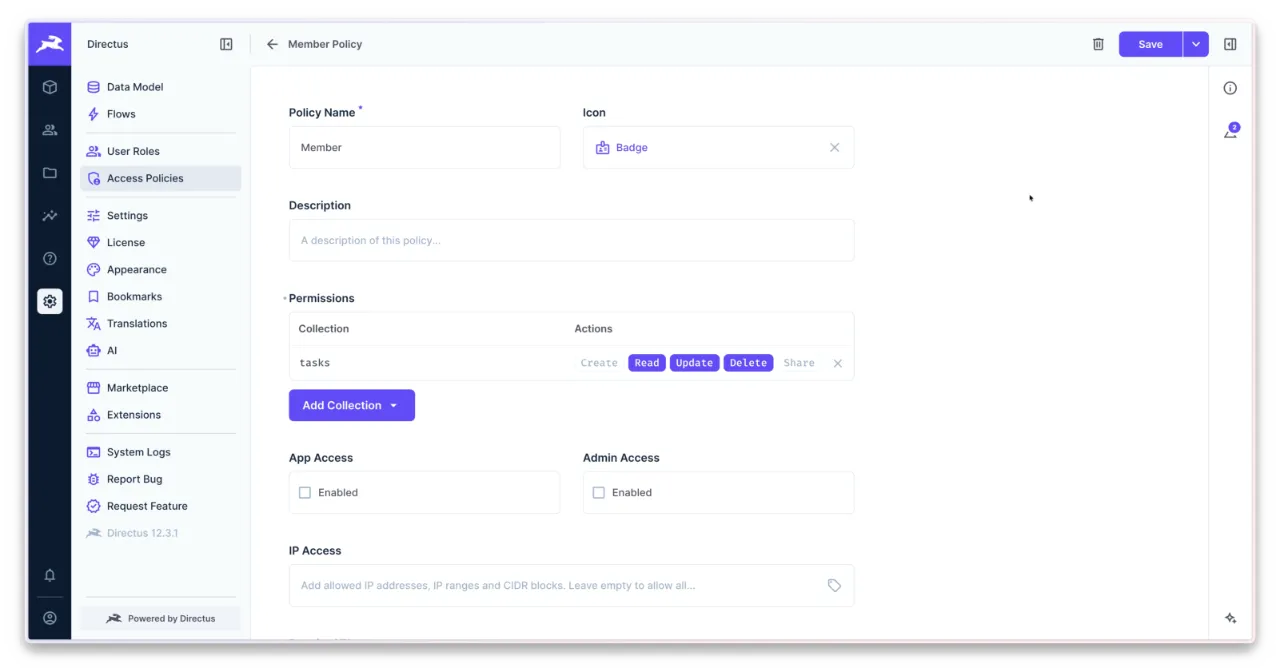
Access is controlled by policies. A policy is a set of permissions, where each says what a user may do with a collection: create, read, update or delete. We manage them in Access Policies settings. We opened the Member policy and allowed all four actions, which is why every member could do everything.
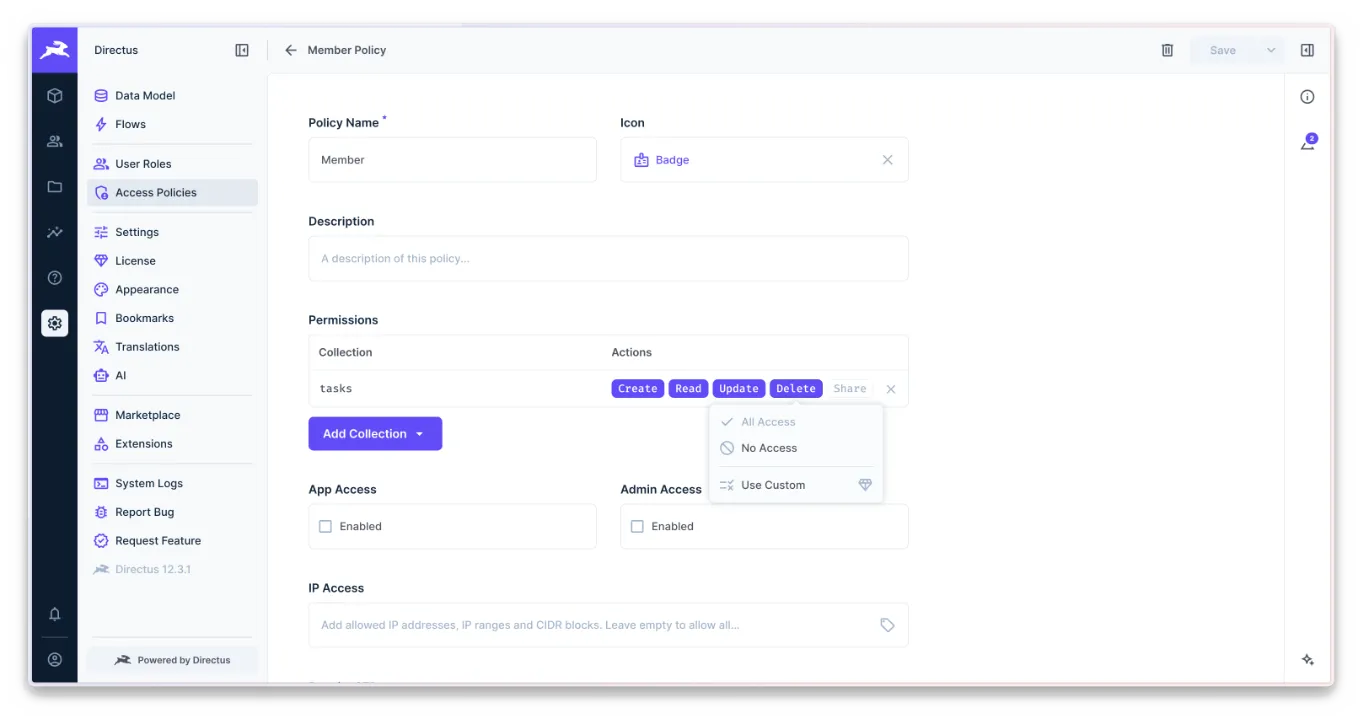
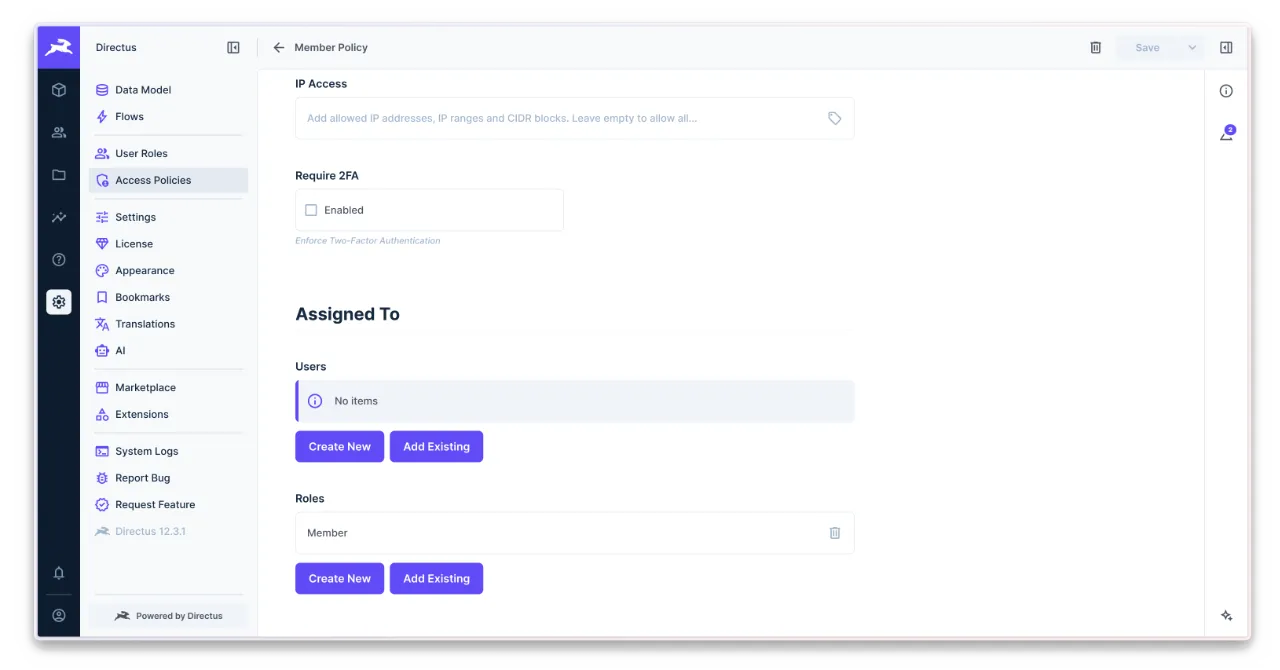
A policy can be attached to a role or directly to a user. We attached the Member policy to the Member role, so everyone in that role group has the same access. Attaching one to a single user is handy for exceptions, when one person needs more.
With the policy in place, Directus can now answer which actions this user may perform on collection. The permissions API returns that information, and the SDK wraps it in readUserPermissions. For each collection, it lists the actions the user is allowed to take, such as create, read, update, and delete.
{
  "tasks": {
    "create": {
      "access": "full"
    },
    "read": {
      "access": "full"
    },
    "update": {
      "access": "full"
    },
    "delete": {
      "access": "full"
    }
  }
}
That shape is precise, but clumsy to read every time we render a button, so the next step was to turn it into something the app can carry around. We need to translate this to a shape that we can easily use.
How to translate Directus policies to Nuxt policies?
The answer from the previous section is shaped by Directus, so we need to find shape that will become the contract in the application for what a user can do. Otherwise, we would couple backend details into the app, which goes against the general rules we established. The simple shape might look as follows.
{
  "id": "55a95a97-13bb-4845-ba07-2b6edc634e62",
  "email": "john.doe@example.com",
  "permissions": {
    "tasks": ["create", "read", "edit", "remove"]
  }
}
Each User data can carry a new permissions attribute that stores the allowed permissions for each collection using terms such as create, read, edit, and remove. That’s clear enough to control access so it can be used as a pattern when working with any data collection in the whole application.
To ensure the system follows this, we need to define a contract with application types. Define the permission names in the Permission type, and build the Permissions type, which consists of every collection slug followed by the allowed permissions array. Finally, modify the User type to carry this data.
export type Permission = "create" | "read" | "edit" | "remove";

export type Permissions = {
  tasks: Permission[];
};

export type User = {
  id: string;
  email: string;
  permissions: Permissions;
};
Once the contract is set, we must modify the Directus adapter and ensure it follows the application rules. We can do this, for example, in a function that sets the user shape in session, which is me in our example. It has been modified by adding a new permissions attribute, followed by a getPermissions function whose role is to get the policies from Directus and translate them into the application type.
async function me(): Promise<User | null> {
  try {
    const result = await client.request(
      readMe({
        fields: ["id", "email"],
      }),
    );

    const user = {
      id: result.id,
      email: result.email,
      permissions: await getPermissions(),
    };

    return user;
  } catch (error) {
    console.error("[Directus] User profile cannot be read.", error);
  }

  return null;
}
We skipped the exact implementation since it differs based on the case. Ask agent to create the structure based on the application types and your authentication methods.
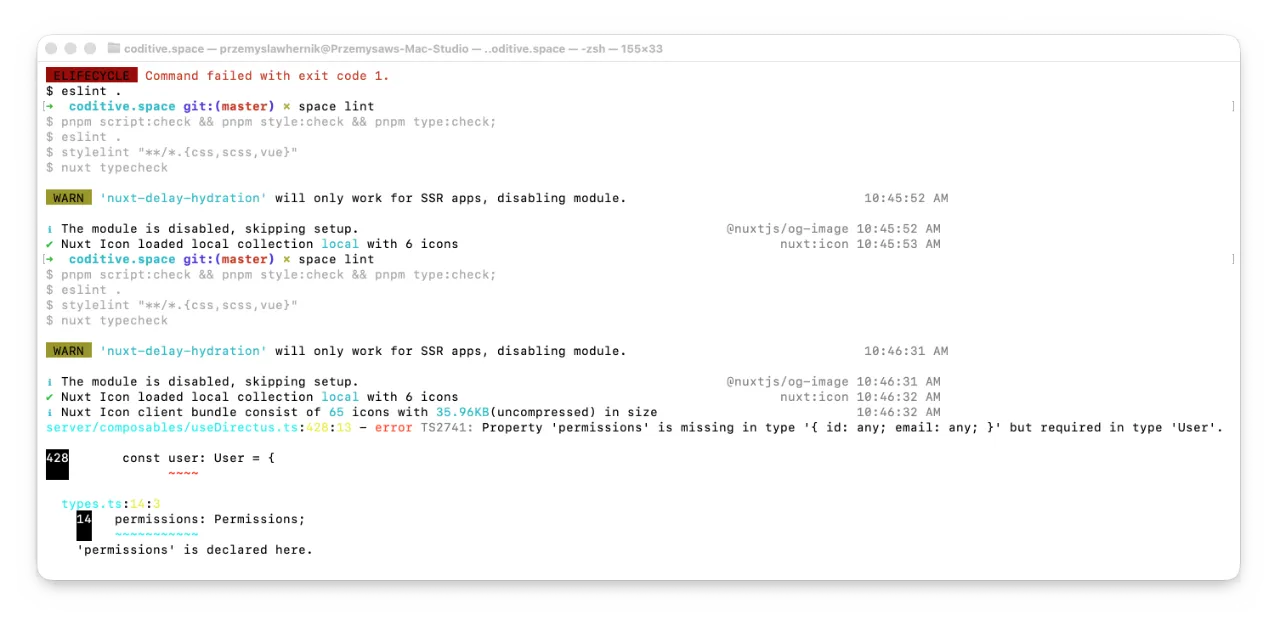
This step is hard to miss. If we do not handle changes in the adapter, the CI pipeline will fail because type checking clearly states that the permissions attribute is missing. That is exactly why we love working with typed languages like TypeScript.
When users try to perform actions that are not allowed in Directus, the application returns an error. However, errors are not something we want to show to users, so we can now work on improving the general user experience in other layers.
How to use policies in Nuxt?
Both sides now provide methods to ask what actions a user can take on a specific collection. We can use them to improve the experience at different layers of the application. The core idea is to stop any work the user is not allowed to do as soon as possible to avoid unnecessary server workloads.
⚠️ These ideas are intended to provide a minimal guide to authorizing user actions. User authentication is a separate part that should be completed earlier.
Server Composable
On the server layer, the first improvement to make is to hide system details from the user. In the current state, when users try to run forbidden actions, the system throws an error, which is good, but this error can expose Directus details, which is wrong. We should handle policy errors in an application-friendly way.
Using the permissions attribute from the session to verify access is the right approach, but to avoid writing the same complex conditions in different parts of the application, create a reusable method in the useAuth composable called requireAccess that accepts the collection slug and action as parameters.
import type { H3Event } from "h3";
import type { Permission, Permissions } from "@@/types";

import useDirectus from "~~/server/composables/useDirectus";

export default function useAuth(event: H3Event) {
  const { me } = useDirectus(event);

  async function requireAccess(
    module: keyof Permissions,
    permission: Permission,
  ): Promise<void> {
    const user = await me();

    if (!user || !user.permissions[module].includes(permission)) {
      throw createError({
        statusCode: 403,
        statusMessage: `You're not allowed to ${permission} ${module}.`,
      });
    }
  }

  return { requireAccess };
}
This method checks whether the current user can perform a specific action and throws a user-friendly error if they cannot, keeping backend details far from the user.
API Endpoints
We can now use the requireAccess method to block forbidden actions as soon as the user request reaches the server endpoint. For example, a task may be changed only by a user with the edit permission, so in the update endpoint, we call the method before the endpoint does any work. A member without that permission gets a clear 403 response, nothing is loaded, and nothing is changed.
import useAuth from "~~/server/composables/useAuth";
import useTasks from "~~/server/composables/useTasks";

export default defineEventHandler(async (event): Promise<void> => {
  const { requireAccess } = useAuth(event);
  const { update } = useTasks(event);

  await requireAccess("tasks", "edit");

  const { id } = getRouterParams(event);
  const body = await readBody(event);

  return await update(id, body);
});
Client Composable
The server blocks incorrect requests as soon as possible, but we can take it a step further. We do not want to burden our server with invalid requests, so we move the access check to the user’s browser too. To avoid duplication, we created a can helper in the useAuth client composable that reads the policy list from the user session and answers whether the user can perform a specific action.
import type { Permission, Permissions, User } from "@@/types";

export default function useAuth() {
  const user = useState<User | null>("user", () => null);

  async function init(): Promise<void> {
    user.value = await $fetch<User>("/api/auth/me");
  }

  function can(module: keyof Permissions, permission: Permission): boolean {
    return !!user.value && user.value.permissions[module].includes(permission);
  }

  return { user, init, can };
}
We use this method in other modules, for example, in the useTask composable, to prevent forbidden actions like removing the task before they reach the server. It shifts workload from the server to the user’s browser, which is useful because less work for the server means more money kept in a pocket.
import type { Task } from "@@/types";

export default function useTask() {
  const { can } = useAuth();

  async function remove(): Promise<boolean> {
    if (!can("tasks", "remove")) {
      return false;
    }

    await useTasks().remove("TASK_ID_HERE");

    return true;
  }

  return { remove };
}
Client Components
The browser already blocks forbidden actions, but why even show users that they can do something if they cannot? That’s why it’s worth using the authorization module for system components as well.
Our collection archive page, described in the previous article, renders a button that allows adding a new task. If a user cannot edit tasks, why show this button at all? We can use the can helper in interface components too to limit what users can do by hiding action elements like save or delete buttons.
<template>
  <div class="task -archive">
    <NuxtLink to="/tasks/create" v-if="can('tasks', 'create')">
      New task
    </NuxtLink>

    <ul>
      <li v-for="entry in entries" :key="entry.id">
        <NuxtLink :to="`/tasks/${entry.id}`">
          {{ entry.title }}
        </NuxtLink>
      </li>
    </ul>
  </div>
</template>

<script setup lang="ts">
const { can } = useAuth();
const { data: entries } = await useAsyncData("tasks", () => useTasks().find());
</script>
After all layers are taken care of, we can now check how it works on the real example.
How do the policies work in a Nuxt application?
To check how the current changes work in the real examples, we created two users: an administrator with all privileges by default and a classic member.
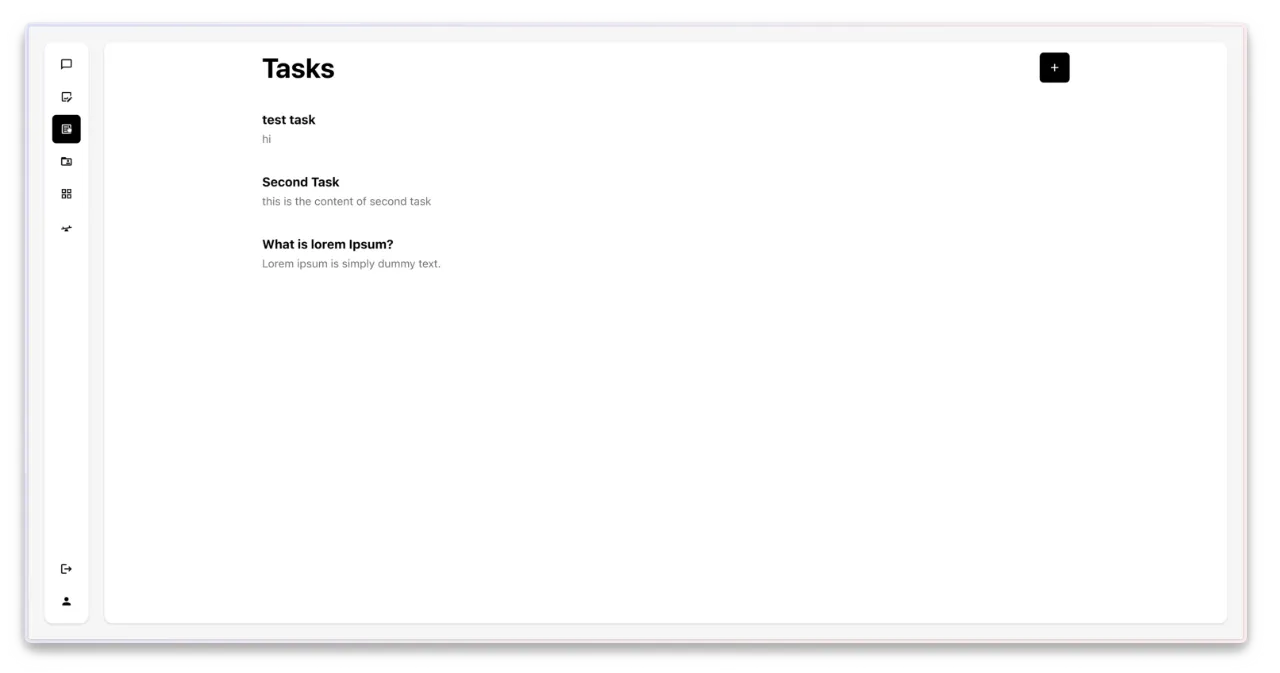
If we log in as an administrator, we can see that the interface allows everything and shows all options. The user sees the creation buttons and can update document content or remove it without any problems.
Now, modify the Member role in Directus, revoke the create privilege, and log in.
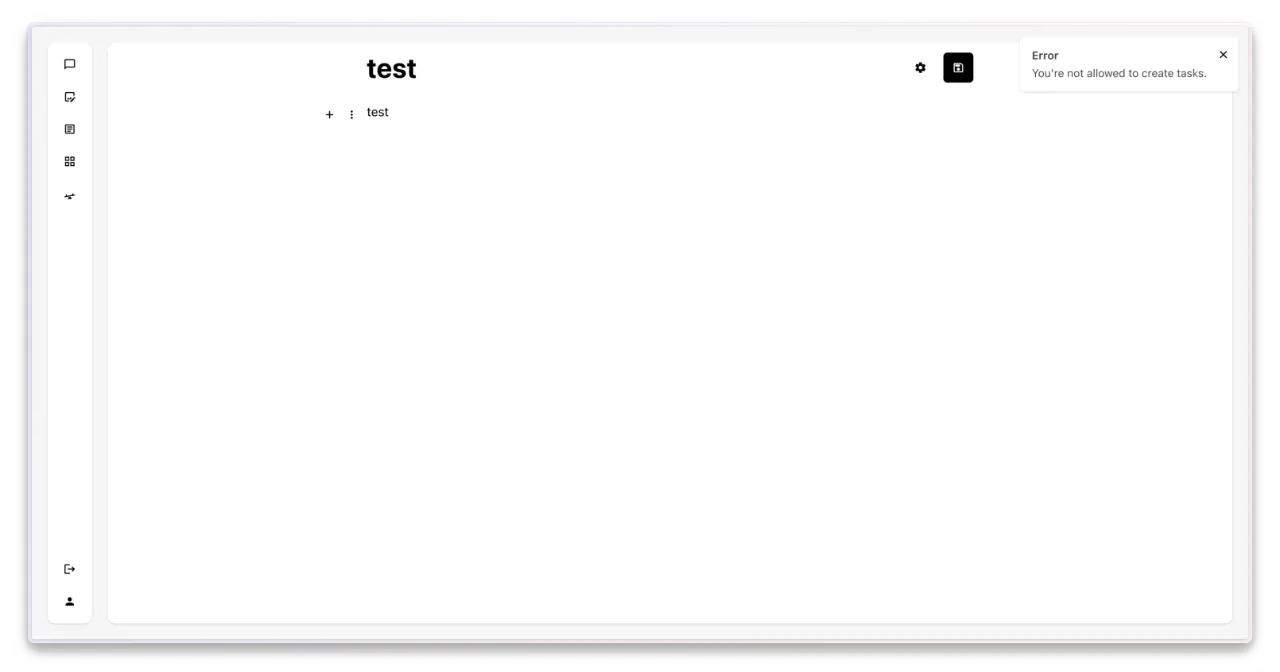
There is no button for creating a new task anymore. The application provides this feature, but it is hidden from the user. If they open the page manually and try to save the results, the client composable prevents this first, and even if it is bypassed somehow, the server endpoint blocks it too.
What did the change improve?
We now have one clear place where access rules live, which stops logic from spreading across random parts of the system. The business gets a cleaner ruleset, the team has fewer places to check, and changes become easier to make without breaking something three layers away.
The app still sits at the center of the policy model, which is exactly how it should be. The adapters follow the app shape instead of shaping the app themselves, so business rules stay controlled. That makes the system easier to change when requirements move, and it saves time every time we need to update who can do what.
The four-layer improvements also help us block bad requests earlier, before they consume compute, hit downstream services, or create work that would never pay off. That reduces waste and keeps more money in our pockets, which is especially helpful when part of the app is hosted in the cloud.
If this sounds like the kind of cleanup your team needs, send us an email, and let’s talk through it. We can help you turn tangled rules into one clear place, keep the business logic in the right layer, and cut waste before it turns into real cost. Stay in touch, and Paweł or Przemek will get back to you as soon as possible.
Check out our social profiles on LinkedIn or Instagram for the next articles, and if you are watching this as a video, give it a thumbs up and subscribe to the channel for more.