How to build data collections in Nuxt and Directus?
Learn how to build data collections in Nuxt and Directus, and keep your app data clear, connected, and easy to work with.
Collections are at the center of most web applications. No matter the domain of the problem they solve, apps often need to work with specific data types such as orders, products or tasks. That data needs a clear structure and has to remain consistent across different parts of the application.
In this article, we use Nuxt and Directus as examples to show how that works in practice. We follow the process from defining a data collection in business terms, to shaping it in Directus, to exposing it through the Nuxt server layer and API endpoints, and finally to presenting it in the interface. The idea is to keep the whole flow clear, practical, and closely connected to the real needs of an application.
How to define data collection in the application layer?
We started in the Nuxt app, not in Directus, with what our Nuxt architecture guide calls the application types. The type is the agreement that the components, endpoints, and the backend all follow. If Directus defined the shape instead, its rules would leak into the whole codebase, and switching backends would mean a rewrite. The application is the most important, and that’s why it should define the shape.
We called the collection tasks. We kept the type short on purpose, so it lists only what the interface needs to show a task and save it back. It lives in a types.ts file.
export type Task = {
  id: string;
  title: string;
  content: string;
  author: string;
};
In plain words, a task needs an ID, a title for the list, the text in the content, and an author property that identifies who wrote it. This way, application components, server endpoints, and external details like Directus all operate on the same schema.
{
  "id": "54786842-26a9-4a9e-8e08-95e0242219ed",
  "title": "What is Lorem Ipsum?",
  "content": "Lorem ipsum is simply dummy text.",
  "author": "c7e5e7e8-f34b-4227-904b-929f354d41ab"
}
Once done, the next step is to reflect this shape in Directus, which can be done in the Data Model module.
How to model data collection in the backend layer?
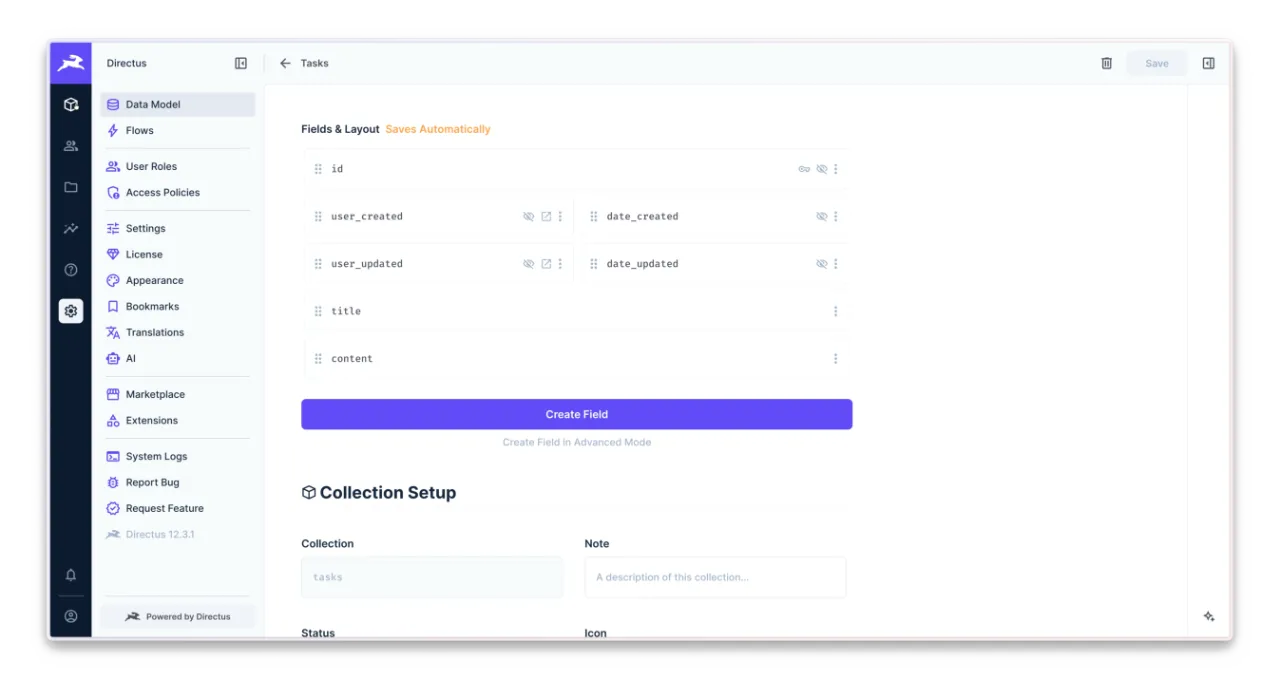
In Directus, the data model is the place where you describe your collections. A collection is a set of objects with its own fields, which then becomes a table in the database. So we describe a task once, in the admin panel, and Directus gives us the table, the API, and the editing form for admins.
First we picked the key. A task needs an ID we can put in a link, so we created the collection with a UUID as its primary key, which is safe to show in the address bar. Then we let Directus add two fields on its own: who created the row and when, and we added the title and the content fields too.
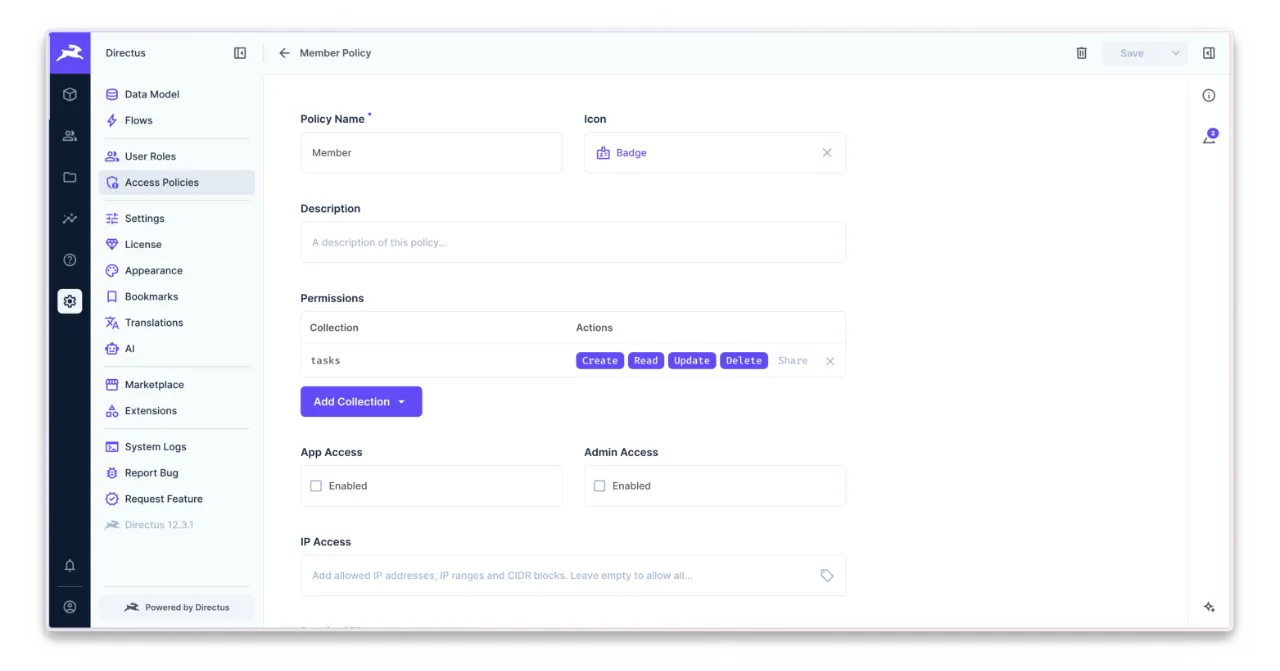
Next came permissions, because by default, for policies other than Administrator, Directus does not allow any actions. We manage this in the Access Policies settings. We already had a Member policy there for regular users, so we opened it and allowed them to create, read, update, and delete tasks. We also checked that the Public policy has no access; otherwise, every visitor could manage all tasks.
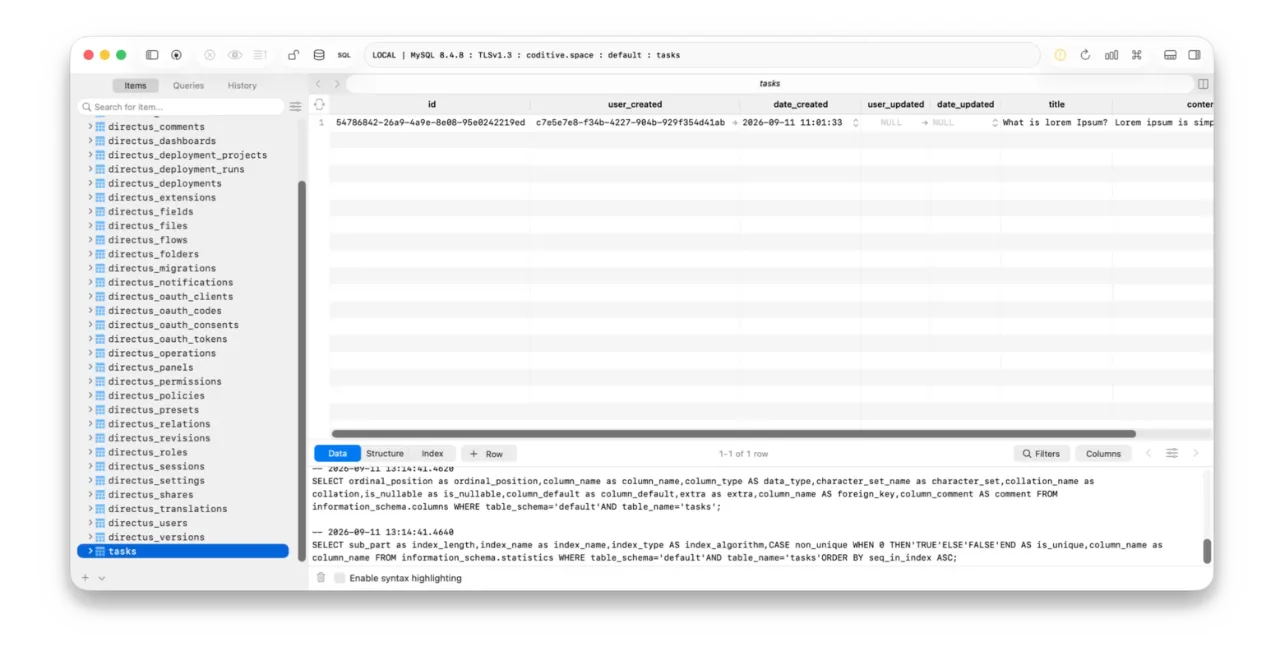
Behind the panel, Directus keeps each collection as a plain MySQL table, so leaving it one day means a simple export, which keeps the architecture loosely coupled.
In a recent project for our client, we created an e-commerce site that supports cryptocurrencies as a payment method. One requirement was to keep the CMS decoupled so we could change it easily without rewriting the entire app. As a result, Directus was used only to manage data, while the app loaded details directly from the database. Data collection was having a separated MySQL tables in Directus by default, making it easy to integrate with tools like Drizzle without touching the CMS.
The application was built around the real business needs rather than external details, so further updates were easy to handle. Directus focuses on business problems first, and that is why we like it so much.
Back in the panel, administrators get a lot of freedom in how the table looks. For each collection, they choose which columns appear in the listing and in what order, so the things they look for most are visible at a glance. In our case, the listing shows the ID, the title, the author, and the content.
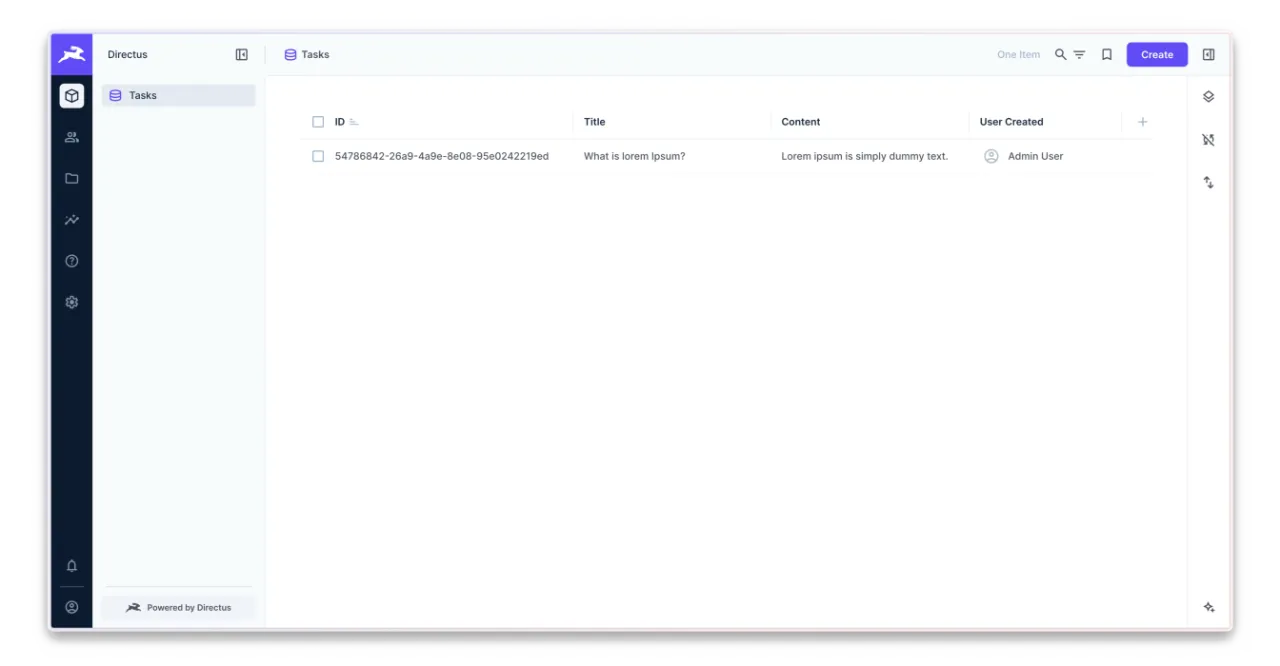
Once the collection was in place, we created one item by hand and queried it through the REST API. It came back with Directus field names, including the two fields Directus filled in by itself. The row holds more than the app defined and calls the author by a different name, and the next section deals with that.
{
  "data": {
    "id": "54786842-26a9-4a9e-8e08-95e0242219ed",
    "user_created": "c7e5e7e8-f34b-4227-904b-929f354d41ab",
    "date_created": "2026-09-11T11:01:33.000Z",
    "user_updated": null,
    "date_updated": null,
    "title": "What is lorem Ipsum?",
    "content": "Lorem ipsum is simply dummy text."
  }
}
How to integrate data collection with the frontend?
Back in the app, we had two parts to work with: the frontend interface and the server we control. The browser never talks to Directus or the database directly. So we went through its four layers: server composables, API endpoints, client composables, and interface components on the browser side.
Server Composables
On the server, we wrote one composable that talks to Directus through the official JS SDK. We call it the vendor adapter because when something changes in Directus, this is the only file we touch. Its purpose is to provide functions to use across different application layers and hide Directus communication details.
We started with one important rule: when a provider uses a different data shape, translate it into app types before anything else touches it. So every row that came from Directus goes through function that maps its data structure to the app schema.
import type { H3Event } from "h3";
import type { Task } from "@@/types";

export default function useDirectus(event: H3Event) {
  function buildTask(data: Record<string, any>): Task {
    return {
      id: data.id,
      title: data.title,
      content: data.content,
      author: data.user_created,
    };
  }
}
After the translation, the task has exactly the four fields, and nothing above this function ever sees Directus field names. The shape is exactly as the app requires.
{
  "id": "54786842-26a9-4a9e-8e08-95e0242219ed",
  "title": "What is Lorem Ipsum?",
  "content": "Lorem ipsum is simply dummy text.",
  "author": "c7e5e7e8-f34b-4227-904b-929f354d41ab"
}
With the translation in place, the rest of the adapter was short. The Directus client is created once at the top, with the URL from the runtime config and proper authorization in place. Then it provides methods for each action a user can do with a task: read, find, create, update, and remove. Every read runs through the translation on its way out, so the composable ensures proper data structure.
import { createDirectus, rest, readItems, readItem, createItem, updateItem, deleteItem, staticToken } from '@directus/sdk';
import type { H3Event } from 'h3';
import type { Task } from '@@/types';

export default function useDirectus(event: H3Event) {
  const { directus } = useRuntimeConfig();

  const client = createDirectus(directus.url).with(rest()).with(staticToken('YOUR_TOKEN'));

  async function getTask(id: string): Promise<Task> {
    const result = await client.request(readItem('tasks', id));

    return buildTask(result);
  }

  async function findTasks(): Promise<Task[]> {
    const result = await client.request(readItems('tasks', {
      sort: '-date_created',
    }));

    return result.map(buildTask);
  }

  async function createTask(task: Task): Promise<string> {
    const result = await client.request(createItem('tasks', {
      title: task.title,
      content: task.content,
    }));

    return result.id;
  }

  async function updateTask(id: string, task: Task): Promise<void> {
    await client.request(updateItem('tasks', id, {
      title: task.title,
      content: task.content,
    }));
  }

  async function removeTask(id: string): Promise<void> {
    await client.request(deleteItem('tasks', id));
  }

  function buildTask(data: Record<string, any>): Task { ... }

  return { getTask, findTasks, createTask, updateTask, removeTask };
}
We knew the app would soon need rules, such as a member being allowed to edit only their own tasks, and those rules needed a home. So we put a second server composable between the endpoints and the adapter specifically for tasks. Its role is to provide methods that hide external details from other layers. So every time we need to find a specific task, we do it with the useTasks composable.
import type { H3Event } from "h3";
import type { Task } from "@@/types";

import useDirectus from "~~/server/composables/useDirectus";

export default function useTasks(event: H3Event) {
  const { getTask, findTasks, createTask, updateTask, removeTask } =
    useDirectus(event);

  async function get(id: string) {
    return await getTask(id);
  }

  async function find() {
    return await findTasks();
  }

  async function create(task: Task) {
    return await createTask(task);
  }

  async function update(id: string, task: Task) {
    return await updateTask(id, task);
  }

  async function remove(id: string) {
    return await removeTask(id);
  }

  return { get, find, create, update, remove };
}
We used this approach in one of the SaaS platforms for one of our clients. They had been using Directus as the backend for regular users, but for a specific set of them, they wanted to load results from static files. So we added an exception in useTasks to use useFiles rather than useDirectus, and that was the only place we touched. No need to touch endpoints, client composables, or components.
Since the adapters are ready, it’s time to deliver the data to the browser via a REST API.
API Endpoints
API endpoints are the only way the browser can reach the server, and we wrote five of them, one for each thing the app does with tasks. In this simplest form, each endpoint takes the request, hands it to the tasks composable, and returns result. Checking who’s asking comes in the next parts of the series on the blog.
A new collection means the same five files, each calling its own composable.
server/api/tasks
├── index.get.ts
├── index.post.ts
├── [id].get.ts
├── [id].put.ts
├── [id].delete.ts
When a user opens the tasks page, the app asks for their list. This GET endpoint answers it: it takes the find function from the useTasks composable, calls it, and returns the array of results.
import type { Task } from "@@/types";

import useTasks from "~~/server/composables/useTasks";

export default defineEventHandler(async (event): Promise<Task[]> => {
  const { find } = useTasks(event);

  return await find();
});
When a user wants to save a new task, the app reaches the POST endpoint. It reads the title and the text from the request body, passes them to the create function of the composable, and returns the ID.
import useTasks from "~~/server/composables/useTasks";

export default defineEventHandler(async (event): Promise<string> => {
  const { create } = useTasks(event);
  const body = await readBody(event);

  return await create(body);
});
When someone follows a link to a task, the app calls the GET endpoint with the ID from the address. The endpoint reads that ID from the route, asks the composable for the task, and returns it.
import type { Task } from "@@/types";

import useTasks from "~~/server/composables/useTasks";

export default defineEventHandler(async (event): Promise<Task> => {
  const { get } = useTasks(event);
  const { id } = getRouterParams(event);

  return await get(id);
});
Every later save of that task goes to the PUT endpoint. It reads the ID from the route and the changed fields from the body, and passes both to the update function of the composable.
import useTasks from "~~/server/composables/useTasks";

export default defineEventHandler(async (event): Promise<void> => {
  const { update } = useTasks(event);
  const { id } = getRouterParams(event);
  const body = await readBody(event);

  return await update(id, body);
});
When a member removes a task, the app calls the DELETE endpoint with the ID. The endpoint reads it from the route and asks the composable to remove the task.
import useTasks from "~~/server/composables/useTasks";

export default defineEventHandler(async (event): Promise<void> => {
  const { remove } = useTasks(event);
  const { id } = getRouterParams(event);

  return await remove(id);
});
With the server endpoints ready, we moved to the browser layer to show results to user.
Client Composables
First, we created a reusable composable that holds calls to endpoints in one place. This hides technical details from other layers and improves reusability. When the app needs to work with tasks, it does not need to create fetches on its own.
The composable has one function per endpoint, and each one calls the server with Nuxt’s $fetch: find asks for the list, get asks for one item, create sends a new one, update saves changes, and remove deletes the task.
import type { Task } from "@@/types";

export default function useTasks() {
  async function find() {
    return await $fetch<Task[]>("/api/tasks");
  }

  async function get(id: string) {
    return await $fetch<Task>(`/api/tasks/${id}`);
  }

  async function create(task: Task) {
    return await $fetch<string>("/api/tasks", { method: "POST", body: task });
  }

  async function update(id: string, task: Task) {
    return await $fetch(`/api/tasks/${id}`, { method: "PUT", body: task });
  }

  async function remove(id: string, task: Task) {
    return await $fetch(`/api/tasks/${id}`, { method: "PUT", body: task });
  }

  return { find, get, create, update, remove };
}
The interface might need a current task instance not only in one component, while keeping it reactive so updates can be reflected in every place that uses this item. So we added a second composable that holds the current task in one place. Every part of the page reads and writes that one object, and saving sends it as a whole. One composable calls the API; a second one holds the item the user is working on.
The task lives in a ref declared outside, so every component that calls the composable gets the same object. It provides computed properties that read from it and write back, so an input can bind to it. The init function loads a task when page opens, and destroy clears it, which is useful when leaving page.
import type { Task } from "@@/types";

const task = ref<Task>({
  id: "",
  title: "",
  content: "",
  author: "",
});

export default function useTask() {
  const title = computed({
    get: () => task.value.title,
    set: (value) => {
      task.value.title = value;
    },
  });

  const content = computed({
    get: () => task.value.content,
    set: (value) => {
      task.value.content = value;
    },
  });

  function init(item: Task) {
    task.value = item;
  }

  const destroy = () => {
    task.value = {
      id: "",
      title: "",
      content: "",
      author: "",
    };
  };

  return { task: readonly(task), title, content, init, destroy };
}
The composable treats every editable field the same way: anything we add later each gets its own computed property. It can also provide action helpers so we can run create, update, or remove methods here to manage the current state more easily.
Components
With both composables in place, the last layer was the pages, and there are three of them: first for listing all items, second for creating a new one, and third for updating.
app/pages/tasks
├── index.vue
├── create.vue
├── [id].vue
When a user opens the archive, we wanted to show the full list of items from the collection. The page uses the find method from the useTasks composable, wrapped in useAsyncData. The interface displays all results as links that open the page with specific item details, and one link to create a new item.
<template>
  <div class="task -archive">
    <NuxtLink to="/tasks/create"> New task </NuxtLink>

    <ul>
      <li v-for="entry in entries" :key="entry.id">
        <NuxtLink :to="`/tasks/${entry.id}`">
          {{ entry.title }}
        </NuxtLink>
      </li>
    </ul>
  </div>
</template>

<script setup lang="ts">
const { data: entries } = await useAsyncData("tasks", () => useTasks().find());
</script>
On the task creation page, there is nothing to load yet, so once the page mounts, it initializes an empty item in the shared state. It binds the title and content to inputs, so each change updates the shared state. When the user saves the form, it triggers the create method from the composable and stores the result. The create method returns the task ID, so the system redirects the user to the specific task page.
<template>
  <div class="task -new">
    <form @submit.prevent="create">
      <input v-model="title" />
      <textarea v-model="content" />
      <button type="submit">Save</button>
    </form>
  </div>
</template>

<script setup lang="ts">
const { task, title, content, init } = useTask();

onMounted(() => {
  init({ id: "", title: "", content: "", author: "" });
});

async function create() {
  const id = await useTasks().create(task.value);

  await navigateTo(`/tasks/${id}`);
}
</script>
When the user opens a specific task, the page reads the ID from the route parameter and then asks the server for that item within useAsyncData. Once ready, it initializes shared state with the results, so the inputs show it right away. Saving goes through the update function there. When the user leaves the page, it’s good to clear the shared state so the component uses destroy method from the composable.
<template>
  <div class="task -single">
    <form @submit.prevent="update">
      <input v-model="title" />
      <textarea v-model="content" />
      <button type="submit">Save</button>
    </form>
  </div>
</template>

<script setup lang="ts">
const { title, content, init, destroy, update } = useTask();

const { data: entry } = await useAsyncData("task", () =>
  useTasks().get(useRoute().params.id as string),
);

onMounted(() => {
  if (entry.value) {
    init(entry.value);
  }
});

onUnmounted(() => {
  destroy();
});
</script>
It’s worth adding that these examples are the simplest ones, used only to show the ideas and rules we follow when creating support for a new collection in our Nuxt application. In the real system, they also have proper error handling and a few other features, but those can be handled separately.
How to check the results?
Once we have everything in place, it is good to check how the results look in the final system. That way, we can follow the whole flow and make sure the data appears where it should across the different layers.
Our application lets you check the list of items and see what is already available at any moment. It gives a quick view of the current state of the app, and we can compare what we see in the frontend with what appears in the Directus and in the MySQL table.
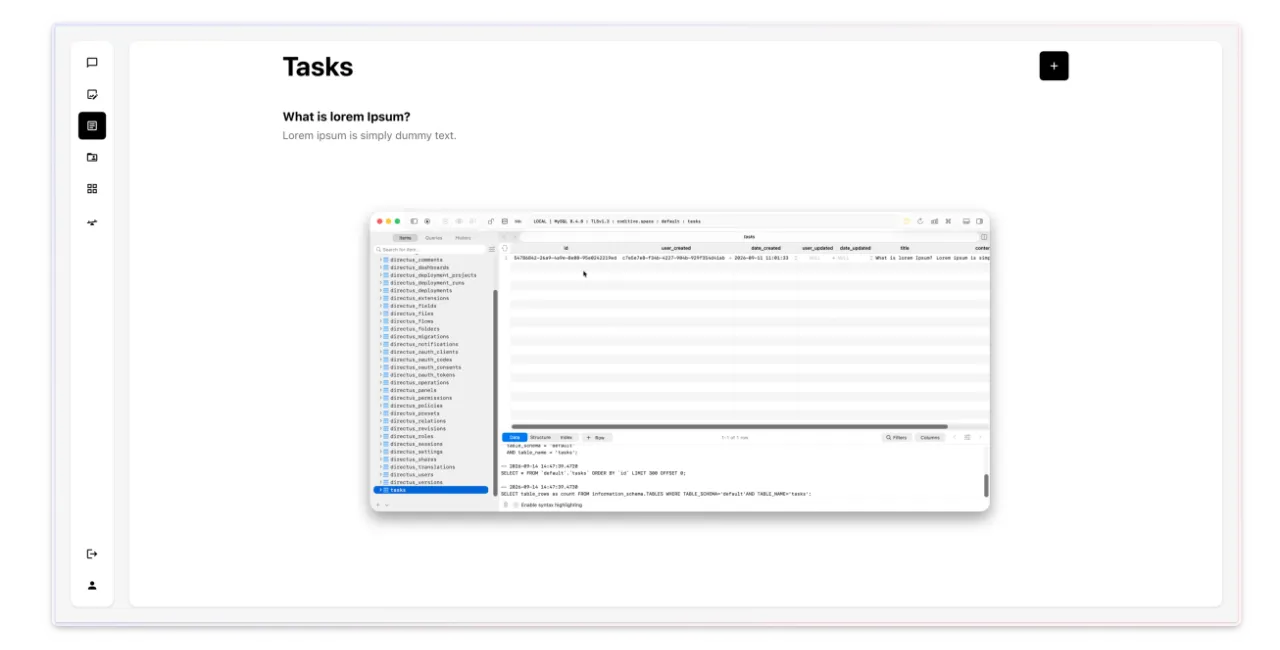
To create a new item, we click the add button, enter the needed details, and save it so the new item appears in the list. After that, we can see the same item in the Directus admin and in the database table, which shows that the data is being passed.
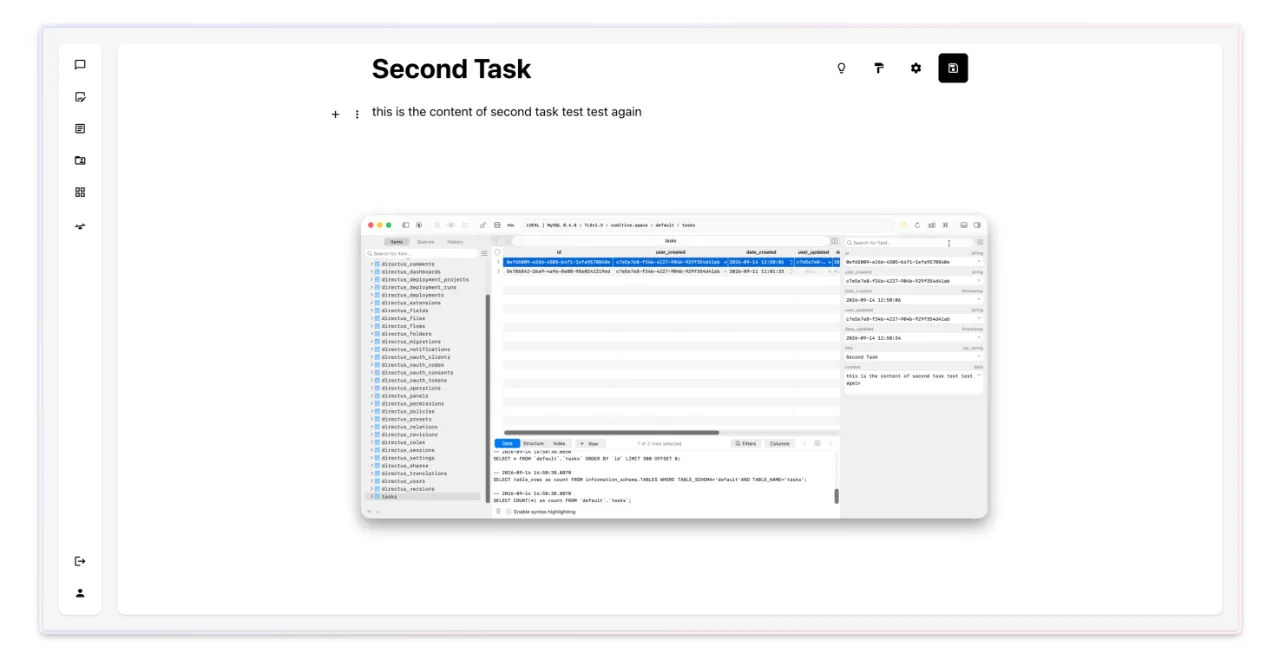
To edit an existing item, we open it from the list, update the information we want to change, and save it again. The updated version then replaces the old one, and the same changes show up in Directus admin and in the MySQL table as well.
What’s the takeaway?
One clear flow for collections makes the whole app easier to extend. We define the shape once in the app, mirror it in Directus, and then handle every collection the same way across server and browser layers. That keeps the codebase unified, makes new work predictable, and helps the team think in domain terms.
If your app keeps data of its own and you want a clearer, more consistent way to handle collections across the whole codebase, talk to our team through our contact page, and Przemek or Paweł will get back to you as soon as possible to discuss your project.
If you found this content helpful, share it with anyone who might benefit from it. Check out our social profiles on LinkedIn or Instagram to stay updated, and if you are watching this as a video, give it a thumbs up and subscribe to the channel for more.