The Nuxt architecture that makes apps easier to build
Learn how to create a Nuxt application structure that makes features easier to add, reduces delivery costs, speeds up updates, and helps AI agents work better with the Nuxt ecosystem.
Nuxt projects often become expensive when the interface, business rules, state management, and validation all live in the same place. That structure can work in a demo, but it becomes painful when requirements change.
A better model uses clear boundaries. If OpenAI is replaced with Gemini in a Nuxt project, only the vendor layer should change, while the interface, validation, endpoint shape, and user flow stay untouched.
In this article, I’ll walk through a Nuxt project structure that keeps client code, server code, and vendor logic separated. I’ll show how data should move through the app, why that matters for AI agents, and where reusability helps reduce copy-paste work.
What happened when our internal Nuxt project started growing?
As a software developer at Coditive, I have spent more than 10 years seeing similar patterns across Nuxt projects, WordPress websites, and SaaS tools: a project structure became much more important as the application grows. We felt this in one of our own internal platforms as well. It started about three years ago as a small tool for supporting internal work with workflows powered by AI models.
The first version proved its value quickly. For about $5 in API usage, at least five team members used it for six months. Compared with paying $20 per user per month for ChatGPT over the same period, the MVP saved roughly $595.

That is when the original structure began to cause problems as we started using more agentic workflows in the delivery process. Logic that should have been reusable spread across several files. Small changes required checking parts that should not have been related. External details were too close to product logic.
So we improved the Nuxt structure to deliver features more easily and quickly without losing quality. The changes described in this article were not the only reason the project moved faster, but they removed a lot of friction. Afterward, after adding more agentic workflows, in the next six months, we delivered more features than we had in the previous two years of after-hours development. It was worth it.
Why should a Nuxt project keep client and server logic separate?
Nuxt projects should have a structure with at least two layers: a client layer and a server layer. The client layer is the part users see and interact with in the browser. It shows pages, buttons, forms, and responds when users click or type. Server layer is the part users don’t see. It works behind the scenes, handles requests, saves data, validates actions, and sends results back to the client. It runs in an place that you control.
This client-server separation matters because code that runs on the client side should never have direct access to business rules, secrets, or the database that stores all the information. If those elements end up in the browser, the app can expose sensitive data and critical logic, like API keys for other services.

Nuxt provides a strong foundation for this architecture. It helps separate a Nuxt project into a client layer containing components, pages, and layouts, and a server layer that handles routing, endpoints, and middleware. This is visible in the directory structure, since the app directory is intended to store browser-related files, while the server directory stores server-related files that implement business rules.
Different Nuxt project responsibilities are separated into layers, but now they need to communicate somehow. Based on our experience, the rule for most apps is simple.
How should the client and server layers communicate in a Nuxt project?
Client-side elements communicate with the server only through the specific entry points controlled by the server, for example, a REST API. When the browser wants something, it sends a request to API endpoint, which then decides whether the answer can be provided and does so when the request is valid.
This creates a clear separation and allows the server to keep sensitive behavior safely controlled. Browser elements cannot access anything they want, such as OpenAI credentials, without validation. They can only send a request, and the server decides whether to provide a results. The server you own controls what can be done.

In our case study, the chat component lets users send prompts through a form, and expects a response generated by OpenAI. When the user submits the form, the browser sends a POST request to the /api/responses endpoint with the user’s data. The endpoint verifies if the client can make the request, and if so, it handles the communication with OpenAI and returns the result to the component for display.
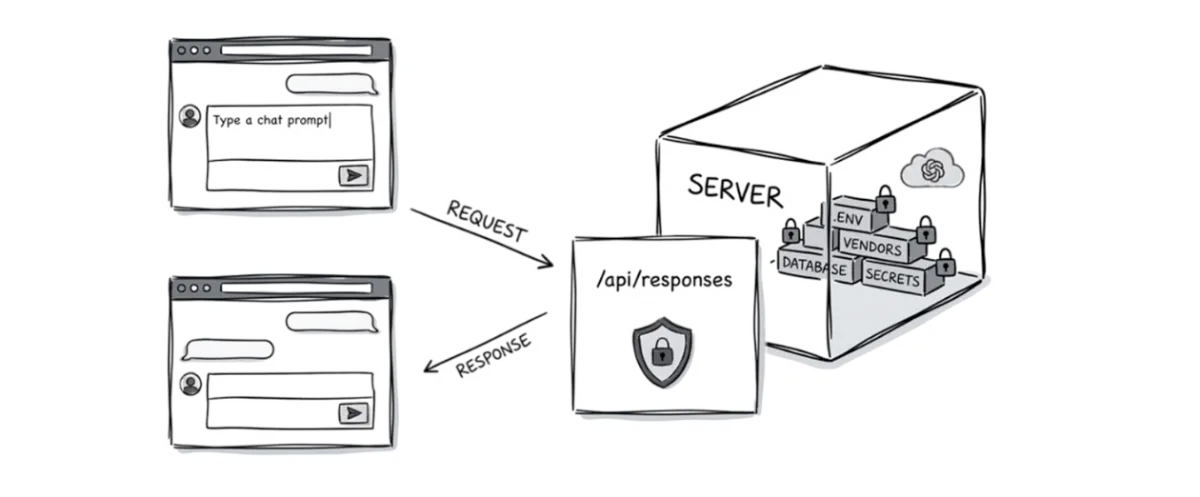
In this flow, the browser knows nothing about OpenAI. It sends a request, and the server handles it without exposing OpenAI calls or secret API credentials. OpenAI requests stay on the server in the request handler, where the browser cannot access them. The browser gets only what the server provides and nothing more.
This flow is natural and reflects how we normally live. A guest in a restaurant places an order with a waiter. The waiter sends it to the kitchen, which prepares the dish, and the waiter brings it back. Each role has a clear job. Guests cannot walk into the kitchen, see the list of suppliers, or infer how the chefs are cooking. The work is organised by roles, which keeps the restaurant running well, even during high traffic.
When should you add more structure to a Nuxt app?
Such simple communication works well for smaller cases or MVP versions, but at some point, keeping all logic inside components and endpoints can become too complex.
As the application grows, teams or agents often need to reuse the same query or action in multiple places. When that logic lives directly inside a single component, it’s often copied into the next one. Each change then has to be repeated in several files, which increases the risk of inconsistent behavior and outdated code over a time.
The same problem appears when dependencies change, such as AI providers for a chat feature. If a single endpoint handles too many responsibilities - data validation, user authorization, and vendor integration - the code can become harder to understand and evolve, especially when the service grows quickly.
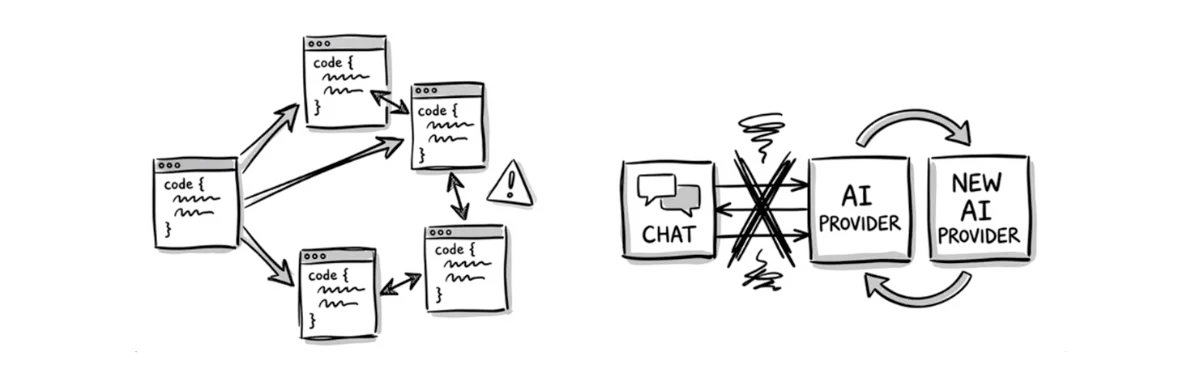
At Coditive, we have seen how these issues can hurt client projects more than once, and the problem is even more visible in the vibe-coding era. That is why we are aiming to add more structure to the Nuxt app we are building. The structure should separate responsibilities more clearly and keep vendor-specific code away from the rest of the application. Nuxt provides tools that can help improve this.
How to add more structure to a Nuxt project?
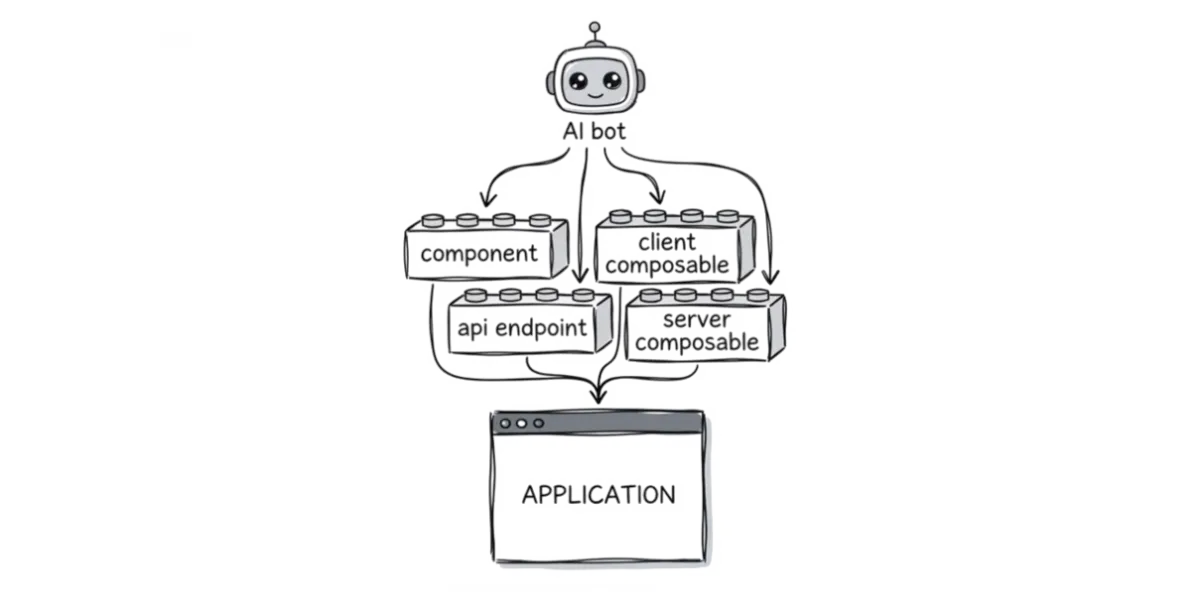
After spending years with the Nuxt ecosystem, we learned that more bulletproof solutions use structural elements beyond components and endpoints to get work done. These elements are separated by specific responsibilities, so we get interface components, client composables, API endpoints, and server composables. Each element has a clear purpose and communicates with the others through contracts.
This structure helps a Nuxt project grow in a controlled way. The user interface stays clean, business rules stay protected on the server, reusable logic has a clear place, and third-party services do not spread across the codebase. Each element has its own place and specific responsibilities that don’t overlap. Here’s an example dir structure:
app/
components/
    AppChat.vue
  composables/
    useResponses.ts
server/
  api/
    responses.post.ts
  composables/
    useAuth.ts
    useOpenAI.ts
types/
  message.ts
Types
Application-level types that describe the shape of the data that the product uses are the first step. These types are a shared agreement across the application, so every part works with the same data shape.
If an external provider like OpenAI uses a different shape for messages, it must translate them into internal types before using them elsewhere. That keeps the rest of the code focused on the product, and makes provider changes easier. When OpenAI must be replaced with Gemini, its implementation must just translate results to the application types. The system can now switch them without impacting other parts.
export type Message = {
  id: string;
  content: string;
  role: "user" | "assistant" | "system";
};
Such a workflow can be achieved with TypeScript, but fortunately, Nuxt supports this. Follow the official instructions to enable this in a Nuxt project, and the first part is done.
Components
Components are responsible for the view layer of the application. They display data, render templates, collect user input, handle user interactions, and call methods from client composables. Components should stay focused on the user interface.
They should use application types and avoid implementing protected business logic, direct database access, permission rules, and vendor-specific code.
<template>
  <div class="app-chat">
    <div v-for="message in messages" :key="message.id">
      {{ message.content }}
    </div>

    <form @submit.prevent="submit">
      <textarea name="message" id="message" v-model="input" />
    </form>
  </div>
</template>

<script setup lang="ts">
import type { Message } from "@@/types";

const { getResponse } = useResponses();

const input = ref<string>("");
const messages = ref<Message[]>([]);

const submit = async () => {
  const result = await getResponse(input.value);

  if (result) {
    messages.value.push(result);
  }
};
</script>

<style scoped lang="scss">
.app-chat {
  position: relative;
}
</style>
Client Composables
Client composables contain reusable client-side logic. They use browser APIs to help components share behavior without duplicating code. They can manage form states, filters, global loading states, and unify calls to application endpoints.
This keeps components cleaner and makes shared behavior easier to reuse across different parts of the application. They ensure the data has a valid structure with types.
import type { Message } from "@@/types";

export default function useResponses() {
  const busy = ref<boolean>(false);

  const getResponse = async (message: string): Promise<Message> => {
    busy.value = true;

    try {
      return await $fetch<Message>("/api/responses", {
        method: "POST",
        body: {
          message,
        },
      });
    } finally {
      busy.value = false;
    }
  };

  const isBusy = computed(() => busy.value);

  return {
    isBusy,
    getResponse,
  };
}
API Endpoints
API endpoints are the server entry points of the application. They receive requests from the client, validate incoming data before business rules run, check permissions, enforce business rules, and decide which server-side actions should run.
They should stay focused on request handling, orchestrating server-side behavior provided by server composables, and ensuring valid data exchange with types.
import { z as zod } from "zod";
import type { Message } from "@@/types";
import useAuth from "~~/server/composables/useAuth";
import useOpenAI from "~~/server/composables/useOpenAI";

export default defineEventHandler(async (event): Promise<Message> => {
  const { requireUser } = useAuth(event);
  const { getResponse } = useOpenAI(event);

  await requireUser();

  const { data, error } = zod
    .object({
      message: zod.string(),
    })
    .safeParse(await readBody(event));

  if (error) {
    throw createError({
      statusCode: 400,
      statusMessage: error.message,
    });
  }

  return await getResponse(data.message);
});
Server Composables
Server composables contain reusable server-side logic. They use Node APIs to handle data access, data transformation, business operations, and communication with other services like the OpenAI client. They help keep API endpoints clean and make server logic easier to test, reuse, and change over time.
import OpenAI from "openai";
import type { H3Event } from "h3";
import type { Message } from "@@/types";

const config = useRuntimeConfig();

const client = new OpenAI({
  apiKey: config.openai.api.key,
});

export default function useOpenAI(event: H3Event) {
  const getResponse = async (message: string): Promise<Message> => {
    const response = await client.responses.create({
      model: "gpt-4o-mini",
      input: message,
    });

    return {
      id: response.id,
      content: response.output[0].content[0].text,
      role: "assistant",
    };
  };

  return {
    getResponse,
  };
}
To understand this, let’s get back to our application to see how the user prompt travels from the interface to the response they need using this structure. We’ll first discuss an incorrect flow, then a correct one.
What’s an example data flow in an application?
The wrong data flow happens when the browser talks directly to vendors. In an AI chat feature, that means the user enters a prompt, the frontend component sends it directly to the OpenAI API from the browser, and the component updates the interface with the response provided by the vendor.
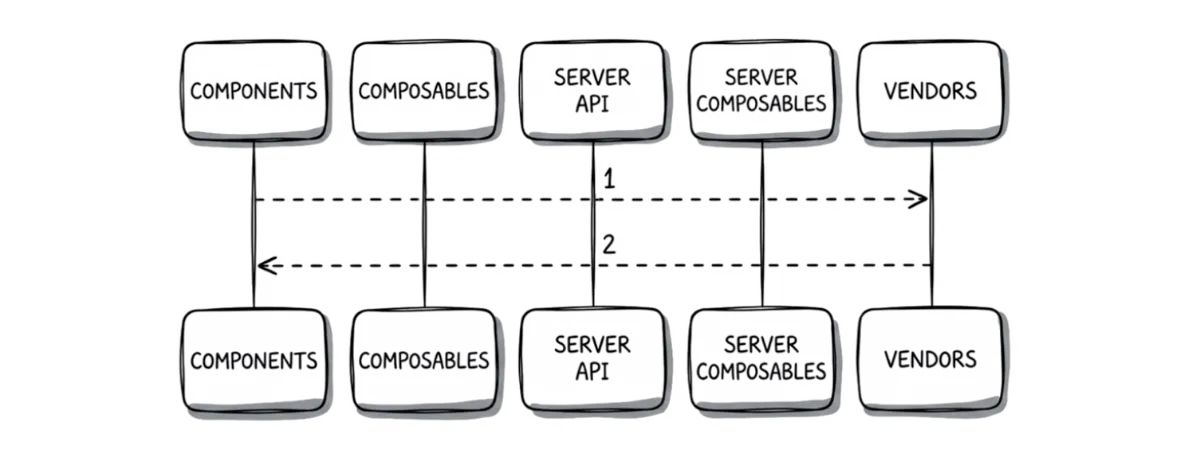
That pattern often appears in vibe-coded applications because it is fast to generate. The agent creates a nice-looking UI, adds the API call where the button click happens, stores the API key somewhere nearby, and the feature just works. For a private demo, that can be acceptable. For a product expected to survive real users, the risk becomes expensive. How should the correct data flow look then?
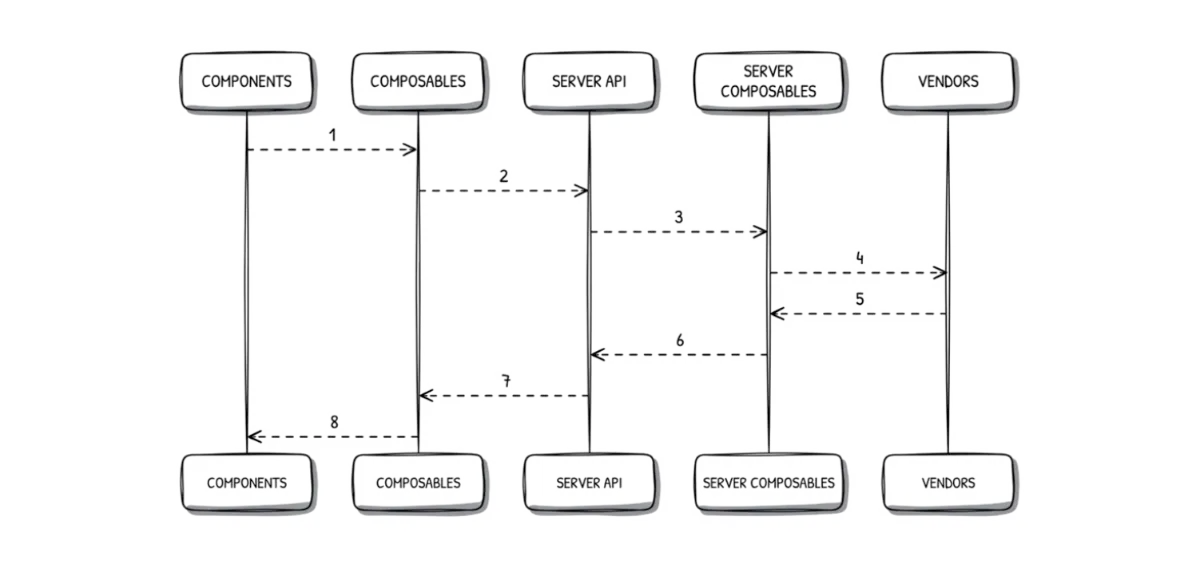
A user types a message in the form, and clicks submit. The Form.vue component updates its local state and calls getResponse from the useResponses client composable. That method sends a POST request to /api/responses endpoint, which checks whether the request is valid. If so, it calls getResponse from the useOpenAI server composable for a result. That method sets up the OpenAI SDK, gets the result, and converts the results to the application types. The data then goes back.
Even though it may feel like extra work, the benefit appears when the product changes. If Gemini replaces OpenAI, the vendor adapter at the server composable changes and nothing more. The chat component doesn’t care. The client composable doesn’t care. The API endpoint can stay the same. When the product must support a similar flow in another component, we use getResponse the method from the client composable, and all other items stay safe. No duplications, less code, and more reusable logic.
How does this help AI agents produce better code?
AI agents often follow the structure already present in the code. If an application has no clear boundaries and everything is in one large file, the generated code usually repeats the same mess. Vendor calls end up in interface components, the same code gets copied into multiple places, and server endpoints become giant files.
A Nuxt architecture described above gives AI agents a cleaner flow. Clear boundaries push the agent to create smaller pieces with specific responsibilities, making the results easier to verify. Developers can review smaller code blocks, their inputs and outputs, and how each piece connects to other modules instead trying to understand 90 000 changes at once, which is the most common way to break an app.
This matters for business teams because AI-generated code still needs trust. Faster code generation has limited value if every pull request requires detective work. A well-defined structure makes review faster, reduces accidental security leaks, and gives the team confidence that changes fit the system. That’s something we all want.
The more structure the app has, the easier it is to build agentic workflows around it. This documentation is useful for every developer, but with agentic workflows, we build a specialized skill to ensure that each feature generated by agents matches this flow. We tested many available skills, but at scale, nothing works better than preparing results tailored to specific cases. If you want to check it or test it in your Nuxt ecosystem, just subscribe to our newsletter, and we’ll share everything when it is ready.
What’s the takeaway?
Such a layered Nuxt structure gives agencies and business owners a better return on development work because it keeps future change cheaper. When the interface, rules validation, and vendor logic are separated, features can be added without rewriting the whole system. That means less time spent on cleanup, fewer regressions in updates, and a codebase that new developers can understand faster. For client work, this makes handoff safer because the structure tells the team where each kind of change belongs.
It also improves delivery quality in ways that matter commercially. Reviews move faster because changes are smaller and easier to verify. Security risks drop because secrets and business rules stay on the server. Vendor changes become less disruptive, which matters when a client wants to switch providers, payment tools, or other services later. For agencies, that means more predictable projects and less debt. For business owners, it means the product can grow without every requirement turning into a rebuild.
If you have a working Nuxt project that requires improvements like this, reach out to us through the contact form. As long-experienced official Nuxt partners, we can help improve your application’s security based on our experience with many Nuxt-based applications created for our clients. Contact us, and Przemek will get back to you.
If you liked this topic, don’t forget to share with anyone who might treat this useful and check out our social profiles on LinkedIn or Instagram. And if you are watching this as a video, give it a thumbs up and subscribe to the channel for more content like this.