How to improve Nuxt security without a big budget?
Learn how to improve Nuxt security without weeks of extra work or large budgets, reduce business risk, and spot practical fixes for your current live Nuxt application.
You know how security work often gets pushed behind features, since nothing is burning yet and the roadmap already feels full, right? And when Nuxt app is already live, it is even easier to assume security part is done. But apps change, users add data, new endpoints appear, and one small gap can later become a client call, or a uncomfortable question: could we have prevented this earlier?
In our case, it took just a day to drastically improve the security of the application we’re building. And in this article, I look at Nuxt application security from a business perspective without making it scary or too technical. I’ll discuss user actions that may hurt the product, how simple protections can lower risk, and how to improve security without weeks of extra work or thousands of dollars reserved for fixes.
This comes from security work we did while building a Nuxt apps for clients. If your Nuxt application is live, growing, or still changing, this should help you check whether a few practical protections are worth adding before small gaps turn into expensive problems.
Be aware that the items discussed here are basic protection methods, and they should never be treated as only one layer of application security. Many risks should also be handled at the server, CDN, or infrastructure level. For production-ready apps, nuxt-security should be treated as baseline or the minimum the application must support.
What bad things can users do in a Nuxt application?
Even when everything depends on the application’s features, we can already see that security aspects are technology-agnostic. No matter what technology you use, you are still at risk of someone harming you in some way. Based on our security case studies, we learned a few of the most common issues.
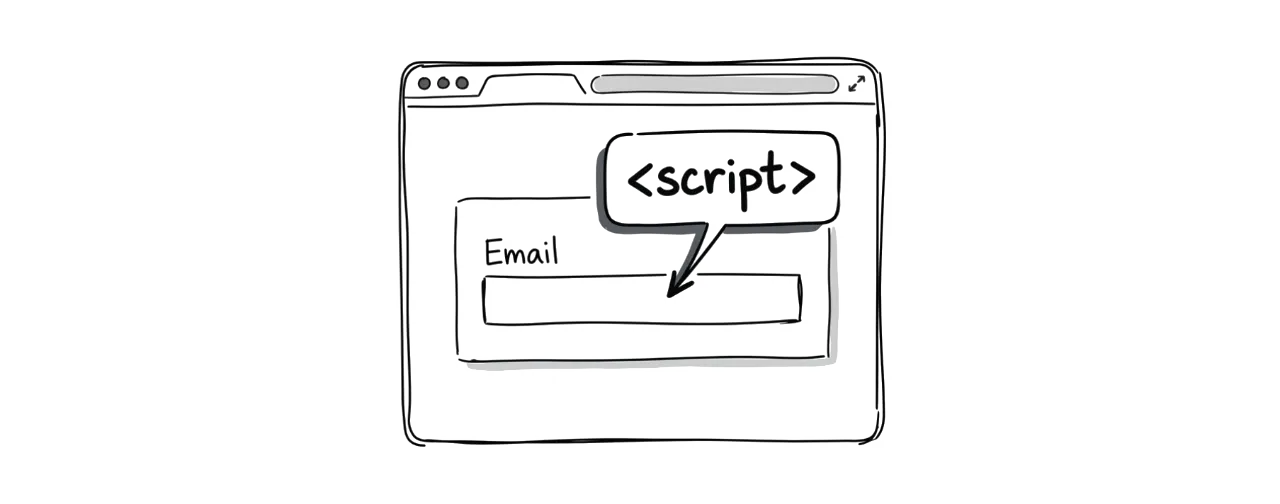
XSS Attacks: A situation where a user sends insecure data through application entry points like form fields. You trust the user to send an email address in the email box, but they can send a <script> tag with malicious JavaScript code there. When stored in the database, it can be rendered in the app and run in the browser without you even knowing, for example, to redirect traffic or steal your data.
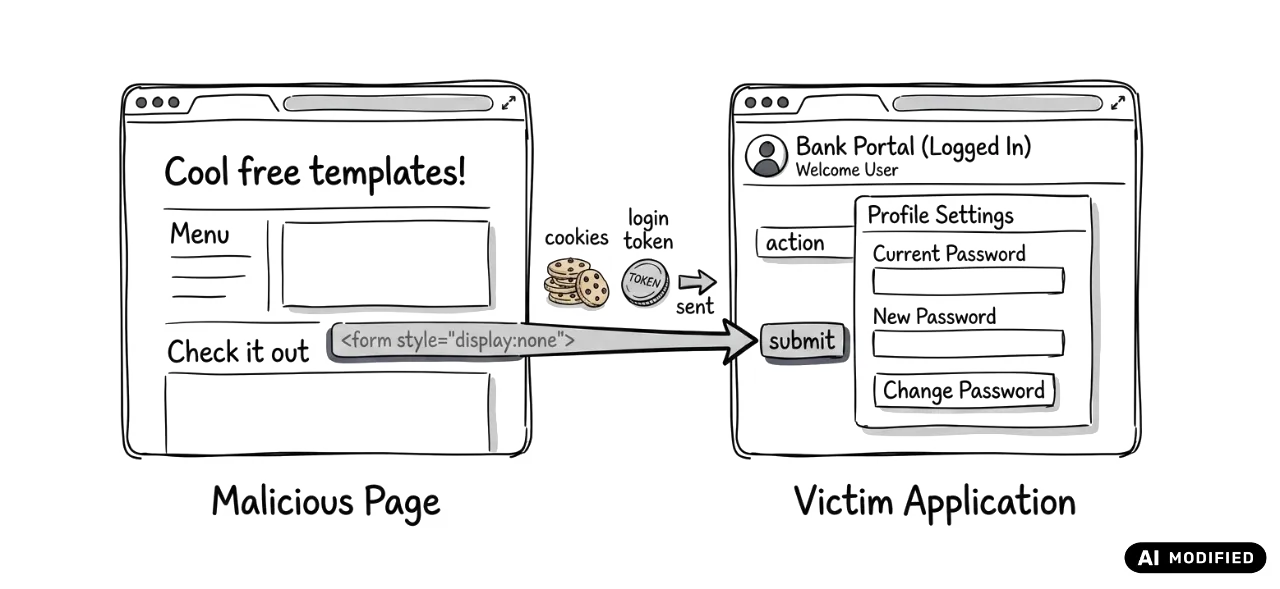
CSRF Attacks: A situation where a logged-in user visits a malicious page that secretly makes a request to your application endpoint to perform actions on behalf of the user, for example, changing the password to gain access to the user’s private data. The browser automatically includes the user’s cookies when making a request, so your app is tricked into thinking that the user made the request.
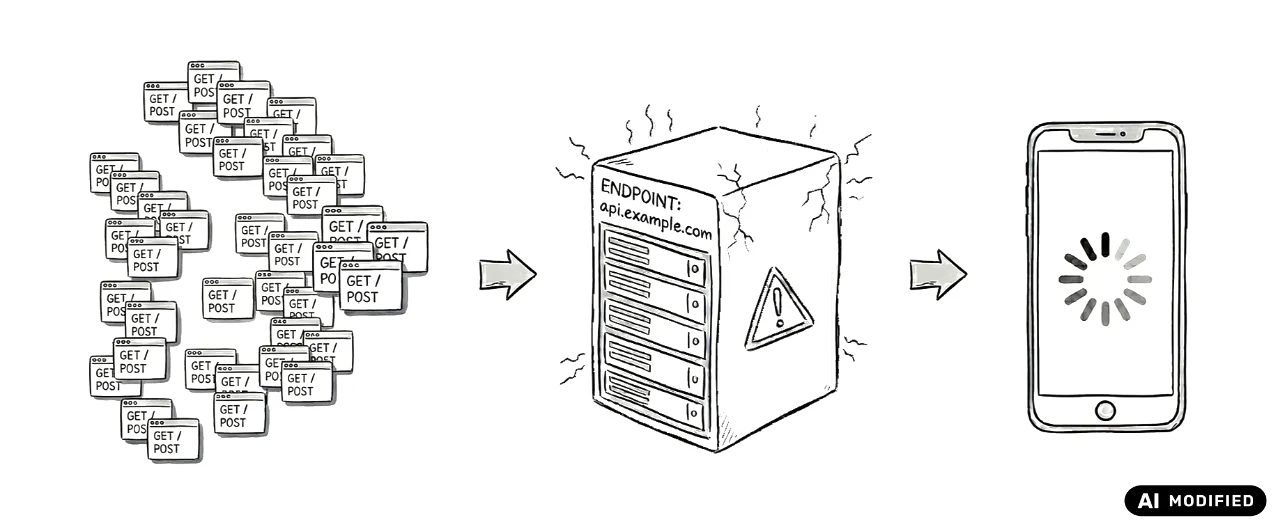
Request Abuse: A situation where an attacker sends an enormous number of requests to an application or specific endpoints, slowing down the whole infrastructure and disrupting all users. In the worst case, this can make the application stop working.
Even when an app feels complete, small pain points can still affect users. In a Nuxt application, these can show up in performance, routing, data handling, or security. By looking at these weak points early, you can reduce risk and improve the overall experience before the next steps. But how does Nuxt help in this area?
How to improve security in the Nuxt ecosystem?
Many application-specific security rules need to be configured based on the project’s features, data mechanisms, or authentication model. Nuxt places responsibility for implementing security rules on developers. To make it easier, the ecosystem provides an additional nuxt-security module, which helps add more security layers to your application. Here are a few key features that we especially love:
-
XSS Attacks: The module by default rejects
GETandPOSTrequests containing suspicious code in the query or body. So anytime a user puts a<script>tag or any other malicious code in a field and tries to send it via API to save in the database, the request will be rejected, and nothing will be stored. -
CSRF Attacks: The module allows adding tokens that are automatically generated while a user visits a page and are required when sending requests to application endpoints. So when another page tries to perform operations on behalf of users, it will be rejected because it has no valid token.
-
Request Abuse: The module limits how many operations each user can perform within a specific time. By default, each customer is allowed to make 150 requests every 5 minutes, so when this limit is exceeded, requests are automatically blocked, limiting the potential application disruptions.
-
Content Security Policy: A module prevents insecure or unwanted content from loading on a page. It defines which sources can be loaded, for example, in
img,script,style,iframe, so any source that doesn’t match the rules - like the script hosted on a different domain - is blocked by the browser.
Those are just a few protection methods that can help your Nuxt application. The module includes many more options enabled by default, such as managing CORS settings, allowed methods, referrer policy, and even securing the application with basic auth, which is especially useful for staging environments. We strongly encourage you to review all its features because it is inexpensive and effective.
How do we deal with security in a real Nuxt project?
We know the common security threats and how nuxt-security can help, let’s focus on a case study that shows how spending only a day helped us ship safer software.
A few months ago, we started building an app for an AI-supported thinking process and a place to create text content. The core mechanisms were ones we should not trust by default. A user can chat with AI agents about anything, so we cannot assume the results provided there are safe. On the other hand, the user can write text content and store it as Markdown, so we also cannot assume the user will type only safe content. Of course, we couldn’t review everything by hand, so the process had to be automated.
How do we improve handling insecure content?
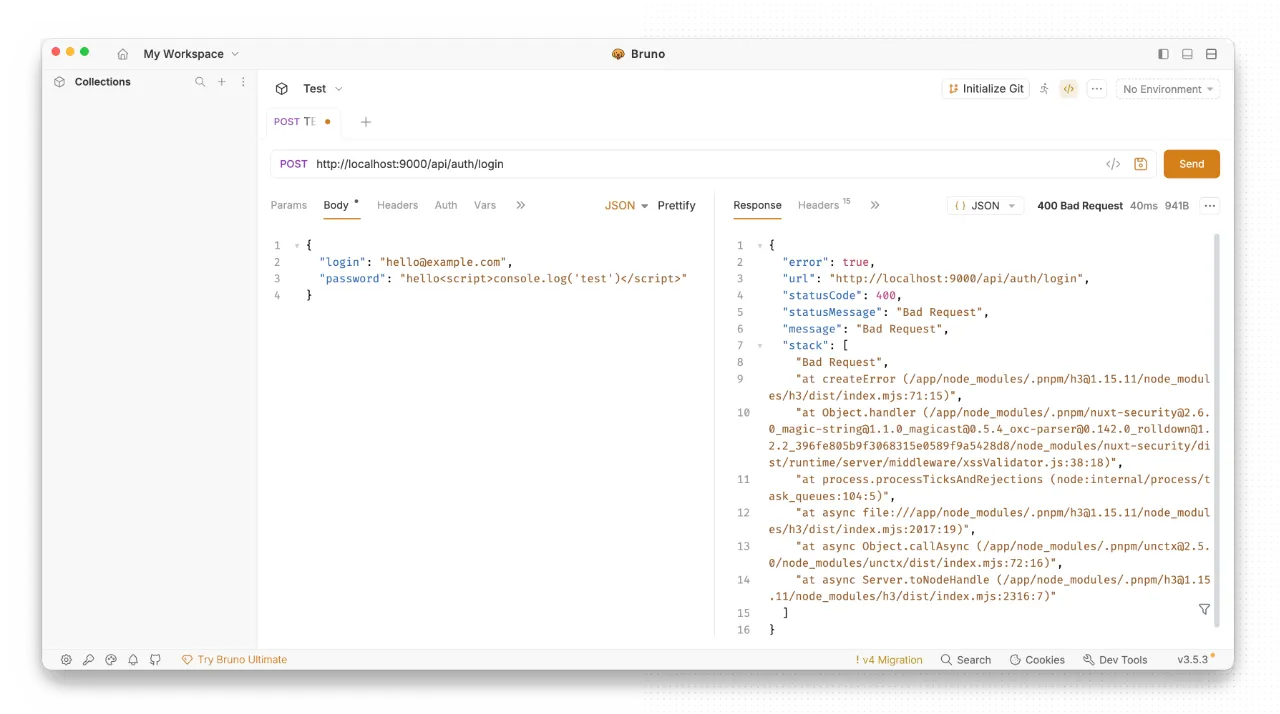
Installing Nuxt Security by default adds more protection against users sending unsafe elements to the database. You install the module, and the endpoints reject anything that includes suspicious content. So, when a user tried to send a <script> tag in the email field of the user configuration page, it was blocked by default. That’s an easy win, but in our case, it required a little more attention.
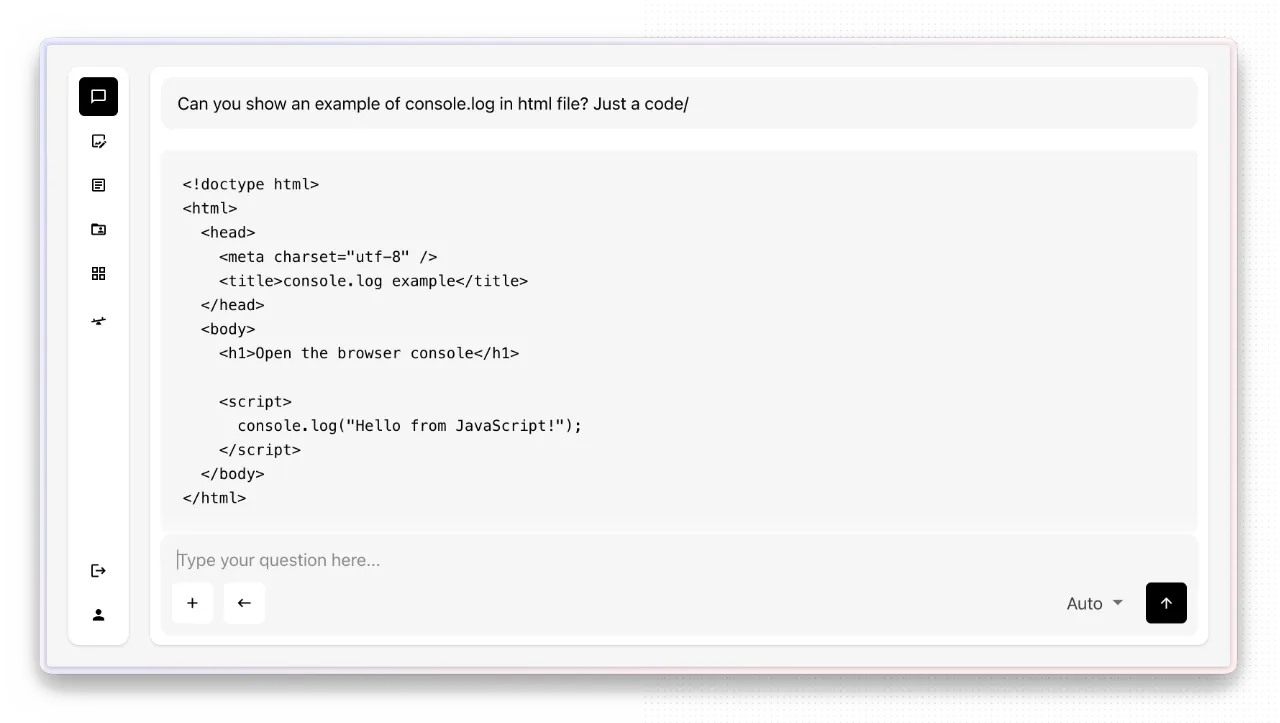
It solved the key issues, but it also made the app unusable in its specific scope. Since the user has flexibility in what is being discussed with the agents, they can ask for an example of JavaScript code that does something in good faith. However, with module enabled, that is forbidden. So when the model responded with content that included <script> as an example, it was rejected by the system, and the conversation was not stored. The same situation occurred in editor. When the user stored code block in good faith, the system did not allow them to save the content, so it looked like a bad thing.
We solved this another way. We disabled the XSS validator for a few endpoints that needed to save legitimate code examples, but this alone was not enough. Content produced by those endpoints is rendered in the interface as HTML, so we don’t want to run unsafe content in the browser. To fill this gap, we used DOMPurify library to make the untrusted content safe before rendering, which is an official OWASP guidance. As a result, any content that came from untrusted paths is sanitized before rendering, so the app renders results while removing or neutralizing unsafe tags and attributes.
How do we limit what the browser is allowed to load?
As another layer, we configured the CSP policy so the browser only loads content from trusted sources. For example, we configured image tags to allow only approved sources, and items outside that policy were blocked. We also restricted scripts tags, so code hosted outside the application could not run in the user’s browser.
This protection is enforced by the browser. Even if unsafe content reaches the page, CSP can reduce what it is able to load or execute by limiting allowed sources for scripts, images, styles, frames, and others. This made the stack safer when rendering user-created content and AI-generated responses.
How do we block untrusted actions from being fired?
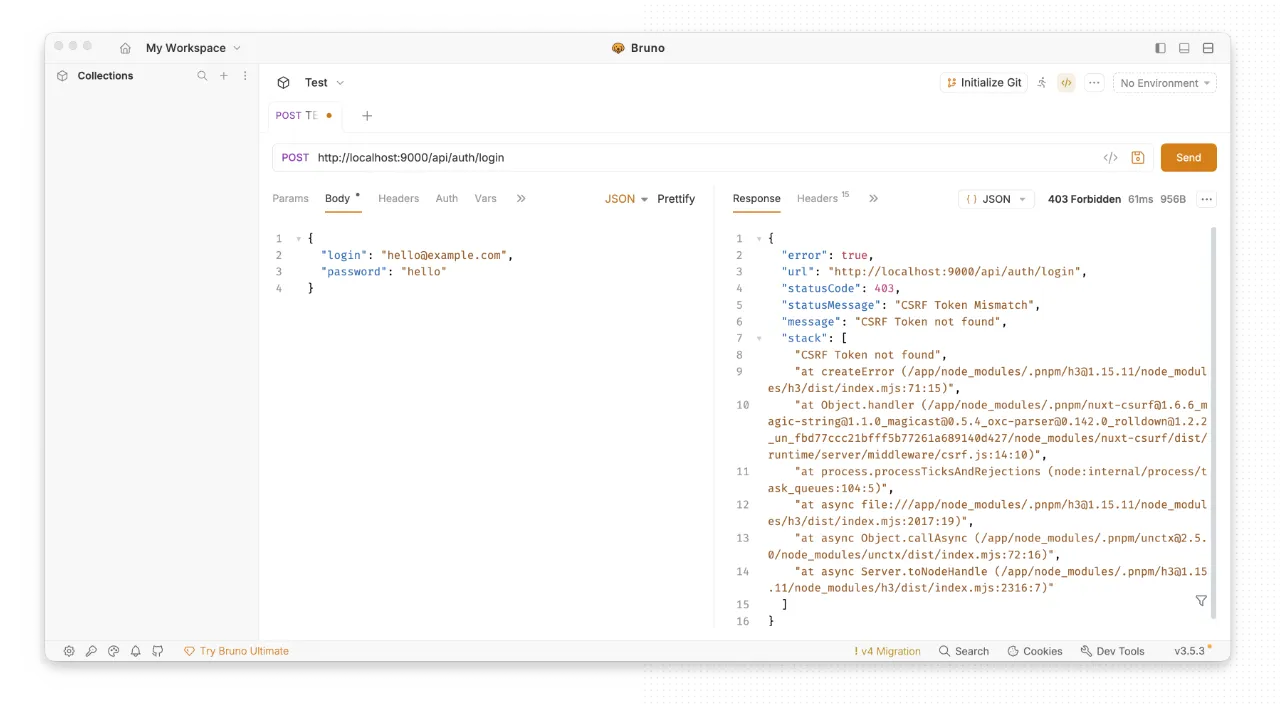
CSRF mechanisms in nuxt-security are disabled by default, but since the app has a REST API, we wanted to have them. We made changes that started to verify tokens in state-changing methods like POST, PUT or PATCH. When someone tries to call endpoints without a valid token, the request is rejected.
We configured CORS mechanisms as well to have control over which websites can read responses from the application in the browser. This helps control browser-based access, which is good, but of course, it does not replace authorization layer. That’s a kind of layer that’s good to have, but does not replace correct access control.
How do we limit harmful traffic from one client?
We configured the application to accept up to 150 requests per 5 minutes from a single client. Initially, we had higher limits, but we decided to start with the smaller values. It feels better to allow fewer requests and then increase limits when real usage requires it, rather than allowing too much.
This protection is useful against request abuse, brute-force attempts, and small-scale overload from one client. If someone calls an endpoint too often, the application can reject additional requests instead of continuing to process every action.
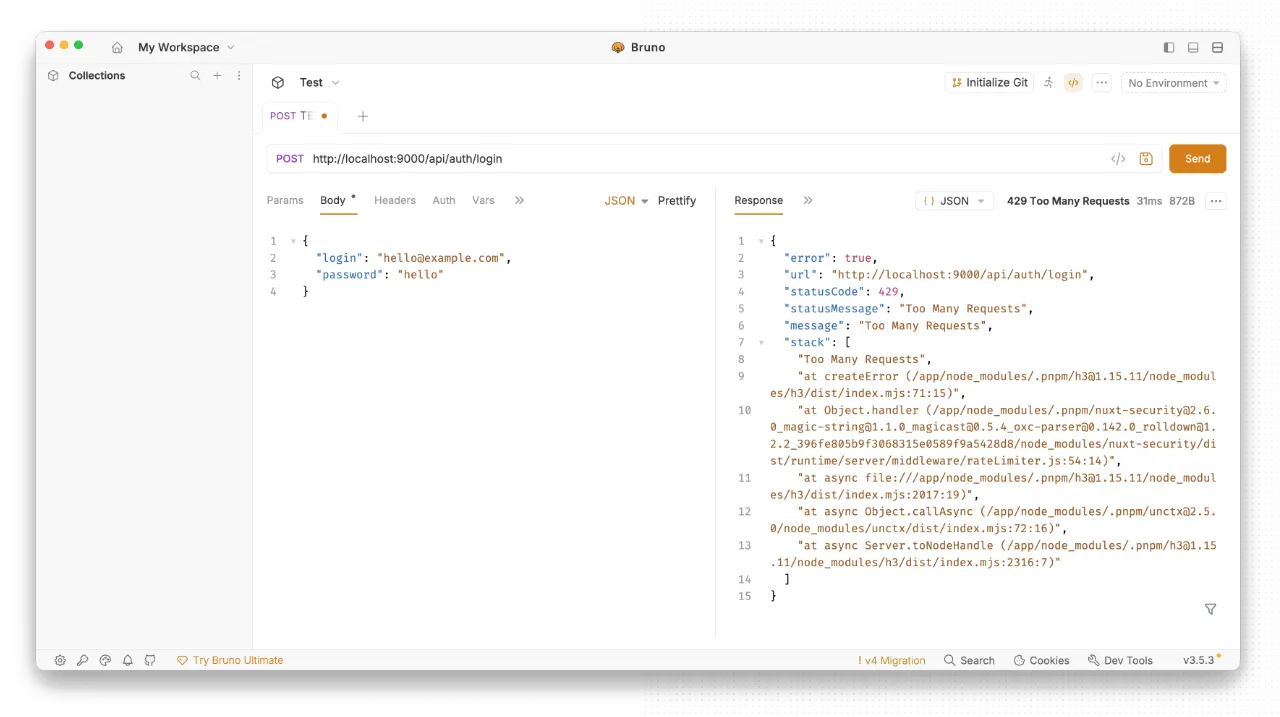
This does not replace infrastructure-level protection, but it gives a useful layer of protection against request abuse. For production apps, rate limiting should still be combined with server, CDN, or hosting-level protections that can absorb and filter larger traffic spikes before they reach the Nuxt application.
Are there more protection methods worth using?
Nuxt Security module provides many more features that can improve your application with one click, and it is worth knowing them all. We like the ability to hide headers that reveal server infrastructure, manage headers that configure the referrer policy, or manage allowed HTTP methods and many others.
Most of them are enabled by default, so installing the module is enough. Still, we recommend reviewing all of them because your application may require different settings. If you are looking for something like this in your system but are not sure where to start, reach out to us through the contact form. We will help you.
What can you gain when using Nuxt Security?
Even though these are only basic methods and should not be treated as the first and only layer of security, it’s better to have them than not. Especially when that’s so cheap.
By combining application-level checks with nuxt-security and infrastructure protections, we reduce the chance that unsafe input reaches sensitive parts of the system, make attacks harder to execute, limit the damage if something slips through, and improve the safety of the data that users store in the application.
It took us about a day to add mechanisms that the application would have been much weaker without. One day of work for such value was a very small price to pay, and we have taken it into account in every project we have made. And we want to recommend that you think about this too.
I hope this gave you a clear idea of how small security improvements can make a real difference in a Nuxt application without needing a huge budget or weeks of extra work.
If you have a working Nuxt project that requires attention to security, reach out to us through the contact form. As long-experienced official Nuxt partners, we can help improve your application’s security based on our experience with many Nuxt-based applications created for our clients. Contact us, and Przemek will get back to you.
Check out our social profiles on LinkedIn or Instagram. And if you are watching this as a video, give it a thumbs up and subscribe to the channel for more content like this.