Strapi v4 to v5 migration - why it's worth it and how to do it right
A real Strapi v4 to v5 migration case study: the built-in MCP server, independent Draft & Publish, plugin migration strategies, and the Cloud Run pitfall.
“This is going to save me so much time.”
That was the reaction from our client’s content team, minutes after seeing what their freshly migrated CMS could do. We had just moved the platform behind their marketing site - close to 1,000 content pages - from Strapi 4.26 to Strapi 5.49, and the feature that triggered that quote (more on it below) wasn’t even in the original scope.
This post is a case study with practical tips, and an honest answer to the question every team still on v4 is quietly asking: is the upgrade worth the trouble? Short version: yes, and by a wider margin than we expected. Here’s the long version.
The project: 1,000 pages and zero appetite for downtime
The setup is one we see a lot. A SaaS company whose marketing site outgrew “just a website” years ago: Strapi runs as a headless CMS on Google Cloud, and a statically generated Nuxt frontend on Vercel pulls everything from Strapi’s API at build time. Blog posts, landing pages, report templates, integration pages, pricing - nearly 1,000 pages assembled from dynamic zones with dozens of section components.
The detail that matters most: editors work in this admin panel every single day. A CMS migration here isn’t a dependency bump. It’s surgery on a tool a whole content team depends on, with the site serving traffic the entire time.
Why we finally pulled the trigger
Funny thing: this migration was on the roadmap a year earlier. Other priorities on the client’s side kept winning (as they should - a CMS upgrade rarely beats revenue work in a planning meeting), so it got parked. Back then we roughly estimated the job at 40-60 hours. Keep that number in mind.
What un-parked it was the security picture. A dependency audit of the v4 project had flagged 382 vulnerabilities, 18 of them critical - not a Strapi problem as such, just what happens to any Node project parked on an old major version while fixes ship elsewhere. The site also ran on Node 18, which stopped receiving security patches in April 2025. An unsupported runtime under a CMS with a report like that stops being technical debt and becomes a liability with a date on it.
The migration answered the whole list at once. Strapi 4.26 became Strapi 5.49, Node 18 became Node 22, the deprecated mysql driver became mysql2, and the whole dependency tree got years younger in one move.
What the client actually gained
Security was the reason to start, but it’s the least interesting thing the client got. Strapi 5 shipped editor-facing features that changed how the site gets published day to day - and on a content operation this size, editor hours are the real currency.
Draft & Publish that finally behaves
Strapi v4 technically had Draft & Publish, but with a catch that anyone who’s run a static site on top of it knows too well: once an entry was published, saving new edits meant those edits were live in the API. On a statically generated site, that’s a trap. An editor starts reworking a published page, a deploy kicks off for something unrelated, and the half-finished rewrite ships to production.
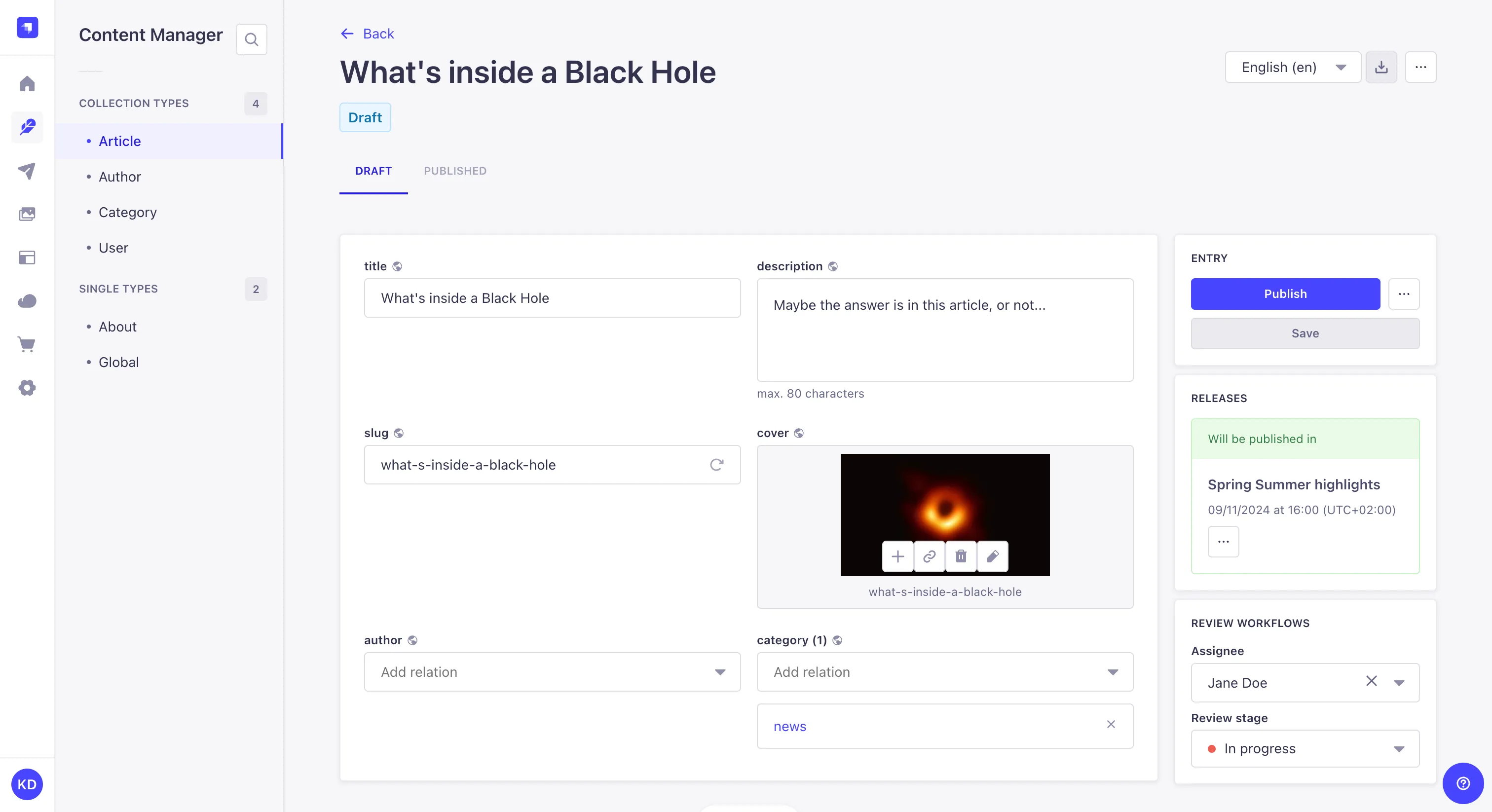
In v5, Strapi re-engineered Draft & Publish so the draft and the published version are truly independent. The admin shows separate tabs for each: editors polish the next version in the draft tab for as long as they need, while the published tab keeps serving exactly what was approved. Rebuild the site twenty times in between - nothing leaks. For a content team of several people shipping daily, this single feature removed a whole category of “who published that?” incidents.
Preview, built in
That pairs with the new Preview feature: editors open a live preview of the draft, rendered by the actual frontend, directly from the Strapi panel. In v4 we relied on a third-party preview-button plugin to approximate this. In v5 we deleted the plugin, wrote a small handler that maps each content type to its frontend URL, and got a first-party preview with no plugin left to maintain.
The built-in MCP server: the sleeper hit
Here’s the feature nobody put in the migration ticket and everyone now talks about. Since version 5.47.0, Strapi ships a built-in MCP server, so you no longer need a third-party plugin for it. Turning it on is this:
// config/server.ts
export default ({ env }) => ({
  // ...
  mcp: {
    enabled: true,
  },
});
That’s the whole setup. From there, an AI assistant like Claude can connect to the CMS and work with content directly: find entries, edit them, update fields, all with the same permissions model as the admin.
Why does that matter on this project? Because it has almost 1,000 content pages. Every “let’s update the CTA wording across all template pages” or “fix this recurring typo” task used to mean either a custom script or an afternoon of clicking. Now it’s a conversation with an assistant that has hands: rewrite intros in bulk, fill in missing SEO descriptions, find every post that still mentions a renamed feature and fix them all in one pass.

Remember the quote this post opened with? It was about this exact feature. For a content team maintaining nearly 1,000 pages, batch editing with AI assistance hands whole workdays back every month.
If you’re on Strapi 5.47 or newer, this is sitting in your config waiting to be enabled. We’d argue it alone justifies staying current.
CKEditor: markdown paste is a small feature with a big fanbase
The rich-text setup also leveled up. The official CKEditor plugin for Strapi 5 is a proper CKEditor 5 integration with a real configuration API, and it let us enable PasteFromMarkdownExperimental. Editors paste markdown - from notes, docs, or an AI assistant - straight into the editor and it lands as clean formatted content. The content team fell in love with this one fast, and honestly, so did we.

Content History: on the wishlist
One more feature worth mentioning: Content History, which lets editors browse and restore previous versions of a document. It’s genuinely useful for a team this size - the catch is that it requires Strapi’s paid Growth plan, so it’s a budget decision rather than a config flag. We’re considering it with the client. If your editorial workflow involves frequent rewrites, factor it into the upgrade math.
Back on the release train
There’s a compounding gain hiding behind all of these features: being current again. On v4, the project was frozen - every new capability Strapi shipped belonged to a major version it couldn’t reach. During the migration itself we rode ordinary version bumps from 5.46 to 5.49, and the MCP server shows why that matters: it landed in 5.47.0, a minor release, and cost us two lines of config to adopt. That’s the deal for staying current: new features arrive as routine maintenance, not as the next migration project.
The hard parts (read this before you start)
Now for the part most migration write-ups skip. Strapi 5 is a major version with real breaking changes, and two areas deserve your respect: plugins and deployment.
Plugins: assume half of them won’t make it
Our v4 package.json carried seven community plugins. After the migration, most of them were gone - and that’s the good news. Every plugin resolved into one of three strategies:
Delete it, because core does it now. The preview-button plugin fell to the native Preview feature. The transformer plugin (which flattened v4’s nested data.attributes responses) became pointless, because v5’s API returns flat documents by default. Watching a dependency disappear because the product absorbed it is the best possible outcome.
Replace it with a v5-ready version. The CKEditor plugin jumped from version 1.x to 7.x, which meant rewriting its configuration in the new Strapi 5 plugin format rather than copy-pasting the old config over. Deep population moved to a v5-compatible fork, plus a small compatibility middleware we wrote so existing frontend queries kept working with the new query format.
Rebuild it yourself. The slugify plugin had no v5 path, so we replaced it with about 130 lines of our own document lifecycle code that does exactly what the site needs and nothing more. The client’s internal LLMs admin plugin needed a proper port to the Strapi 5 admin API. And the old Vercel deploy plugin (the “publish and trigger a rebuild” button editors rely on) wasn’t v5-compatible at all, so we rebuilt the part we actually used as a tiny local plugin.
A couple of stragglers remain on the list - an internal plugin for generating image alt descriptions still needs its v5 port, and there’s the usual sweep of deprecation warnings to clean up. That’s normal. Budget for the long tail.
The tip hiding in all of this: before you migrate anything, audit every plugin and ask “does v5 make this obsolete?” first, “is there a v5 version?” second, and “how small would our own version be?” third. We shrank the plugin surface by more than half, and every deleted plugin is a future upgrade problem that no longer exists.
The populate trap: v5 only returns what you ask for
One breaking change deserves its own warning label. Strapi 5 is stricter about population: for dynamic zones, the API returns only the components you explicitly list in the query. Anything missing from that allowlist isn’t an error - it’s silently absent from the response.
On a site assembled from dozens of section components, “silently absent” means sections vanishing from live pages with no error anywhere. That’s exactly what bit us: after the cutover, a few template pages rendered without some of their sections, and an author page lost its SEO metadata, all because those components weren’t in the populate allowlist.
We fixed the queries, then made sure this can never happen silently again: a small script now runs in the frontend build, compares every dynamic-zone component actually used by live content against the populate allowlist, and fails the build on any gap. A blank section is now a loud red build instead of a support ticket three weeks later. If you take one engineering tip from this post, take this one.
The environment gotcha: local and server play by different rules
The biggest thing to be aware of when comparing local and server environments: they don’t just differ in horsepower, they play by different rules. A hosting platform adds startup timeouts, health probes, and network latency between services, and each of those can change how a well-tested step behaves. Plan the migration around your platform’s rules, not just Strapi’s changelog.
The step where this matters most is Strapi 5’s one-time database migration, which runs on first boot and restructures content for the new Draft & Publish system. It executes as a long series of small queries, so its runtime depends on the latency between the application and the database, not on data size - negligible when everything sits on one machine, very real once they’re separate services. Our stack runs on Google Cloud, and with Cloud Run talking to Cloud SQL every query pays a network round trip. The total ran long past Cloud Run’s startup probe timeout.

When that happens, the platform simply restarts the app - and the migration starts over on a half-finished database. We hit exactly this while deploying to our staging environment on Cloud Run, against a copy of the production database. That’s precisely what staging is for: the cost was a database restore and a reworked deploy, and production never saw any of it. So the first practical tip: run the full migration deploy on staging against production-shaped data, with a backup and restore path ready - surprises found there are to-do items, not incidents.
The real fix was architectural: stop squeezing a long one-time migration into a serving container’s startup window. We moved it into a Cloud Run Job - a separate task that boots Strapi, runs the migration to completion, and exits. A Job opens no port and has no startup probe, so nothing interrupts it, and we disabled retries so it could never run twice on the same data. The deploy pipeline became: build the v5 image, run the migration job, and only if it succeeds, deploy the service. If the job fails, production keeps serving v4 untouched. With that in place, the job does its slow work in the background and the new service comes up in seconds against an already-migrated database.
Two habits made the production cutover uneventful: the staging rehearsal above, and keeping every step in code - the job definition, the pipeline order, the rollback - so the whole run was reviewable and repeatable.
Estimated at 40-60 hours. Done in 20.
Remember the original estimate? When this migration was scoped a year earlier, we put it at 40-60 hours - a fair number for a CMS this customized, based on how these projects used to go.
The actual figure: about 20 hours. That includes the plugin work, the deployment saga, manual testing, post-launch polishing, and the new toys like the MCP server that weren’t even in the original scope.
The difference is AI-assisted development done properly. We ran the migration with Claude Code and Anthropic’s newest models, and the mechanical majority of the work - porting plugin configs, rewriting queries for the new API format, drafting the migration job, hunting the populate gaps - compressed enormously. The judgment calls stayed human: which plugins to kill, when to roll back, what “done” means for a production content platform. That mix is why the estimate fell by two-thirds while the scope actually grew.
There’s a client-facing lesson in that too: migrations you postponed because the quote stung a year ago are worth re-quoting. The math has changed.
So, is Strapi v4 to v5 worth it?
Emphatically yes, from every direction at once. The editors got independent drafts, in-panel previews, markdown paste, and an AI assistant wired straight into the CMS. The engineers got a smaller plugin surface, a flat sane API, and a deploy pipeline that can’t corrupt the database anymore. The business got off an unsupported runtime and onto a stack that receives security fixes again - and the invoice came in at a third of the original estimate.
If you’re planning your own move, our field notes in three lines: triage every plugin before you start (delete, replace, rebuild - in that order), guard against v5’s silent populate behavior with an automated check, and never run the v4-to-v5 database migration inside a serving container’s startup window - give it a job of its own and rehearse on a copy of production.
And if you’d rather have someone who has already stepped on these rakes handle it: we build and migrate Node.js and Strapi backends for a living, usually with a Nuxt or Vue frontend on top. Tell us about your setup and we’ll give you an honest estimate - it’s probably lower than you think.