Keeping delivery stable with automated code quality checks
Learn how automated code quality checks protect budgets, improve maintainability, and reduce release risk in Nuxt, WordPress, and WooCommerce projects.
Every new feature, integration, plugin, or campaign page adds business value - but it also adds technical complexity. If that complexity is not managed early, it can lead to preventable defects, slower delivery, higher maintenance costs, and avoidable release risk.
That is why automated code quality checks are part of our Nuxt, WordPress, and WooCommerce delivery process. They help us detect common issues before they affect timelines, budgets, or customer experience. For our clients, the value is practical: cleaner delivery, faster developer feedback, fewer avoidable defects, and a codebase that remains easier to maintain as the project grows.
Why does early issue detection matter?
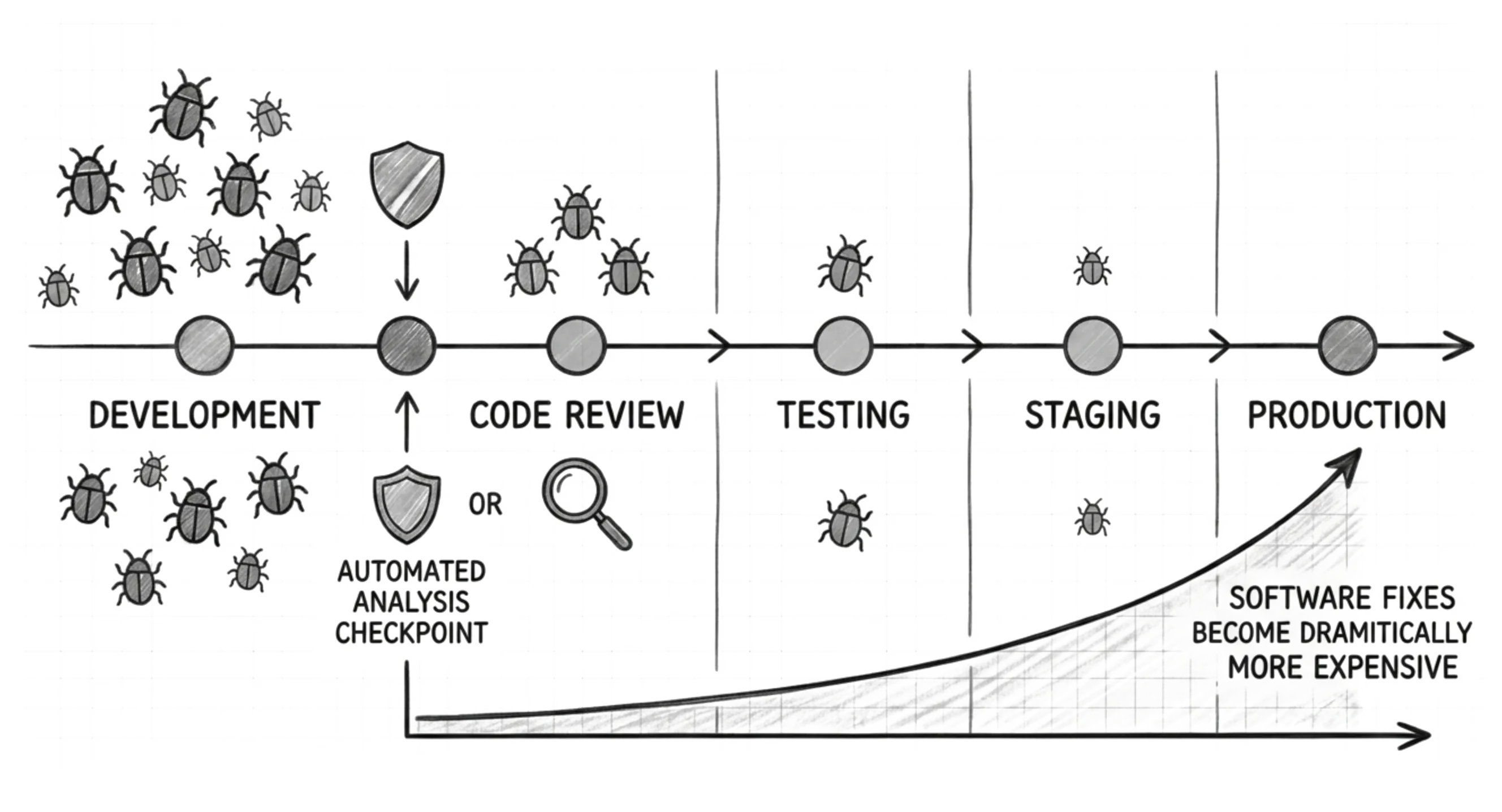
The earlier a problem is found, the easier it usually is to fix. An issue identified while a developer is still working on a feature can often be corrected quickly. The same issue discovered later during testing, or by real users, can affect budgets, operations, and customer experience.
Code review and testing remain essential, but they should not be the only line of defense. In active projects, especially those with multiple developers, frequent changes, or ongoing development, some issues are easy to overlook when review depends only on manual attention.
That is why we integrate automated code analysis into our workflow from day one. It adds a quality checkpoint before code moves further through the delivery process. This reduces avoidable rework and helps the team keep delivery predictable.
How do we protect quality from day one?
Our verification process starts before a feature reaches the shared project repository that stores the code. Each change is checked against quality rules in the developer’s local environment. If something does not meet the required standard, it must be corrected before the wider team depends on it. The developer can’t simply push the code that breaks rules to the shared repository.
After the code is submitted, automated checks at the repository level provide a second layer of verification. Before a feature is marked as ready for review and then deployed, the workflow checks its quality level and clearly reports the results. This helps the team determine whether the feature is ready for review and deployment, while reducing time spent on predictable issues.
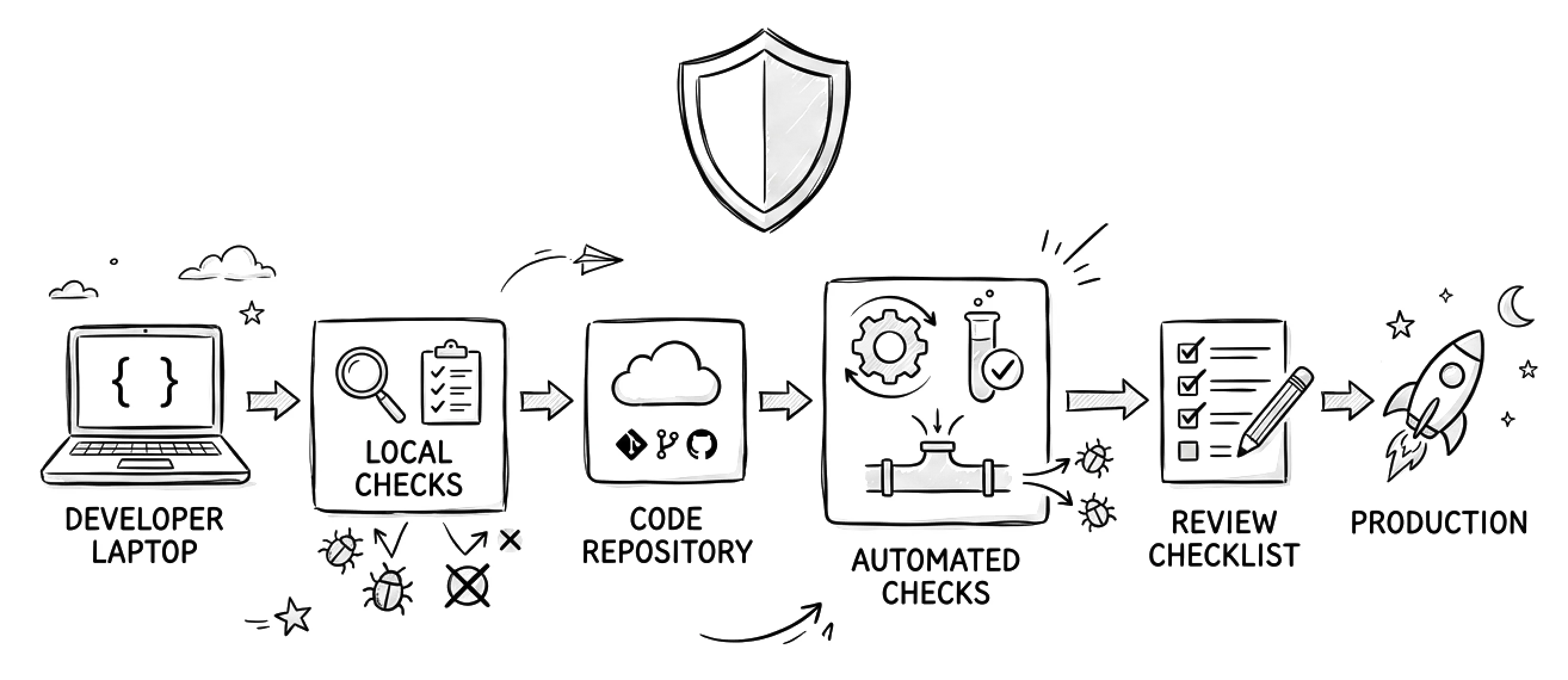
For clients, this means fewer delays, better budget control, and a more reliable foundation for future development.
What tools do we use to protect quality?
Quality standards are not optional in our delivery process - they are built into it. Every language and framework in our stack runs through a linter and formatter before a human reviews the code. Reviewers spend their attention on the logic, not on where the semicolons go. The distinction between those tool types is simple.
-
Formatters ensure consistent code style across the codebase. They keep code easy to read and unified, regardless of how many developers work on the project.
-
Linters check quality and logic issues, such as unused code, incorrect function usage, security risks, performance issues, and bugs that can affect business logic.
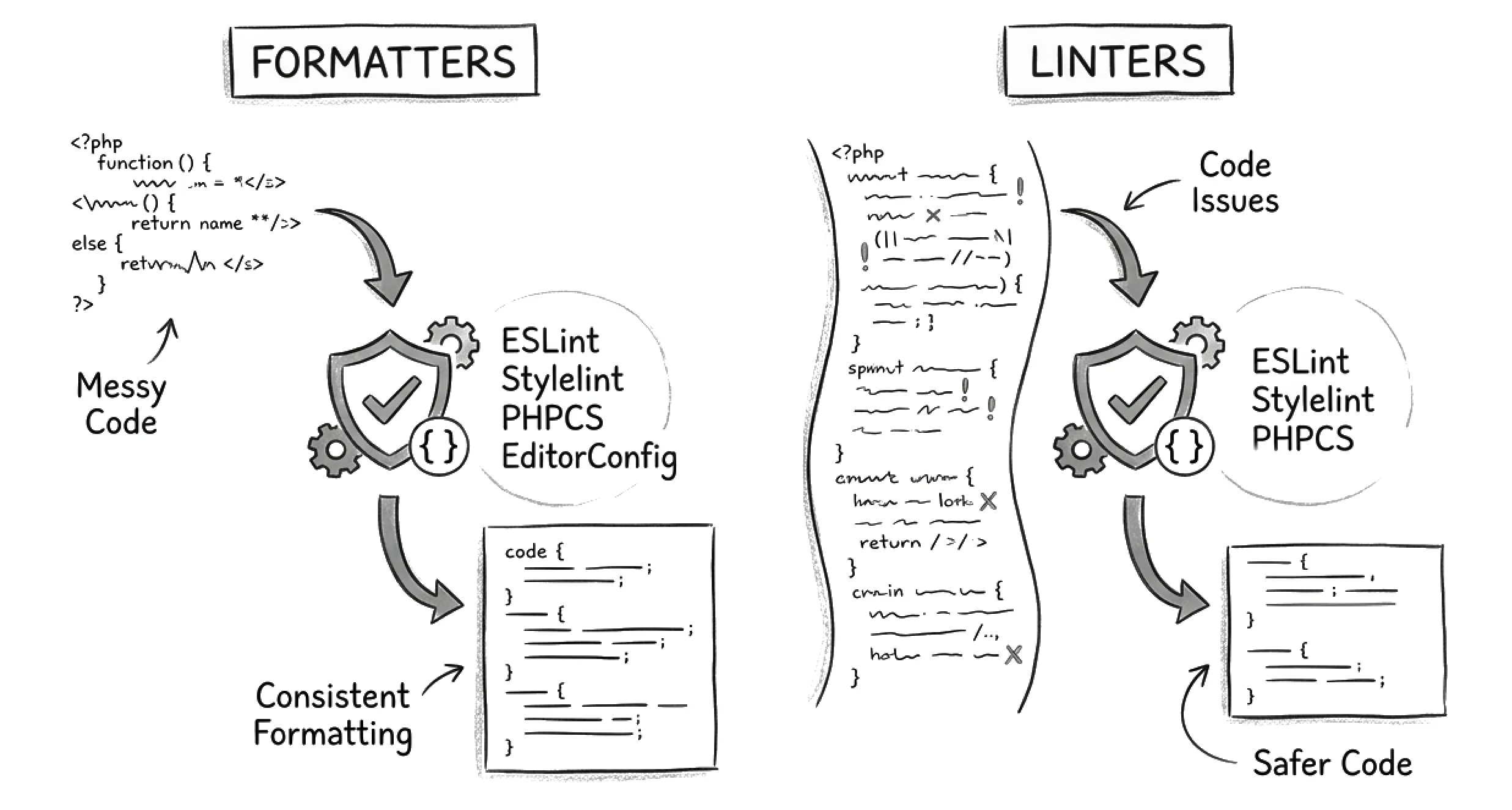
Each project can have its own stack, but with more than 15 years of development experience, we have defined quality standards that work well with the most popular technologies: ESLint for JavaScript and TypeScript, Stylelint for styles, and PHPStan or PHPCS for PHP code. Here are a few examples of how these tools help.
PHPStan
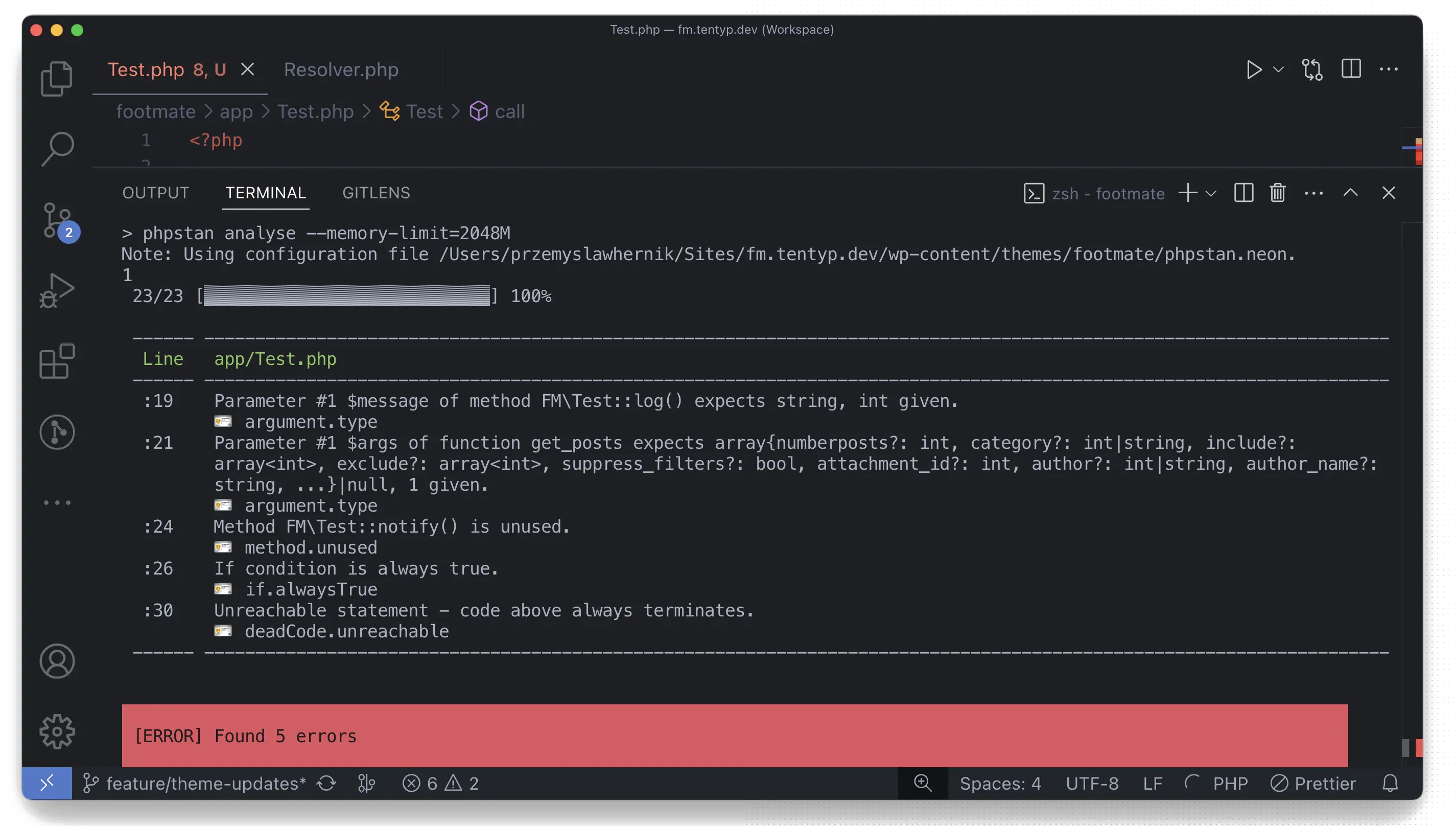
PHP is dynamically typed, so a wrong argument type or a call to a method that does not exist can go unnoticed until runtime. In the worst case, the issue appears in front of a user. PHPStan closes that gap by analyzing the codebase without running it. It catches type mismatches, dead code, impossible conditions, and null-safety issues early in the development process. For example, if an incorrect value is passed to a function, PHPStan can alert the developer before the code is executed.
PHP_CodeSniffer
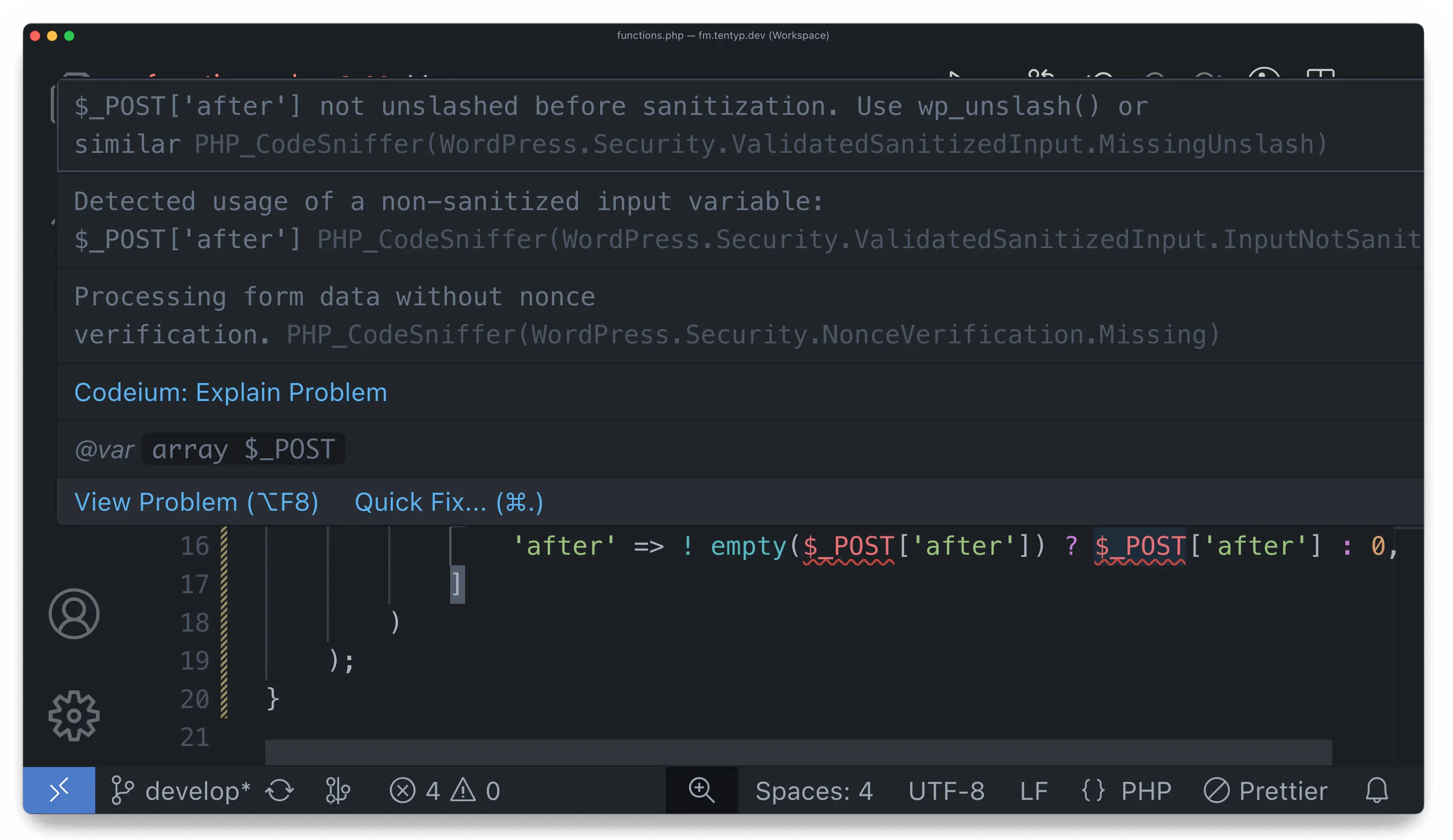
Where PHPStan focuses on logic issues, PHP_CodeSniffer, also known as PHPCS, helps keep the codebase consistent, secure, and aligned with agreed standards. In WordPress and WooCommerce work, PHPCS is especially useful for detecting issues such as unescaped output, unsanitized input, and missing nonces. These checks help prevent security gaps that could become business problems after release.
ESLint
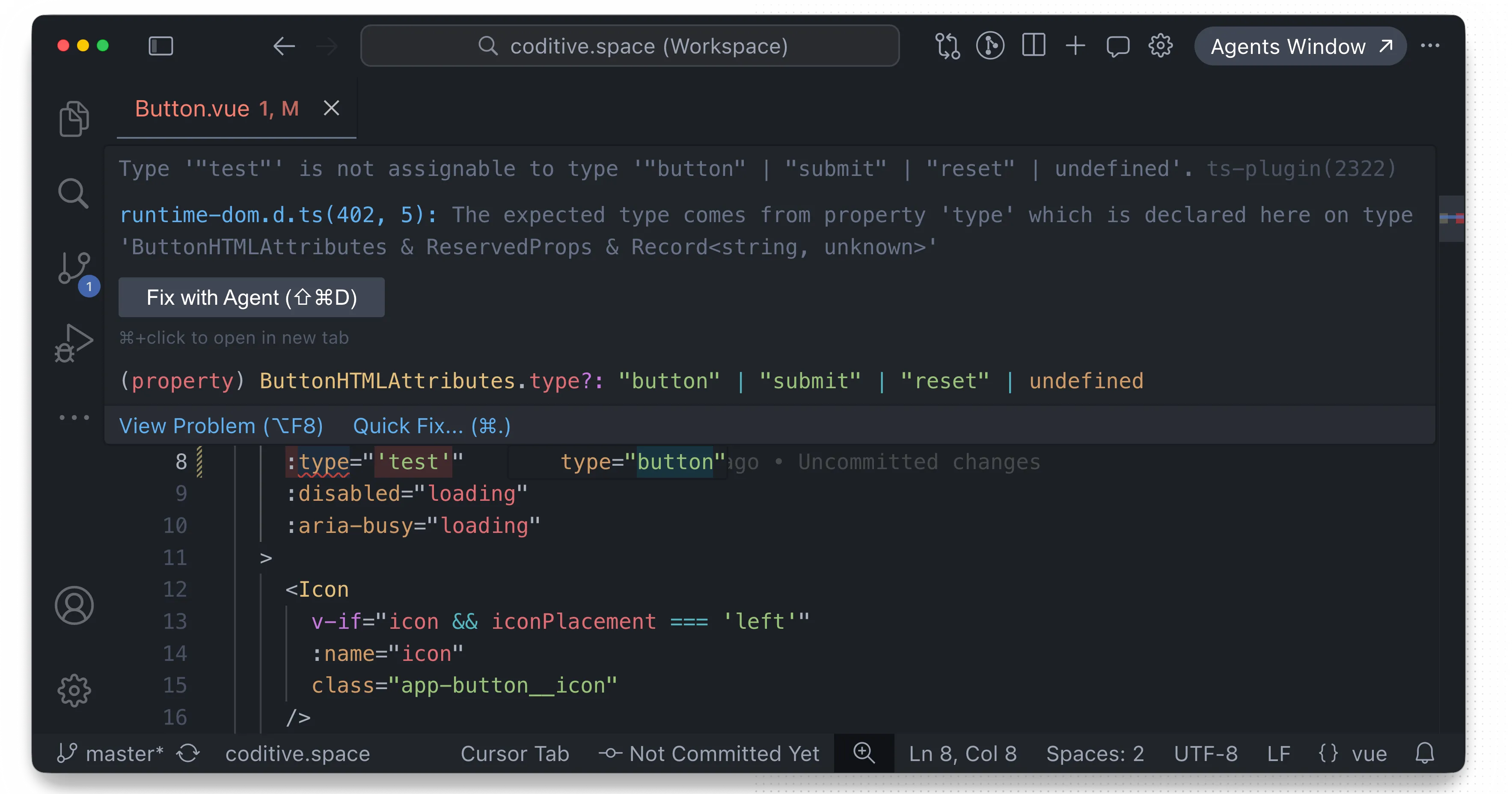
In Nuxt projects that use TypeScript, ESLint helps teams maintain predictable frontend code as the project grows. This is especially valuable when multiple developers build reusable components and share work across the same codebase. ESLint can warn developers when values are used incorrectly, when rules are broken, or when code patterns may lead to bugs. This feedback appears before the code runs in the client’s browser, helping the team reduce frontend regressions.
Stylelint
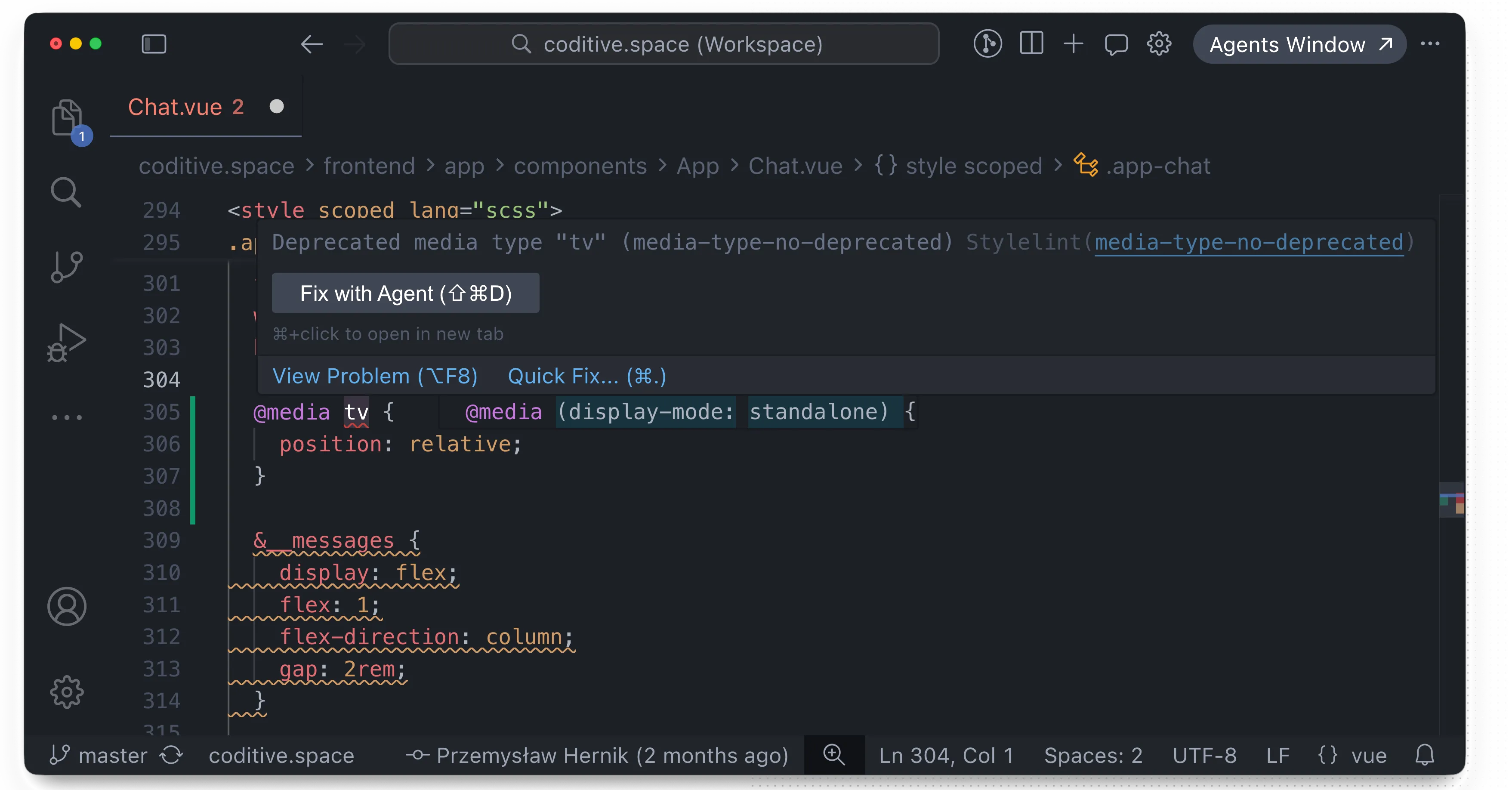
Stylelint helps protect the quality of project layouts and styles. It checks stylesheets for issues such as invalid syntax, inconsistent patterns, and deprecated declarations. When a developer uses a deprecated declaration, Stylelint reports it early so the code can be updated before it reaches the client’s devices. This helps reduce layout issues across browsers and screen sizes.
For readers who want to validate this approach with their own development team, we have prepared a dedicated technical article covering tool installation, workflow, and implementation practices. It can help business owners, agencies, and technical leads ask the right questions, assess whether similar quality checks are already in place, and identify where the development process may need improvement.
- Introduction to Linting Process in Web Development
- EditorConfig: The Best First Step Towards a Consistent Codebase
- PHP_CodeSniffer: In-Depth Tutorial for Developers
- ESLint: Setting Up From Start to Finish
- Stylelint: CSS Linter You Must Know As A Frontend
- PHPStan: How to Find Bugs Faster with PHPStan?
What do our clients gain from this practice?
Automated code analysis value affects how confidently a project can evolve, how quickly the team can respond to changing business needs, and how efficiently future improvements can be delivered. The main benefits include:
-
Lower delivery risk: Many issues can be identified before they reach shared environments, testing, staging, or production. This reduces the chance of broken functionality, unexpected behavior, launch delays, and customer-facing problems.
-
Better budget usage: Automated checks reduce the time spent finding predictable problems manually. More development effort can be focused on business priorities, feature improvements, and long-term product value.
-
More maintainable code: Codebases without quality controls can become harder to understand, review, extend, and maintain. Automated analysis helps highlight unnecessary complexity and supports technical debt reduction.
-
More consistent collaboration: Automated checks create a shared quality baseline for the team. This reduces subjective review discussions and helps developers focus on architecture, functionality, user experience, and business logic.
In practice, they help keep software aligned with business goals as the project evolves.
Is your project built on a maintainable foundation?
The automated code analysis tools described in this article are not the only protection methods we use in our workflow. We also use additional automation in later stages, which we will describe in future articles. This guide represents an initial minimum that helps us create consistent, future-ready projects for our clients.
If you are unsure whether your current Nuxt or WordPress project follows effective quality standards, we can help assess it from a business and delivery perspective. Our team can review the current state of your codebase, identify potential risks, and provide a clear report covering:
-
What is working well?
-
Where is maintainability at risk?
-
Which issues could affect future development?
-
How can delivery quality be improved?
Get in touch with us to review your current setup and identify the best next steps for improving reliability and long-term success.