We usually see this question appear in two moments.
The first one is reactive. A site has been live for a while. Publishing still works, but every change feels heavier than it should. Performance slips. Small tweaks turn into multi-day tasks. At some point, someone suggests headless WordPress and the discussion suddenly shifts from features to architecture.
The second moment is proactive. You are planning a new, ambitious website or platform. You want it to be faster, more flexible, and easier to evolve than what you built before. The stack decision matters, because you do not want to redesign everything again in a year.
From our perspective as a software house, traditional WordPress and headless WordPress are both valid tools. The difference is not which one is better, but which one fits what you are actually building.
Traditional WordPress. Reliable, Efficient, and Still Very Powerful
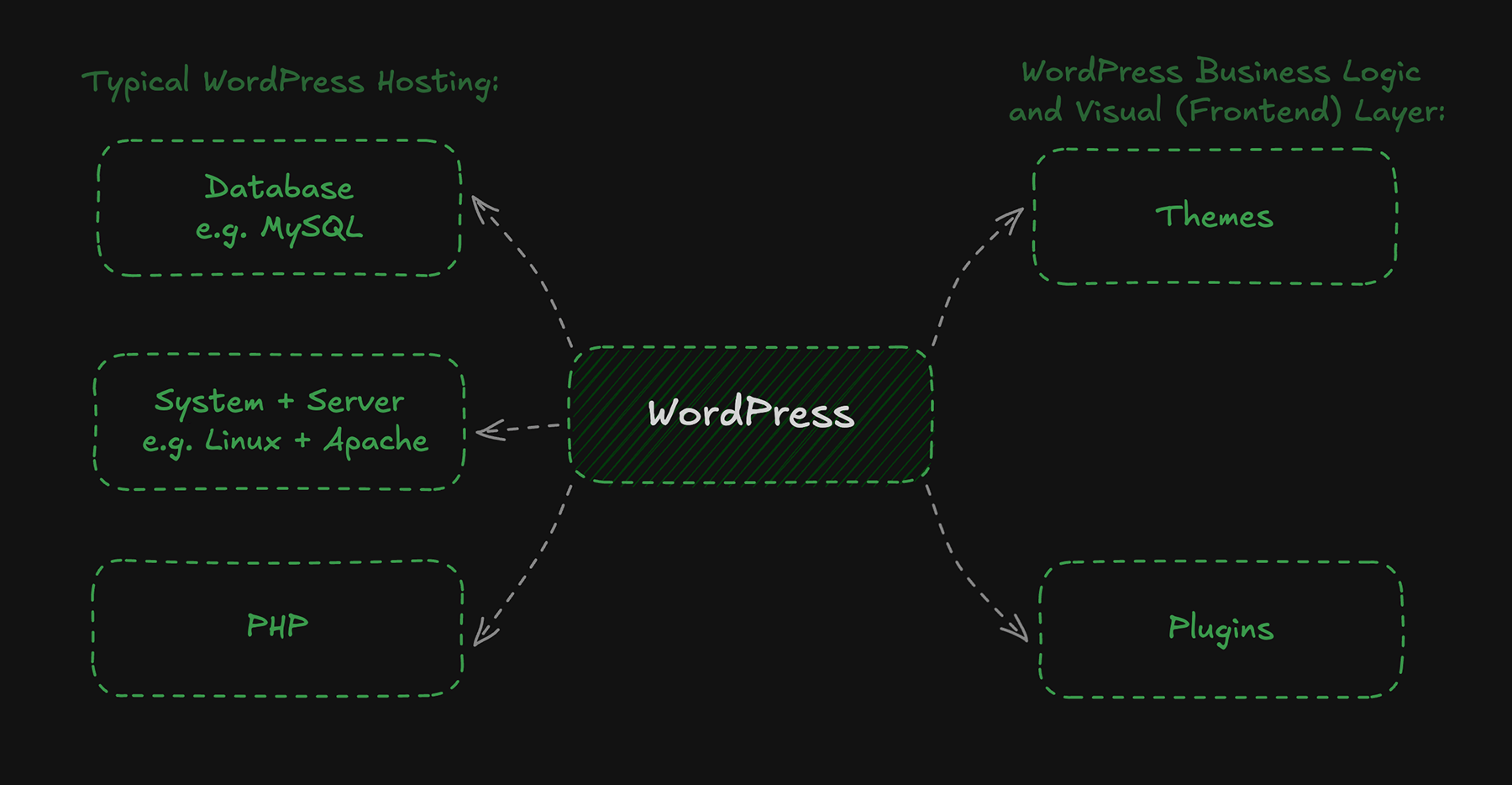
Traditional WordPress means one system handles both content management and frontend rendering. Editors work in WordPress and WordPress outputs the website.
It is a familiar setup, and that is a strength, not a weakness.
When traditional WordPress is the right choice
Traditional WordPress works best when the website supports the business, rather than being the product itself.
In these projects, clarity and speed matter more than architectural flexibility. You want predictable publishing, previews that reflect reality, content structures everyone understands, and infrastructure that is simple and affordable to run.
This setup is usually easier and cheaper to launch and maintain. In many cases, a well-configured standard hosting environment is enough. Infrastructure costs stay predictable, which is often an important factor for business-focused websites and teams planning long-term ownership.
From our experience, this setup performs best when paired with a custom theme built around the actual content model, not a generic template. On top of that, we usually rely on a small set of proven plugins that solve specific problems well.
When the project requires it, we extend WordPress with custom plugins instead of stacking more third-party dependencies. This keeps the system understandable and easier to maintain.
Where teams get into trouble
Most problems we see with traditional WordPress are not caused by WordPress itself.
They appear when plugin choices are made without a long-term plan. Over time, teams install more and more plugins to solve individual issues. Many of them overlap in responsibility, follow different quality standards, or stop being maintained.
The result is familiar. Performance degrades slowly. Updates become stressful. Debugging gets harder because no one has a clear view of how everything fits together.
WordPress can scale and perform extremely well, but only if the stack is curated deliberately. Plugin discipline is one of the most important factors in long-term success.
Practical takeaway
Choose traditional WordPress when you want an easy to maintain, stable solution with a clear and efficient publishing workflow, or when time to launch plays an important role.
Headless WordPress. A Strong Tool for Product-Like Experiences
Headless WordPress separates content management from presentation.
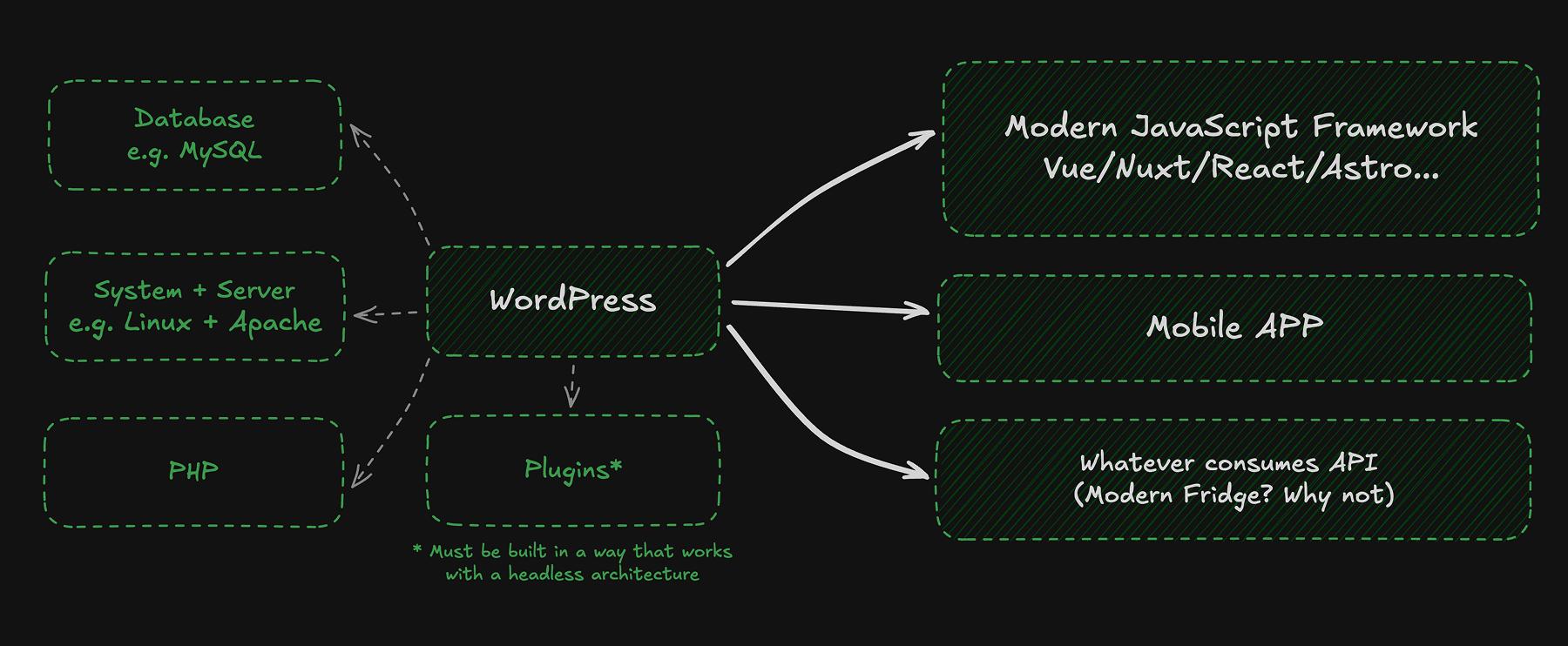
WordPress remains the admin and content engine. The frontend becomes a separate application that consumes content through an API. This approach naturally fits modern frontend stacks built with Vue, Nuxt, React, or Astro.
From an engineering perspective, headless is about control.
When headless WordPress makes sense
Headless becomes relevant when the frontend starts behaving more like an application than a traditional website, or when the system behind it becomes inherently complex.
We see this not only in classic product-like apps, but also in advanced platforms built around heavy data processing, integrations, or AI-driven workflows. This includes internal tools, customer portals, and systems where WordPress acts as one part of a much larger architecture.
In these scenarios, WordPress works best as a focused content, configuration, and backend layer, while a modern JavaScript frontend handles the logic and visual layer. Everything users see and interact with lives in a separate layer, which could be powered by a JavaScript framework like Nuxt, but it could also be a mobile app, or even something else entirely.
The tradeoffs we discuss upfront
Headless architectures introduce real complexity, and it is important to be clear about that from the start.
Previewing content, handling drafts, and scheduling publications do not work out of the box. They need to be designed, implemented, and maintained.
Many traditional WordPress plugins also lose their value. Anything that depends on themes, shortcodes, or server-side rendering usually needs a replacement or a custom solution. Forms, SEO tooling, and caching strategies often move into the frontend stack.
This shifts more responsibility to engineering teams. For the right project, this is a benefit. For others, it becomes unnecessary overhead.
Practical takeaway
Choose headless when the frontend is a long-term product surface that needs to scale and evolve.
Arguments That Matter Less Than They Used To
Animations and Transitions
A few years ago, animations were often treated as a strong reason to move to a modern frontend framework.
That argument is less convincing today. Modern browsers support the View Transitions API, which enables smooth navigation and state transitions without building a full single-page application.
This changes how we approach the conversation.
Where view transitions work well
They are a strong progressive enhancement. Smooth page-to-page navigation, subtle continuity between states, and reduced reliance on heavy client-side routing.
For many content-driven sites, this delivers enough polish without adding architectural complexity.
Where frameworks still make a difference
Modern frontend frameworks are still the better choice when the experience involves complex UI logic.
Authenticated dashboards, personalization, data-heavy views, and shared component libraries are significantly easier to build and maintain in a dedicated frontend application.
In those cases, animations are a side effect of good architecture, not the main goal.
Performance
Performance, much like animations, is often treated as a stack problem, while in reality it is usually an execution and maintenance problem.
Performance issues are rarely caused by choosing traditional or headless WordPress.
In practice, slow sites usually suffer from the same set of problems. Excessive JavaScript, too many third-party scripts, heavy media assets, weak caching, poor hosting, and unclear architectural decisions.
We have seen carefully built traditional WordPress platforms outperform rushed headless setups.
A common concern is whether classic WordPress can handle very large portals with massive content volumes and traffic. From our experience, it can.
We helped improve the performance and architecture of an existing WordPress-based platform with over three million articles that was already struggling with architectural and performance issues. Over several months, we redesigned key parts of the system, introduced proper caching layers, optimized database requests, and reduced unnecessary complexity. Load times dropped by roughly ninety-five percent, reaching response times measured in milliseconds.
It may sound like marketing, but the point matters:
The technology stayed the same. The approach changed.
If performance matters, focus on strategy, measurement, and maintenance, not just the framework. This is exactly why we often start with audits and focused optimizations, like those described in our performance and speed optimization approach:
https://coditive.com/services/wordpress-development/performance-and-speed-optimization/
A Practical Way to Decide
Instead of asking which option is better, we encourage teams to focus on what they are building.
Traditional WordPress is usually the right choice for content-driven websites focused on communication and lead generation.
Headless WordPress becomes relevant when the site behaves like an application or needs to support multiple products and platforms.
There is also a hybrid path.
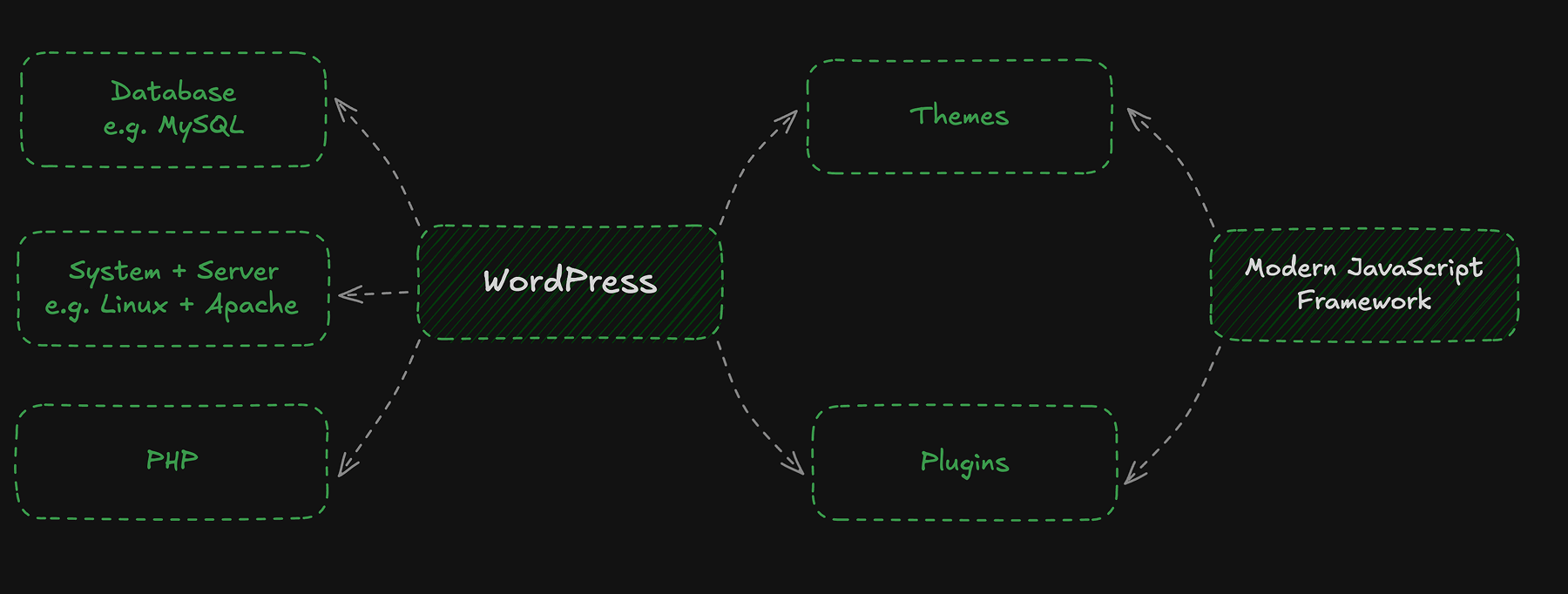
Many teams start with a well-structured traditional WordPress setup and later move selected elements to a headless frontend. This works best when the content model is clean from the beginning.
You can also enhance a traditional WordPress site with modern frontend components without going fully headless. For example, TresJS is a Vue-based library that brings Three.js-powered 3D graphics into Vue applications. You can use it to build a single interactive component and embed it into a classic WordPress setup where it adds real value.
How We Explain This to Clients
When we discuss this decision with clients, we keep it grounded in ownership and risk.
The first question is always whether the project is a publishing website or a product-like experience.
To make the differences more concrete, we often summarize them in a simple comparison:
| Feature/Aspect | Standard WordPress | Headless WordPress |
|---|---|---|
| Ease of Use | User-friendly, minimal technical knowledge required | More complex setup, requires technical expertise |
| Flexibility | Limited by themes and plugins | High flexibility with modern front-end frameworks |
| Performance | Can be slower with heavy themes/plugins | Typically faster due to decoupled architecture |
| Scalability | Potential issues with high traffic | More scalable, as front end can be optimized separately |
| Security | More susceptible to attacks | Improved security with decoupled back-end |
| Development Time | Shorter due to ready-made themes/plugins | Longer due to custom front-end development |
| Cost | Generally lower initial cost | Higher initial cost due to custom solutions |
| SEO-Friendly | Built-in SEO capabilities | SEO optimization depends on front-end implementation |
| Plugin Compatibility | Wide plugin support | Limited, plugins may need alternatives or custom work |
This comparison helps shift the conversation from trends to ownership, cost, and long-term responsibility.
The deciding factor is maintenance. If there is no plan to maintain a separate frontend, headless is not the right move. If the project is clearly growing into application-level complexity, forcing everything into themes and plugins will create problems later.
How Coditive Helps
As a software house, we approach architecture decisions through constraints, not trends.
We look at the content model, the real requirements of the frontend, performance and security expectations, and what the team wants to maintain long term.
From there, we recommend a setup that supports the business without introducing unnecessary complexity.
Sometimes that means a classic WordPress website built to stay fast and maintainable. Sometimes it means a WordPress-powered web application with a headless architecture and a modern frontend.
Conclusion
Traditional WordPress is not outdated. Headless WordPress is not automatically better.
Traditional WordPress offers simplicity and a reliable publishing workflow. Headless WordPress offers control and flexibility for product-like experiences.
The right choice is the one that fits your project today and still makes sense as it grows.
If you are unsure which option fits your project, let’s talk. We help teams make architecture decisions that work today and still make sense as the product grows.
